PG18 Query Optimization
PG18 Query Optimization
Pavel Tolmachev
PostgreSQL 18 · 2026
Start reading · Print the whole book · Original PDF
Contents
Figures
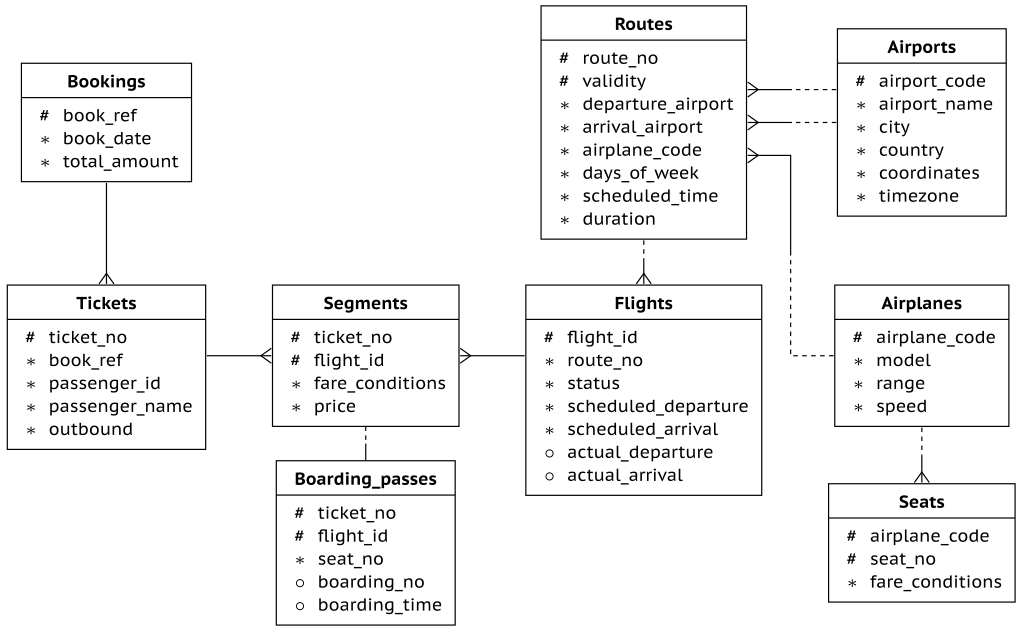
- Figure 1.1 — Airlines Database Schema
- Figure 2.1 — Query Tree after Syntax Analysis
- Figure 2.2 — Semantic Analysis and Access Control
- Figure 2.3 — Expanding a View during Query Rewriting
- Figure 2.4 — From Query Tree to Execution Plan
- Figure 2.5 — Execution Plan Nodes
- Figure 2.6 — Query Processing Stages
- Figure 2.7 — Prepared Statements and Cursor Execution
- Figure 2.8 — Cardinality and Selectivity Estimates
- Figure 2.9 — Startup and Total Cost Estimates
- Figure 3.1 — Sequential Scan of Heap Pages
- Figure 3.2 — Buffer Ring for a Sequential Scan
- Figure 3.3 — B-tree Index and Heap Pages
- Figure 3.4 — Index Lookup for One Value
- Figure 3.5 — Index Range Scan
- Figure 3.6 — Building a Bitmap from an Index
- Figure 3.7 — Reading Heap Pages through a Bitmap
- Figure 3.8 — Exact and Lossy Bitmap Entries
- Figure 3.9 — Clustering Heap Rows in Index Order
- Figure 3.10 — Index-Only Scan and the Visibility Map
- Figure 3.11 — Leader and Workers in a Parallel Plan
- Figure 3.12 — Limits on Parallel Workers
- Figure 3.13 — Parallel Sequential Scan
- Figure 3.14 — Parallel Index Scan
- Figure 3.15 — Parallel Index-Only Scan
- Figure 3.16 — Parallel Bitmap Heap Scan
- Figure 3.17 — Scan Cost versus Selectivity
- Figure 3.18 — Best and Worst Cases for Index-Only Scans
- Figure 4.1 — External Sort: Writing Sorted Runs
- Figure 4.2 — External Sort: Merging Sorted Runs
- Figure 4.3 — Incremental Sort
- Figure 4.4 — Hash Aggregation
- Figure 4.5 — Grouping Sorted Data
- Figure 4.6 — Window Frames with and without Ordering
- Figure 4.7 — Window Frames within Partitions
- Figure 5.1 — Nested Loop Join
- Figure 5.2 — Memoize
- Figure 5.3 — Nested Loop in Parallel Plans
- Figure 5.4 — Single-Batch Hash Join
- Figure 5.5 — Merge Join
- Figure 6.1 — Distinct Values and Null Fraction
- Figure 6.2 — Most Common Values and Their Frequencies
- Figure 6.3 — Histogram of the Remaining Values
- Figure 8.1 — Materializing an Intermediate Result
- Figure 8.2 — Materialized and Inlined CTE Plans
- Figure 8.3 — Function Scan and ProjectSet
- Figure 8.4 — Function COST and ROWS Estimates
- Figure 8.5 — Argument-Aware Planner Support
- Figure 9.1 — Layers of System Performance
Tables
- Table 6.1 — Functional Dependencies
- Table 6.2 — Most Common Combinations
- Table 6.3 — Distinct Combinations
- Table 6.4 — Statistics on Expressions
About this edition
© Postgres Professional, 2026. The English text and illustrations are reproduced from the PostgreSQL 18 · 2026 PDF. This web edition keeps the original chapter order, examples, and version-specific behavior. Original page references link to their corresponding locations in the chapters. Figure and table numbers, descriptive captions, image alternatives, and chapter summaries are supplied for this web edition. Broken documentation links are repaired to the same pages and versions; the original destinations remain recorded in the source manifest.
Introduction
This book covers the fundamentals of query optimization in PostgreSQL.
Postgres Professional develops training courses for database administrators and application developers. One of them is the “QPT. Query Performance Tuning” course.
If the course and the book cover the same subject, why have both?
The book grew out of a revised version of the QPT course, so the overlap is substantial. The difference is in the form.
The course develops the subject systematically, starting with the basic algorithms PostgreSQL uses to plan and optimize queries. It is divided into modules and related topics, each with theory and practice. The theory is not limited to slides: most topics include demonstrations on a live PostgreSQL instance running in the course virtual machine. Students receive the slides with detailed speaker notes, demonstration output, solutions to practical exercises, and additional reference material. The course can be taken with an instructor or studied independently; the materials, including video recordings, are available on our website.
The course works best when you can run the demonstrations and exercise yourself. The book serves a different purpose.
You can read it on the subway or while waiting for a bus, put in a bookmark, and return later without starting a computer or recreating the course environment.
That difference in form required more than simply moving the course text onto printed pages. Long lines of code do not fit well on a page, and the course’s separate theory and demonstration blocks feel artificial in a book. We therefore rewove demonstration results into the narrative, changed some examples, and dropped others that mainly illustrated additional details. To keep the book compact, we also left out the topic “Index Types” and combined some topics, including “Access Methods” and “Parallel Access.”
Before reading, you should be comfortable with SQL and Unix-like operating systems. PL/pgSQL is useful but not required. We also assume roughly the background covered by the DBA1 or DEV1 courses. Details of server configuration and internals that do not directly help with query optimization are intentionally left out.
All examples use the “Airlines” demonstration database dated September 1, 2025. We use the version containing six months of flight data. The QPT course for PostgreSQL 16 uses the previous version of the demo database, dated August 15, 2017.
Referenced resources
1 Demonstration Database
1. General Information
To work with more complex queries, we need a substantial database: nine tables filled with realistic data. We chose airline travel as the subject area. The database contains information about flights operated by an imaginary airline over a certain period of time.
The database schema is shown below. We tried to make it neither too complicated nor too simple: simple enough to avoid unnecessary details, but rich enough to support meaningful and interesting queries.
The database is available on the website in four sizes. This book on query optimization uses the September 1, 2025 version, about 2.7 GB in size, containing six months of flight data.
You can check the version with the following function:
2. Main Entities
The central entity is a booking (bookings).
The row gives us the booking date and the total amount. Against the real clock, the booking gets older every day:
The demo database, however, has a fixed “current” time:
Relative to that clock, the booking is much younger:
A booking can include several passengers. Each passenger is issued a separate ticket (tickets) for the outbound journey and, if needed, another one for the return journey.
The selected booking has these tickets:
A ticket contains one segment (segments) if there is a direct flight between the departure point and the destination, or several segments if the journey requires connections.
What segments do our passengers travel? It is enough to look at one passenger, because all passengers in the same booking follow the same itinerary:
This was the outbound ticket. Compare it with the return ticket:
The outbound and return itineraries do not have to match: on the way back, Evgeniy has three connections, and two of the flights (flights) are in Comfort class.
Each flight follows a route (routes) from one airport to another. Routes with the same route number have the same departure and arrival airports, while individual flights differ by departure date.
To find out which routes are behind the selected flights, we have to account for the temporal relationship between these tables. The schedule changes from time to time, so the join must match not only the route number but also the route’s validity interval to the flight’s departure time.
The timetable (timetable) view hides this complexity. Like a flight information board, it shows the information we need while hiding the join between the two tables:
Both outbound flights and one return flight have already arrived (status Arrived). At the demo database’s current time, the passengers are flying from CDG to MUC (status Departed). Check-in has not yet opened for the remaining flights (status Scheduled).
Airports (airports) use the standard three-letter airport code as their key. Here is the full record for one airport:
Here is the route we are interested in:
During this validity period, the route operates seven days a week and uses a CR7 airplane (airplanes):
The number of seats (seats) and their distribution among fare classes depend on the airplane model used for the flight. In the demo database, all airplanes of the same model have the same cabin configuration.
For example, here is the first row:
These are Business-class seats. Here is the total number of seats in each fare class on this airplane:
Here is the complete record for one flight on the selected route. Actual times may differ from the schedule: usually not by much (the departure in this case was delayed by six minutes), but sometimes by several hours:
When a passenger checks in for the first flight, boarding passes (boarding_passes) are issued for all flights on the ticket. A boarding pass specifies a seat. The combination of flight and seat is unique: two passengers cannot occupy the same seat. At boarding, the pass is stamped with the passenger’s boarding sequence number and the time they passed through the gate.
Which seats has our passenger occupied, or will occupy?
The demo database can display airport, city, country, and airplane names in different languages. The display language is controlled by a configuration parameter set at the database level:
Switch the current session to Russian:
The implementation uses views over base tables that store translations as JSON:
To summarize, here are the tables and views in the demo database:
2 Planning and Execution
1. Simple Query Protocol
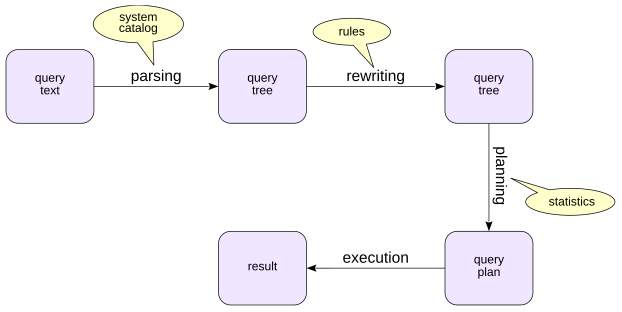
Start with the simplest case: what happens when you type, say, a SELECT command in psql. Query processing goes through several stages:
- Parsing
- Rewriting
Planning (optimization)
Execution
Parsing
Syntax analysis
The first step is parsing: PostgreSQL breaks the query text into tokens—identifiers, numbers, string literals, and so on—and checks that they form syntactically valid constructs.
Take a simple query:
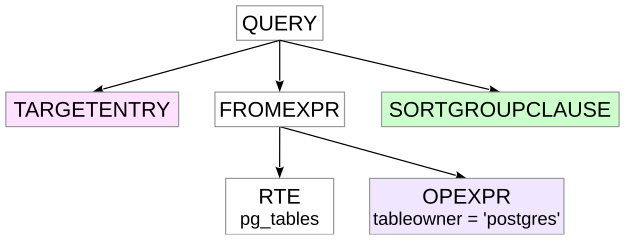
At this stage, the backend builds a parse tree in memory. The figure shows a simplified version of that tree. The colors indicate the approximate correspondence between parts of the query text and nodes of the tree.
RTE stands for Range Table Entry, a name that is not especially obvious from the outside. PostgreSQL uses RTEs internally for tables, subqueries, join results, and other row sets that can appear in an SQL query.
Semantic analysis
Next comes semantic analysis, called parse analysis in PostgreSQL. At this stage PostgreSQL determines which database objects the query refers to and whether the user has permission to access them.
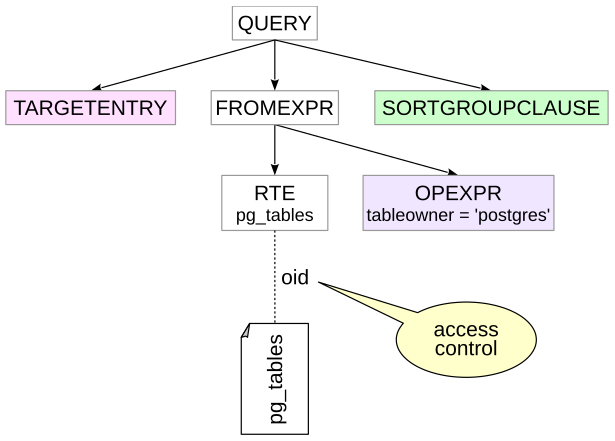
During parse analysis, PostgreSQL consults the system catalog. In our example, it resolves the name pg_tables to a particular view identified by an oid in the catalog. Access privileges on that view are checked as well.
Rewriting
The query is then rewritten according to rules.
An important special case is a view: a reference to a view is expanded into the query that defines the view. Strictly speaking, processing is not as neatly separated as this simplified sequence suggests, because the view definition also has to be parsed and analyzed.
For our example, the result can be pictured approximately like this:
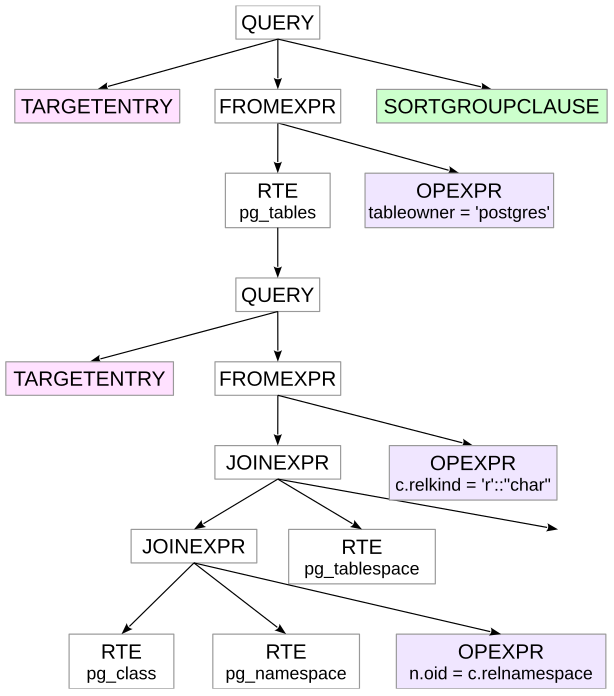
The SQL shown here is only an illustration. Rewriting operates on the query tree, not by substituting SQL text. In the tree, nodes corresponding to the view query are attached under the RTE for pg_tables.
Planning
PostgreSQL then plans the query.
The planner considers different ways to execute the query and estimates their costs using a mathematical model that operates on information about the data, called statistics. The candidate with the lowest estimated cost is represented as a plan tree.
A fragment of the plan for our example looks like this:
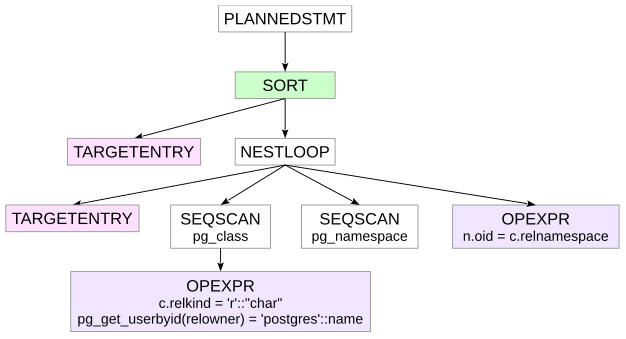
Seq Scan reads rows from a table, while Nested Loop joins two row sets. The textual representation in the figure is the form produced by the EXPLAIN command. We will discuss access methods and join methods in detail in later chapters.
Notice that only two of the original three tables remain: the planner has determined that one table is not needed to produce the result and has removed it from the plan.
Execution
Finally, the executor runs the selected plan and returns the result to the client.
The plan tree works as a pipeline. In the figure below it is redrawn to show only the essential structure.
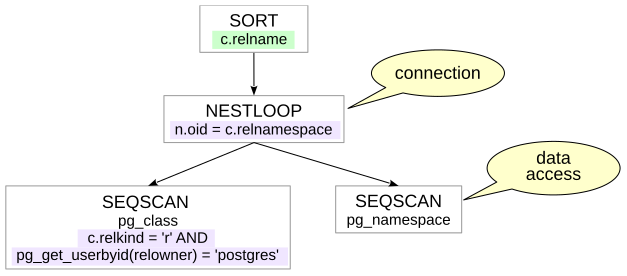
Execution starts at the root of the tree. The root node—in our case, Sort—requests data from its child. Once it has the data it needs, it performs its operation and returns rows upward, eventually to the client.
Nodes such as Nested Loop combine data from different sources. A join node requests rows from its two children, compares them according to the join condition, and returns matching pairs to its parent. The lower Seq Scan nodes fetch rows from the corresponding tables and pass them upward to the join.
Some nodes cannot return any result until they have consumed all the input they need. A regular sort is an example: it must see its input before it can determine the sorted order.
Other nodes can return rows as they arrive. A table scan, for example, can normally produce rows while it is still reading the table. This can make it possible to return the first part of a result quickly—for example, when an application displays data page by page. PostgreSQL documentation describes this executor mechanism as a demand-pull pipeline: a parent asks a child for the next row, and the request propagates down the plan tree.
2. Extended Query Protocol
By default, a client uses the simple query protocol: it sends an SQL statement to the server and, for a SELECT or a command with RETURNING, receives the result rows.
For example:
With the simple query protocol, every query goes through all of the processing stages described above, even if the same query is executed repeatedly.
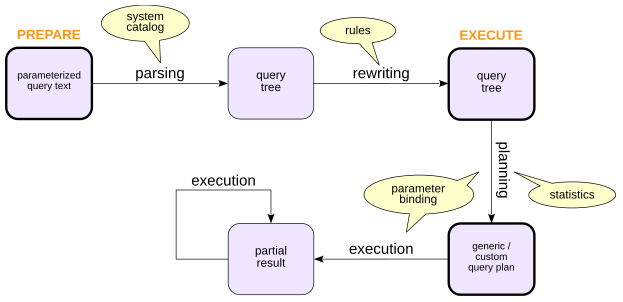
PostgreSQL also provides the extended query protocol, which separates query processing into more explicit steps. In practice, this makes it possible to prepare statements and use cursors.
Prepared Statements
To prepare a statement, the client sends the server a query, possibly containing parameters. The server parses, analyzes, and rewrites the query and retains the prepared statement state in the backend process.
To execute the prepared statement, the client supplies the values for its parameters. PostgreSQL can then build a custom plan that takes those particular values into account and execute it.
Preparing a statement avoids repeating parsing, analysis, and rewriting when the same statement is executed many times in one session.
If a statement has no parameters, there is no benefit in re-planning it for each execution, so PostgreSQL can reuse a generic plan.
If the statement does have parameters, PostgreSQL initially has the option of using custom plans and may later switch to a generic plan when it estimates that the generic plan is not significantly worse on average. We will return to that decision in Chapter VI, “Statistics.”
Prepared statements are also an important way to avoid SQL injection: values from an untrusted source can be sent separately as parameters instead of being concatenated into SQL text. This protection applies to values passed as parameters; dynamic SQL structure such as table or column names still has to be constructed safely.
Prepare a parameterized statement:
Execute it by name:
At execution time, the parameter value is bound, the statement is planned as needed, and then executed.
Prepared statements can be inspected through the pg_prepared_statements view:
executions with a generic plan
executions with custom plans
The last two columns show how many times the statement has used generic and custom plans. When a prepared statement is no longer needed, it can be removed with DEALLOCATE.
PREPARE, EXECUTE, and DEALLOCATE are SQL commands. Other programming languages expose the same idea differently, but database drivers ultimately use the same client/server protocol.
Cursors
Cursors make it possible to retrieve a query result incrementally instead of receiving all rows at once. They are common because applications are usually written in imperative languages and often process result sets iteratively.
Information about an open cursor is kept in the backend process.
Declare a cursor in SQL and fetch the first row. A cursor normally lives inside a transaction:
Fetch the second row (the cursor will be closed automatically when the transaction ends):
Database APIs provide ways to determine whether more result data remains, so an application can fetch from a cursor in a loop.
3. A Closer Look at Planning
Planning deserves a closer look because it is both central to query performance and one of the more complicated stages of query processing.
The Planning Process
The planner explores alternative execution plans, estimates their costs, and chooses the cheapest plan it finds.
A plan node’s cost depends on the operation being performed and on properties of the data it processes. Reading rows sequentially from a table obviously has a different cost model from fetching them through an index, and the amount of data being processed matters greatly.
Two concepts are especially important when estimating data volume:
Cardinality: the estimated number of rows produced by a node
Selectivity: the fraction of input rows that satisfy a condition, or predicate
Estimating selectivity and cardinality requires information about the data: table sizes, value distributions in columns, and so on. In practice, this brings us to statistics. PostgreSQL collects and refreshes statistics through autovacuum’s auto-analyze work and through the ANALYZE command. Cardinality errors are among the most important causes of poor plans.
They can come from insufficient statistics, from correlations that the available statistics do not describe, from expressions for which useful statistics are unavailable, or from limitations in the planner’s estimation models. Even a correct cardinality estimate does not guarantee a perfect cost estimate—the cost model and its parameters are approximations—but cardinality is a major input to almost every subsequent planning decision.
Cardinality Estimation
Cardinality estimation is recursive. To estimate the cardinality of a node, PostgreSQL first estimates the cardinalities of its children, then uses the node type and its predicates to estimate how many rows the node itself will produce.
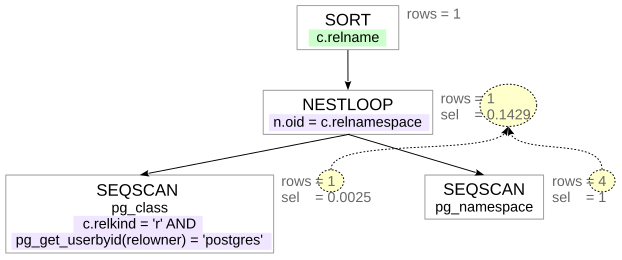
The process starts at leaf nodes, where access methods read data. Estimating them requires the size of the relation and the selectivity of its predicates. Later chapters show where those estimates come from.
Suppose for the moment that we can estimate the selectivity of simple predicates. Compound predicates can then be approximated with formulas such as
These formulas assume that conditions x and y are independent. If the predicates are correlated, the estimate can be wrong. PostgreSQL’s extended statistics can improve some of these cases.
Next come joins. We already have cardinality estimates for the two input row sets, so we also need an estimate of the join condition selectivity. We will postpone the details and return to concrete examples later.
Other nodes can be treated in a similar way—for example, aggregation. A sort normally preserves cardinality, while other operations may change it.
An estimation error introduced low in the plan tree propagates upward. It can become amplified as more operators depend on the incorrect estimate and can eventually lead the planner to choose a poor plan.
Cost Estimation
Cost estimation is recursive as well. To estimate the cost of a plan subtree, PostgreSQL starts with the costs of its child nodes and adds the cost of the operation performed by the current node.
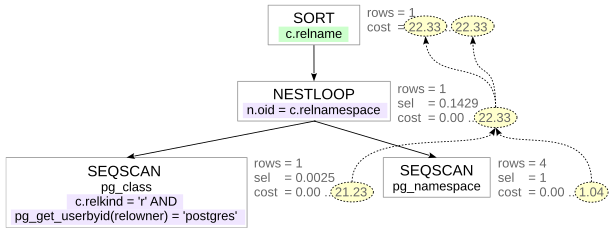
The cost of a node is computed from the planner’s mathematical model using the cardinality and other properties estimated for that node.
EXPLAIN shows two cost components: startup cost defines the estimated work that must be done before the node can begin producing rows, and total cost defines the estimated cost of producing all rows.
Some operations require little or no startup work. Other operations have to do substantial work before returning the first row.
A regular sort, for example, must consume the input that it needs to sort before it can emit sorted output. Such a node has a nonzero startup cost, which has to be paid even when the consumer needs only a small part of the final result.
It is important to understand that cost reflects the planner’s estimate and may not correlate with actual execution time. Cost can be thought of as being expressed in arbitrary units that mean nothing by themselves. It is needed only so that the planner can compare different plans for the same query.
Choosing the Best Plan
The optimizer tries to find the best plan without spending unreasonable time planning.
For joins, PostgreSQL normally uses dynamic programming to build larger join relations from smaller ones while discarding alternatives that cannot win under the planner’s criteria. As the number of relations grows, exhaustive consideration of join orders becomes too expensive. PostgreSQL can reduce the number of plans it considers, either by considering only some pairwise join alternatives or by switching to the Genetic Query Optimizer (GEQO). This creates another possible source of a poor plan: not an incorrect cost estimate, but the fact that the best plan was never considered. In such cases the query author can sometimes help by constraining the join order.
What counts as the ”best” plan? For an ordinary query, PostgreSQL normally optimizes for obtaining the complete result, so total cost dominates.
With cursors, however, getting the first rows quickly can matter more. The parameter cursor_tuple_fraction (default 0.1) tells the planner what fraction of the cursor’s rows is expected to be retrieved. A smaller value gives startup cost more influence relative to total cost.
Viewing a Query Plan
EXPLAIN displays a query plan. It is the indispensable tool for query performance work, and learning to read it well is essential. Here is the plan for the query we used above:
Adding analyze makes PostgreSQL execute the query and show actual execution statistics as well as estimates:
Be careful with EXPLAIN ANALYZE on statements that modify data: the statement is actually executed.
Collecting timing information for every plan node can noticeably slow a query on some platforms. If you do not need per-node timing, disable it with timing off.
Referenced resources
3 Access Methods
1. Sequential Scan
The planner has several ways to access table data. The simplest is a sequential scan (Seq Scan).
A sequential scan reads the table’s main fork page by page. As usual, regular tables are read through the shared buffer cache; temporary tables use the session’s local buffers.
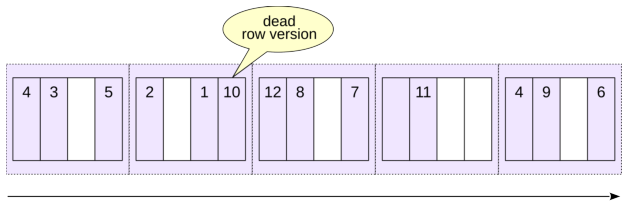
During a sequential scan PostgreSQL can prefetch neighboring pages efficiently using either operating system read-ahead or asynchronous I/O instead of issuing unrelated random reads.
A sequential scan is usually a good choice when a query must read the whole table or a large fraction of it, that is, when the predicate is non-selective: a large fraction of the input rows passes the predicate.
In a query plan, a sequential scan is represented by a Seq Scan node:
The values in parentheses are important:
costis the estimated cost.rowsis the estimated number of rows returned by the operation.widthis the estimated average row width in bytes.
Cost is measured in arbitrary planner units and has two components.
The first number is the startup cost: the cost that must be paid before the node can return its first row. For a sequential scan it is zero because no preparatory work is needed.
The second number is the total cost of producing all rows.
PostgreSQL’s cost model accounts for both I/O and CPU work. In the simplified calculation used by this example, the I/O component is the number of table pages multiplied by the cost assigned to one sequential page read:
The CPU component includes the cost of processing table rows:
Dead Row Versions
During a sequential scan PostgreSQL has to examine row versions in each page, including obsolete versions that have not yet been removed by vacuuming. If a table contains many dead row versions, scanning it can become noticeably more expensive.
This is one reason timely vacuuming can improve the performance of some queries.
Create a copy of flights and disable autovacuum so that dead row versions are not cleaned up automatically:
Delete every row:
The old row versions remain in the table file until vacuum reclaims them, so the file is still the same size:
Get the query plan with the analyze option. The implicit buffers option shows the number of blocks:
hit: a needed block was already in PostgreSQL’s cacheread: a needed block was not found in the buffer cache and was requested from the operating systemwritten: a previously dirty block was written by this backenddirtied: a previously clean block became dirty
The scan touched more than three hundred heap pages even though no live rows remain. Vacuum the table and check the size again:
Dead row versions have been removed, and the table size has decreased. Run the query again:
The table is empty, so there are no row versions to inspect and the estimated cost is minimal. On a much larger table, the work spent walking pages full of obsolete versions can be substantial.
Buffer Rings and Synchronized Scans
A large sequential scan can bring many single-use pages through the buffer cache and evict useful cached pages. To prevent this, PostgreSQL uses a bulk-read buffer access strategy for sufficiently large heap scans. When a relation is larger than one quarter of the buffer cache, only a part of the cache is used as a buffer ring within which replacement occurs, while the rest of the cached data remains unaffected.
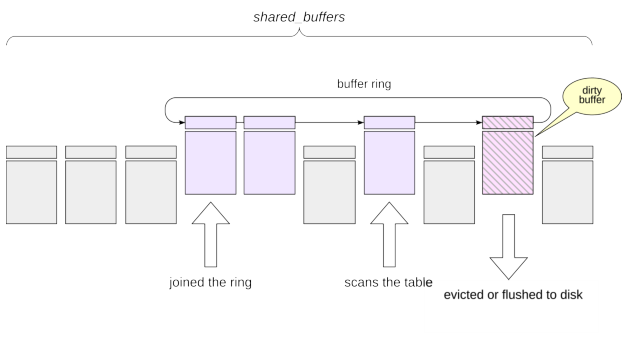
Large sequential scans can also use synchronized scanning. When several backends scan the same large table, a new scan can start near the position where another scan is currently reading, continue to the end, and then wrap around to the beginning. This increases the chance that several backends can use the same pages while they are still cached in the buffer ring.
Temporary tables use local buffers, so this buffer cache access strategy and synchronized-scan mechanism do not apply in the same way.
2. Index Scan
We will use one PostgreSQL index type, B-tree, to explain Index Scan. It is the most commonly used index type for scalar data.
Like other PostgreSQL indexes, a B-tree is a secondary structure. It occupies additional disk space and can be dropped and rebuilt from the table. Its purpose is to make operations that touch a relatively small part of a table cheaper, and B-tree indexes are also used to enforce primary-key and unique constraints.
An index associates indexed values—search keys—with references to table row versions. A B-tree keeps keys in a well-defined sort order so that PostgreSQL can navigate the tree to the required key and then follow the corresponding tuple identifiers into the table. A B-tree operator class must define a linear ordering for the data type. Numbers, strings, and dates are typical examples. A geometric point, by contrast, has no single natural total order suitable for the usual B-tree semantics; PostgreSQL provides other index types for spatial data.
A PostgreSQL B-tree is balanced and highly branching. Its depth depends on the key size and the number of entries, but in practice even very large indexes often need only a few levels.
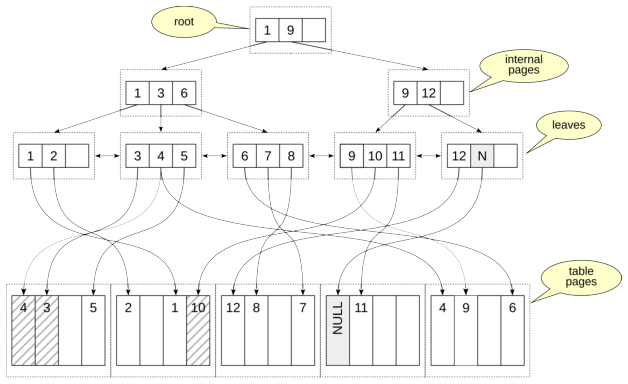
The figure shows an example B-tree. Its pages consist of index entries, each containing:
A key—values from the indexed (key) columns
Either a downlink to another index page or, at the leaf level, one or more references to table row versions
Keys within a page are ordered.
Leaf pages are the bottom level of the tree. Their entries refer to table row versions. Leaf pages are linked in both directions, which makes it efficient to scan keys forward or backward.
Internal pages point to pages on the next lower level. Separator keys tell the search which subtree can contain the requested value. The top page is the root.
A B-tree page need not be completely full; free space is useful for future inserts.
When a page cannot accommodate a new item, PostgreSQL splits the page. One half remains in the existing page and a new sibling page is allocated. B-tree pages are not normally merged back together after a split, so some workloads can cause index growth and fragmentation.
By default, B-tree indexes store null values after non-null values for ascending order (NULLS LAST). The ordering can be changed when the index is created with NULLS FIRST or NULLS LAST, together with ASC or DESC where needed.
Looking Up One Value
Suppose we want the row whose indexed value is 4.
The search starts at the root of the tree. The index entries in the root page define key ranges in the pages below: “from 1 to 9”and “9 and above.” We need the “from 1 to 9”range, which corresponds to the entry with key 1. The keys are ordered, so searching within the page is very efficient.
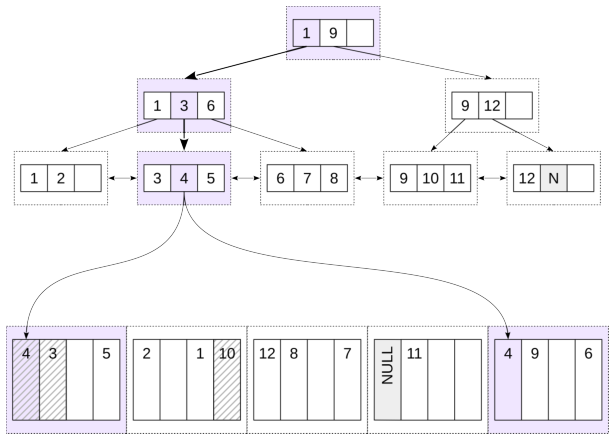
The reference from the entry we found takes us to a page on the second level. There we find the range “from 3 to 6”
(key 3) and move to a page on the third level. This is a leaf page. There we find key 4 and follow its reference to the table page.
Note that even unique indexes can have duplicate keys, because MVCC can create multiple versions of the same row. To save space, equal keys can be stored in the index page as a single entry containing several pointers.
Before a heap tuple can be returned, its visibility must be checked.
The figures highlight the pages and entries that had to be visited.
Consider the bookings table. Column book_ref is the primary key, so PostgreSQL automatically created the unique B-tree index bookings_pkey.
Check the plan for one key:
The chosen access method is Index Scan, and the plan names the index. Access to the index and to the heap is represented by one plan node. Index Cond shows the condition used by the index.
For this kind of lookup, the startup cost includes the work needed to descend to the relevant leaf page. The estimate is small because the planner expects upper B-tree pages to be cached and charges mainly CPU work for the descent.
The total cost adds the expected leaf page and heap page accesses.
Because this index is unique and the equality condition identifies at most one visible row, the simple cost intuition is roughly one leaf access plus one heap page access. Random page reads are costed using random_page_cost:
Its default is higher than seq_page_cost, reflecting the greater cost traditionally assigned to nonsequential access. On SSDs, or when most data is cached, installations often use a smaller difference between these parameters.
The correct values depend on the storage and workload rather than on a universal SSD rule.
Index Cond contains conditions that can drive the index scan, or otherwise be checked at the index level.
Conditions that require the heap row are shown separately as Filter:
Looking Up a Range
B-trees are efficient not only for equality lookups but also for ordered ranges: <, <=, >, >=, and BETWEEN.
First, we find a boundary key of the condition. For example, for the range from 4 to 9 we can choose 4 or 9, while for the condition “less than 9” we must choose 9. Then we descend to a leaf index page, as in the previous example, and obtain the first value from the table. From there we move through the leaf index pages to the right or left, depending on the condition, examining entries until we encounter a key outside the range.
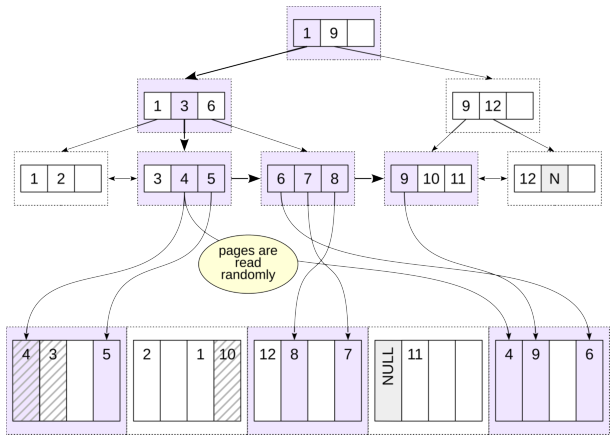
The figure shows a search for x BETWEEN 4 AND 9, equivalently x >= 4 AND x <= 9. PostgreSQL descends to the first qualifying key and then visits 5, 6, and so on through 9. When it reaches 10, the range scan stops.
Two properties make this work: keys are ordered on all pages, and leaf pages are linked in a doubly linked list. The search result is automatically sorted.
Notice that we had to access the same table page several times. We read the first table page for value 4, then the last page, also for value 4, then the first page again for value 5, then the last page again for value 6, and so on.
The ordering provided by a B-tree can eliminate a separate sort:
The same B-tree can be scanned backward:
Here the scan reaches the appropriate right-side leaf position and walks the leaf chain in the reverse direction. Buffers shows the page traffic, while Index Searches shows how many separate B-tree searches were initiated.
3. Bitmap Scan
Repeated visits to the same heap pages can make a plain index scan expensive. Even when a page is already in the buffer cache, PostgreSQL still has to locate and pin it and perform the required tuple work. A bitmap scan separates finding candidate tuple locations from visiting heap pages.
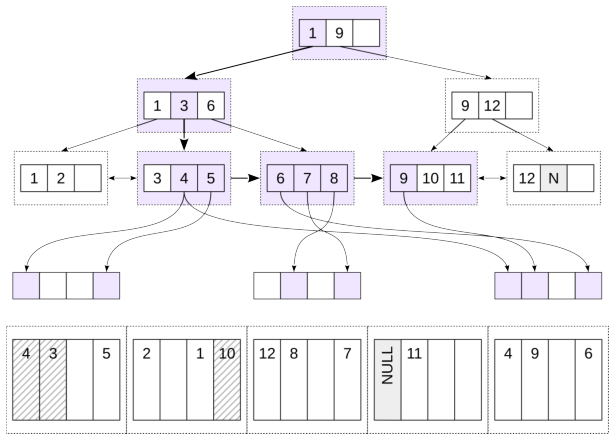
First, the index is scanned (Bitmap Index Scan) and a bitmap is built in the process’s local memory. The bitmap consists of chunks. Each chunk corresponds to a table page, and each bit in the chunk corresponds to a row version in that page. While the bitmap is being built, row versions that satisfy the condition and must be read are marked. Because the bitmap is divided into chunks, a bitmap with only a few marked row versions occupies little space.
Conceptually, exact bitmap entries identify heap pages and tuple offsets within those pages.
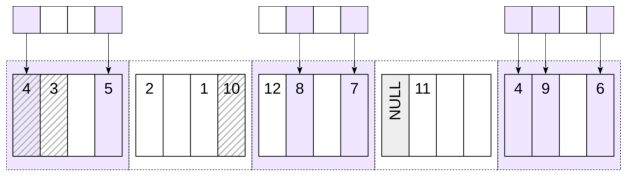
Once the bitmap is ready, Bitmap Heap Scan visits the heap pages.
A heap page may contain several candidate tuples, but the page itself need only be visited once. This is the main advantage over a plain index scan when many matching index entries are scattered across fewer heap pages.
The two indexes created above give the planner alternative bitmap sources. For a query that retrieves a substantial number of rows, it chooses a bitmap scan:
The plan has two relevant nodes:
Bitmap Index Scanreads the index and constructs the bitmap.Bitmap Heap Scanuses that bitmap to read heap pages.
The startup costs show the trade-off: the bitmap cannot be used until it has been built completely. Bitmap access gives up the streaming behavior of a plain index scan in exchange for more organized heap access.
Combining Bitmaps
A bitmap can also combine several index conditions. For two ranges on the same index:
PostgreSQL builds two bitmaps and combines them with BitmapOr.
Different indexes can participate in a combined bitmap scan as well:
Lossy Bitmap Pages
The bitmap is stored in backend local memory and is constrained by work_mem; bitmap scans do not spill their bitmap to temporary files.
If an exact bitmap grows too large, PostgreSQL can make parts of it lossy. An exact entry identifies individual tuple offsets in a heap page. A lossy entry remembers only that a heap page may contain matches.
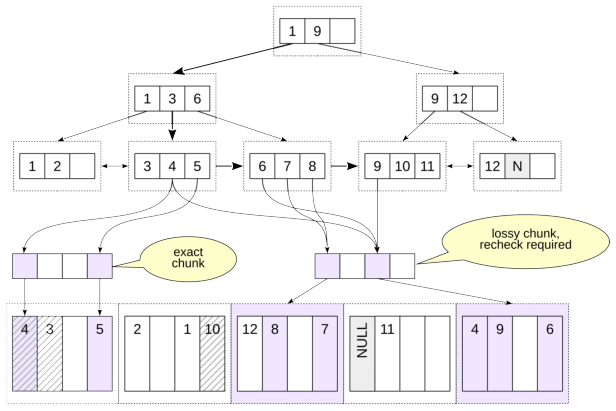
With a very small work_mem and a very large result, even a fully lossy bitmap may not fit. In that exceptional case PostgreSQL can exceed the work_mem budget and allocate enough memory to represent the required heap pages.
Lossy bitmap chunks save memory, but when Bitmap Heap Scan reaches such a chunk it must recheck the condition for every row version on the corresponding table page.
Lossy chunks require rechecking the condition for every row version in the table page, which affects performance. If two bitmaps are combined and a chunk in at least one bitmap is lossy, the resulting chunk must also be lossy. The value of work_mem can therefore have a large effect on bitmap scan performance.
Bitmap Heap Scan shows the recheck condition (Recheck Cond). The condition is not always rechecked, but only when precision has been lost because the bitmap does not fit in memory.
With the normal memory setting:
Heap Blocks: exact=15839 tells us that all heap page entries remained exact.
Now reduce the available memory and run the same query:
Now some heap pages are represented by lossy bitmap entries. Rows Removed by Index Recheck shows how many candidate rows failed the condition when PostgreSQL had to recheck it.
Restore the setting:
Clustering
A plain index scan becomes much more attractive when heap rows are physically correlated with index order.
Nearby index entries then tend to point to the same or neighboring heap pages, so the scan performs much less random heap access.
When the physical correlation is very high, the bitmap’s page grouping advantage can largely disappear and the planner may prefer a plain index scan.
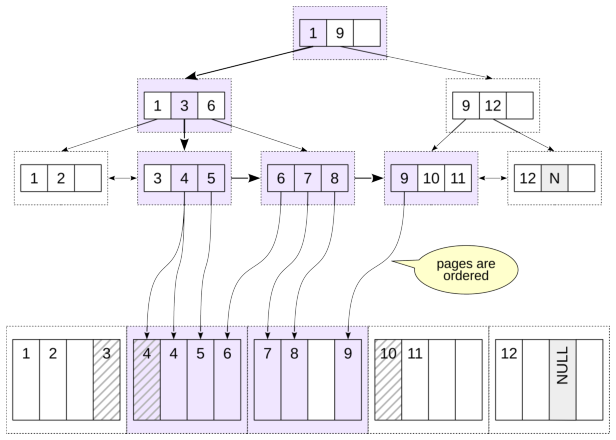
The CLUSTER command can physically rewrite a table according to an index. Initially, the rows in bookings are not physically ordered, which is shown by the following query without ORDER BY:
Reorder the rows according to the index on total_amount.
We execute the code in a transaction so that clustering does not affect subsequent commands:
A plain sequential read now happens to encounter rows in the new physical order:
The ANALYZE above refreshes statistics so that the planner learns the new physical correlation. Before clustering, this predicate used a bitmap scan; with strong correlation, a plain index scan is cheaper. The final ROLLBACK restores the table for later examples.
Two practical points matter:
CLUSTERrewrites the table and requires anACCESS EXCLUSIVElock, much like other full-table rewrite operations;PostgreSQL does not maintain the clustering order automatically. Later inserts and updates can gradually reduce the correlation.
4. Covering Indexes
Index-Only Scan
If a query needs only values that are available from an index, the index can be covering for that query.
In principle PostgreSQL could then answer the query without visiting the heap. MVCC visibility complicates this. A B-tree leaf entry tells PostgreSQL which table tuple it refers to, but index entries do not carry enough visibility information to prove that the tuple is visible to the current snapshot.
The visibility map solves this for pages known to be all-visible. If the map says that every tuple in a table page is visible to all transactions, an index-only scan can skip following references to that heap page from leaf index entries.
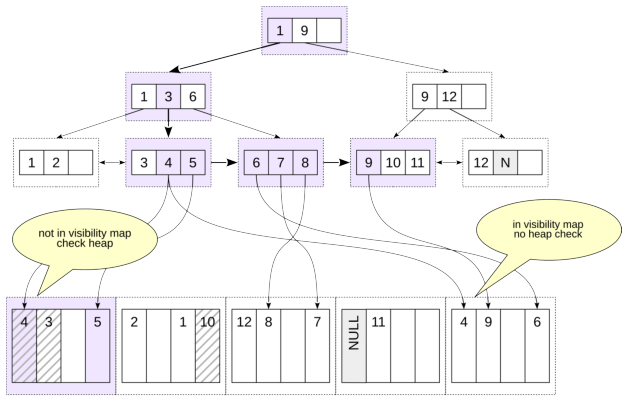
Vacuum activity therefore matters to index-only scans: updates and deletes clear all-visible information when necessary, while vacuum can set the all-visible bit again after it verifies a page.
The planner does not know the exact future number of heap fetches. It uses relation statistics, including the estimated fraction of all-visible pages, when costing an index-only scan. If it expects too many heap visits, a different access method may be considered cheaper.
For each matching index entry, the executor checks the visibility map. If the heap page is all-visible, no heap access is needed; otherwise the heap tuple must be fetched to check visibility. The plan node is still called Index Only Scan even when some heap visits are required.
Heap Fetches shows how many heap tuple fetches were required for visibility checks. Here the visibility map was sufficient and no heap visit was needed.
Now update one row:
The update clears the all-visible state for the affected heap page. When matching index entries point to that page, the executor has to visit the heap:
The executor did not scan every tuple in the modified page. Rather, index entries that needed visibility checks caused heap fetches because the page could no longer be trusted as all-visible.
INCLUDE Indexes
A covering index can make a query much cheaper, but adding every required column as an index key is not always appropriate. For example:
Adding a key column to a unique index changes what combination of values is declared unique.
The data type of an added column may not be supported by the index.
PostgreSQL lets an index carry non-key columns through the INCLUDE clause.
Included values do not participate in the search tree’s key semantics. They are stored as payload in leaf entries so that an index-only scan can return them without visiting the table.
In PostgreSQL 18, INCLUDE is supported by B-tree, GiST, and SP-GiST indexes.
An INCLUDE index and a covering index are not the same concept. An index can cover a particular query without using INCLUDE; conversely, an index with included columns may still fail to cover some other query.
The primary-key index tickets_pkey contains ticket_no but does not contain book_ref, so it is not covering for this query:
The Buffers line reports page accesses. Here a very large number of buffer hits reflects the cost of visiting the table for values that are not present in the index. Create a unique index with book_ref as payload:
The planner now chooses Index Only Scan and uses the newly created index. Because the relevant heap pages are all-visible, Heap Fetches is zero, and the number of pages touched is much smaller.
Because columns added with INCLUDE are not used by the index access method, an INCLUDE index can contain columns whose data types are not supported by B-tree, for example geometric types or xml.
5. Parallel Access
PostgreSQL can execute parts of a query plan in parallel. The leader process starts parallel worker processes, which execute the parallel-aware part of the plan. Their output is collected by a Gather or Gather Merge node.
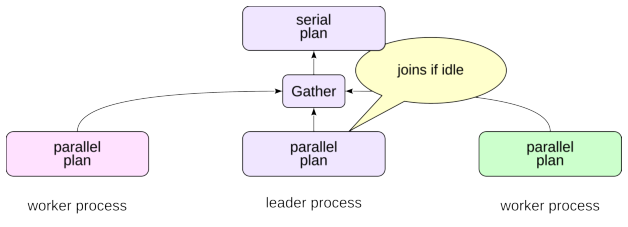
The leader can also participate in executing the parallel plan, especially when it is not fully occupied consuming tuples from workers.
Starting workers, coordinating them, and transferring tuples all have costs. Parallel execution is therefore not appropriate for every query. In addition, only some plan nodes and operations are parallel-aware; the rest of the plan runs serially in the leader.
Worker-Pool Limits
Several configuration parameters limit parallel execution.
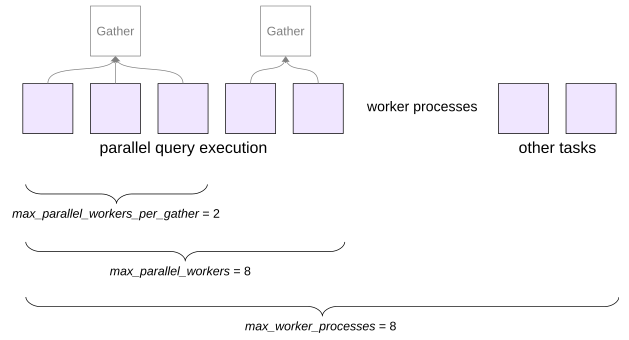
PostgreSQL worker processes are used for more than query parallelism. Logical replication and extensions can use background workers as well. Worker processes can also be used in application code; see the DEV2 course lesson Background Processes.
max_worker_processes limits the total number of background worker processes that can be active. Its default value is 8.
max_parallel_workers limits how many workers can be used for parallel query execution across the server. Its default is also 8.
max_parallel_workers_per_gather limits how many workers can run concurrently for one leader process. Its default value is 2.
The appropriate values depend on CPU capacity, I/O bandwidth, memory, the workload, and the number of concurrent sessions.
Raising a limit does not make every query faster; it changes the amount of parallel work the planner and executor are allowed to use.
Parallel Seq Scan
A Parallel Seq Scan lets several processes cooperate in scanning one table.
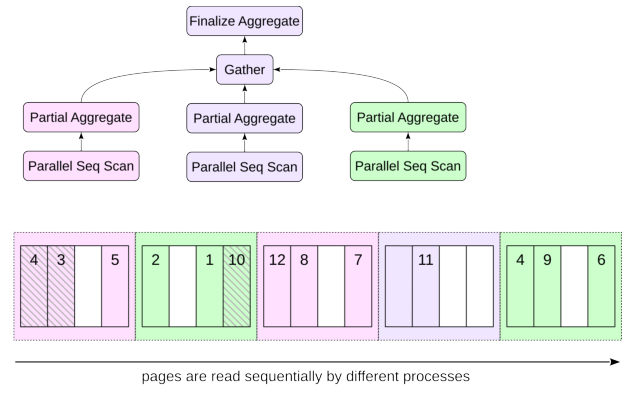
The name is not contradictory. Heap blocks are still visited sequentially, as an ordinary Seq Scan would do. The difference is that participating parallel processes read blocks concurrently. They share the same parallel scan state to stay in sync with each other.
The benefit is not simply that storage can be read by several processes. Each worker also performs predicate evaluation and other per-row CPU work on the pages it receives. Parallelism pays off when that saved execution time is larger than worker startup, synchronization, and tuple-transfer overhead. Aggregation is a good example because workers can scan and partially aggregate many rows while sending only compact partial results upward.
On a small table, count(*) is cheaper to execute serially:
Aggregate cannot return the final count until it has consumed all input, so its startup cost is close to its total cost.
Run the same kind of query on the much larger bookings table:
Everything below Gather is the parallel portion of the plan. It is executed by the planned workers and may also be executed by the leader. Gather and nodes above it run in the leader.
Each worker computes a partial count; the leader gathers those partial results and Finalize Aggregate produces the final value.
Not every query can use parallel execution. For example, many data-modifying or row-locking operations are not eligible, and parallel-safety rules for functions and other operations can make a plan serial. These restrictions evolve between PostgreSQL releases, so version-specific details should be checked against the current documentation.
Parallel Index Scan and Parallel Index-Only Scan
B-tree index access can also participate in a parallel plan.
A parallel B-tree scan works in two stages. First, the leader process descends from the root of the tree to a leaf page. Then worker processes read leaf index pages in parallel, moving along the list. A process that reads an index page also reads the required table pages.
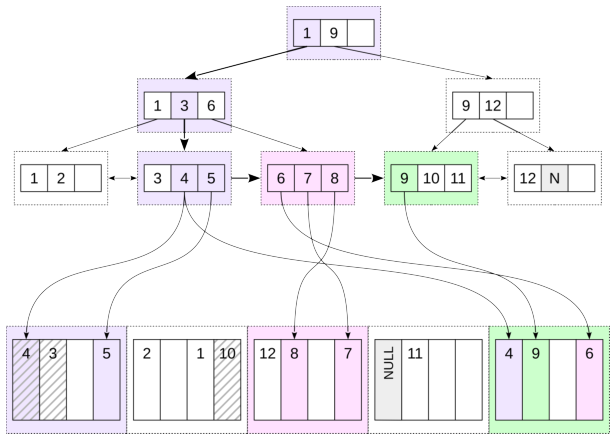
Several processes may need to read the same table page. The figure shows this case: the last table page contains rows referenced from several index pages read by different processes. Of course, the page itself is present in the buffer cache only once. A parallel index-only scan works similarly, except that heap visits can be avoided for entries whose heap pages are all-visible.
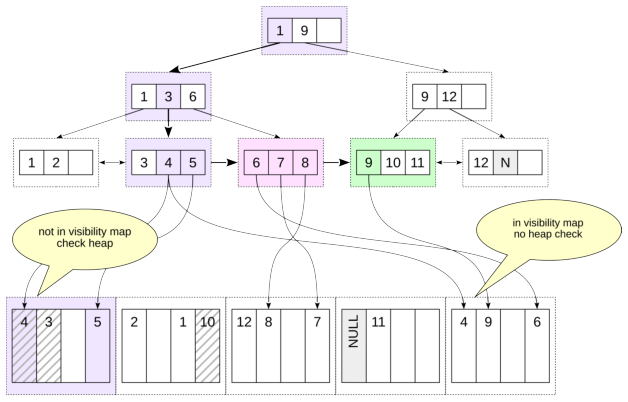
As an example, count bookings made during the last month:
The structure resembles the earlier parallel sequential-scan plan, but rows are obtained through Parallel Index Only Scan.
Parallel Bitmap Heap Scan
Bitmap heap access can also be parallel.
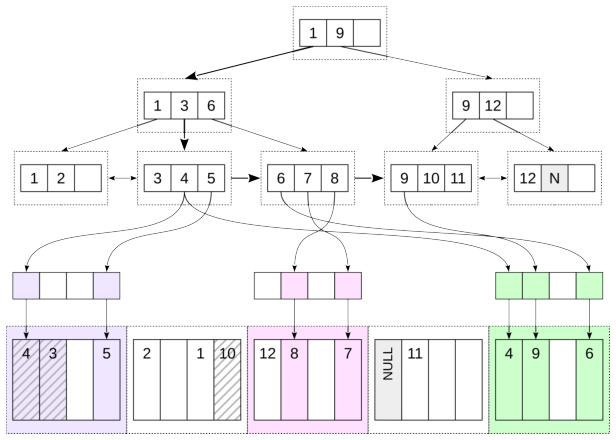
The bitmap itself is built serially: the leader performs the Bitmap Index Scan and constructs the shared bitmap state.
The heap phase can then be performed cooperatively by workers through Parallel Bitmap Heap Scan.
Count bookings made during the last three months for less than 5,000:
The leader constructs the bitmap in Bitmap Index Scan. Heap blocks selected by that bitmap are processed in parallel by Parallel Bitmap Heap Scan.
Remove the indexes created for the examples:
6. Comparing Access Methods
There is no universal selectivity threshold at which one access method becomes better than another, but the broad pattern is easy to see.
A plain index scan is most attractive when the predicate is highly selective—only one row or a small fraction of the table is needed. The cost of navigating the index and fetching a few heap pages is then much smaller than scanning the whole relation.
At intermediate selectivity, a bitmap scan is often competitive. It pays the startup cost of building the bitmap but reduces repeated heap page visits. In the worst case, the heap work of a plain index scan can grow roughly with the number of matching tuples, while a bitmap heap scan organizes that work around the number of heap pages that contain candidates.
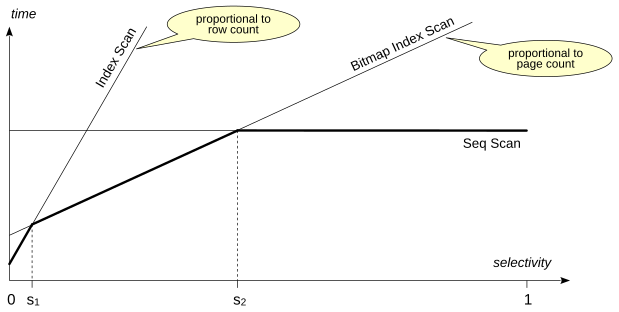
At low selectivity, when most rows pass the predicate, a sequential scan is usually best. Reading an index in addition to reading most of the heap only adds work. This effect is stronger on rotating disks, where random reads are much slower than reading sequentially located pages.
The crossover points depend strongly on the table, the index, physical correlation, row width, cache state, storage, planner cost parameters, and the exact query. The planner combines these estimates rather than using a fixed ”use an index below X percent” rule.
One more factor is ordering. A B-tree index scan delivers rows in index order and can therefore avoid a separate sort. That may make it attractive even when its raw row-access cost is not the smallest.
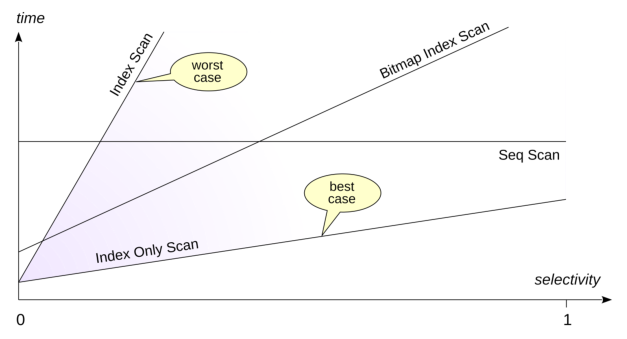
Index-only scan performance depends strongly on the visibility map and on how many heap pages are all-visible.
The planner therefore includes the estimated all-visible fraction when costing index-only access.
Referenced resources
4 Sorting and Grouping
1. Sorting
A B-tree index can produce rows in index order. When that order matches the query’s ORDER BY, PostgreSQL can sometimes avoid an explicit sort:
If the required ordering is not available from an access path, PostgreSQL needs two separate steps: obtain the rows and sort them.
In-Memory Sort
In the simplest case, the data being sorted fits in the memory available to the sort operation under work_mem. PostgreSQL can then sort it in memory. EXPLAIN ANALYZE shows both the sort method and the amount of memory used:
A regular Sort node cannot return its first row until it has consumed and sorted its input. Its startup cost therefore includes the cost of reading the complete input. For a comparison sort, the typical amount of work grows on the order of , where M is the number of input rows.
If the query needs only the first N rows of the sorted result, for example because of LIMIT, PostgreSQL can use a bounded top-N sort rather than fully sorting every row:
The estimated query cost is lower, and the sort uses less memory. A top-N heapsort needs work on the order of rather than sorting all M rows completely.
External Sort
If the data set is too large to sort within the available memory, PostgreSQL uses an external sort.
The sorter reads as much input as it can handle in memory, sorts that portion, and writes a sorted run to a temporary file.
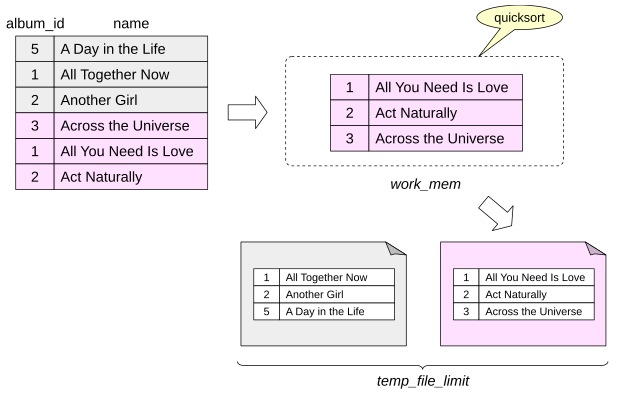
The process repeats until all input has been turned into individually sorted runs.
temp_file_limit limits the total space used at any one time by temporary files belonging to a PostgreSQL process. Explicit temporary tables are not counted against this limit.
The sorted runs are then merged. Conceptually, the merge keeps track of the next candidate from each input run, selects the smallest or largest one, returns it, and advances that run. The implementation reads data in buffered blocks rather than literally one row at a time so that I/O remains efficient.
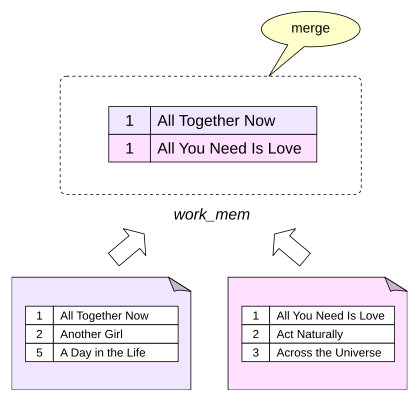
If memory is insufficient to merge all runs in one pass, PostgreSQL performs a multi-pass merge: groups of runs are merged into larger runs, which are then merged again until the final ordered stream can be produced. A large sort makes the use of temporary storage visible in EXPLAIN ANALYZE:
Sort Method: external merge tells us that the sort spilled to disk. The Disk value reports the temporary disk space used by the sort, while the temp buffer counters show temporary I/O.
Incremental Sort
Suppose a query requires ordering by keys, but its input is already ordered by the first m keys. There is no need to sort the entire data set again. PostgreSQL can divide the input into consecutive groups that have equal values of the presorted prefix and sort those groups only by the remaining keys . This is incremental sort.
Incremental sort can reduce memory requirements and the likelihood of spilling to disk because each sort works on a smaller portion of the input. It also has a latency advantage: PostgreSQL can begin returning rows after the first group has been sorted instead of waiting for the entire input to be sorted.
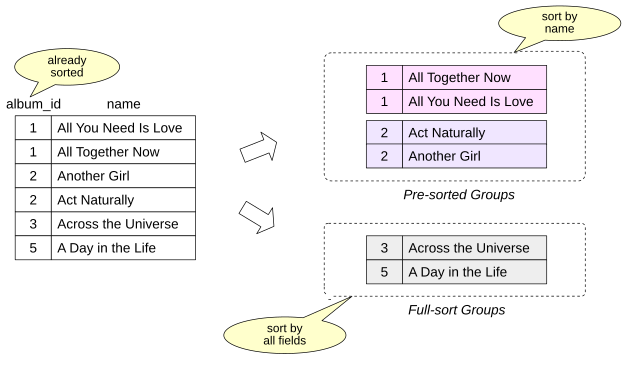
The trade-off is additional overhead from identifying and processing many groups.
PostgreSQL uses two strategies internally. Larger groups that share the same presorted prefix can be sorted individually. Small groups can be accumulated and fully sorted together to avoid excessive per-group overhead.
Incremental sort can be disabled with enable_incremental_sort.
Create an index on bookings.total_amount:
Now increase work_mem and sort by total_amount and book_date:
The index scan already provides rows ordered by total_amount, shown as Presorted Key. Incremental Sort only has to establish the remaining order by book_date.
Pre-sorted Groups describes the larger groups that were processed using the existing total_amount order and sorted further by book_date. Full-sort Groups describes small groups that were combined and sorted as complete groups.
In this example both groups fit entirely in memory and were quicksorted.
Now reduce work_mem:
Run the query again:
With less memory, the large presorted groups are now handled with external merge, and EXPLAIN reports their temporary disk usage explicitly.
Restore the setting and remove the demonstration index:
Building a B-tree
PostgreSQL could in principle build a B-tree index by starting with an empty tree and inserting entries one by one as it scans the table. For a bulk index build, that would be inefficient.
Instead, PostgreSQL forms the index entries, sorts them by index key, fills the leaf level in order, and then builds the upper levels until only the root remains. The sorting machinery is closely related to the sorting discussed above, but index creation uses maintenance_work_mem rather than ordinary work_mem. Maintenance operations are relatively infrequent, so it is often reasonable to give them a larger memory budget.
B-tree index construction can also run in parallel. The number of workers is chosen in the same way as for parallel queries, depending on the table size, but is limited by max_parallel_maintenance_workers.
For parallel index builds, maintenance_work_mem applies to the build as a whole rather than separately to every worker.
2. Grouping
Where Grouping Appears
SQL can divide rows into groups with GROUP BY. Aggregate functions are commonly used with those groups to compute one result per group. Window functions have a related concept through PARTITION BY, but unlike ordinary grouping, window functions do not collapse the rows of a partition into one result row.
Grouping also appears implicitly when duplicates must be removed, for example with: DISTINCT; UNION without ALL; INTERSECT without ALL; EXCEPT without ALL. PostgreSQL can use different physical strategies for grouping and duplicate elimination.
Two important ones are hashing and processing data in group-key order. The planner chooses among available alternatives based on estimated costs, memory, ordering already available from lower plan nodes, and other properties of the query.
Hash Aggregation
A hash table uses a hash function to map values into a finite set of buckets. For a lookup:
- Compute the hash value.
Use part of that value to choose a bucket.
Inspect entries in the bucket and use equality comparison to distinguish values whose hashes or bucket assignments collide.
With a reasonable load factor and a good distribution, lookup is expected to take approximately constant time. A poor distribution or an overloaded hash table increases collision work.
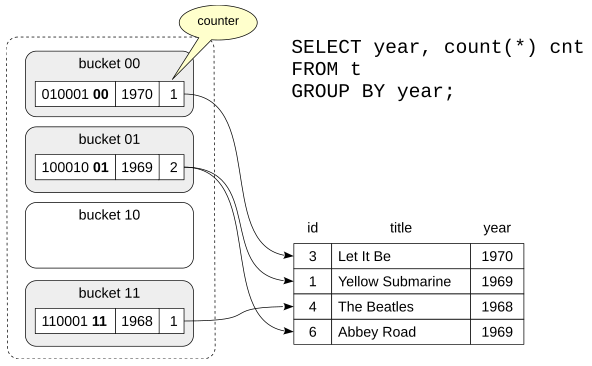
The plan node for hash-based aggregation is HashAggregate:
The startup cost is significant because HashAggregate has to consume its input and build aggregation state before it can produce the final groups.
EXPLAIN ANALYZE shows memory use:
Grouping Sorted Data
Duplicate elimination and grouping can also exploit rows that arrive ordered by the grouping keys.
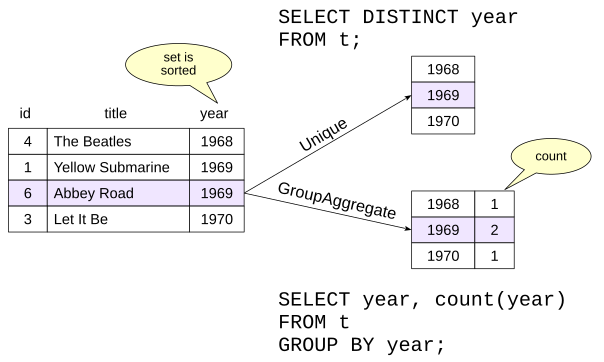
Unique removes adjacent duplicates. Because equal keys are next to one another, it only needs to compare the current value with the previous one.
The GroupAggregate node returns aggregated data. In the example in the figure, the node builds a list of distinct values of the year field and counts how many times each value occurs in the data set.
When the input already has the required order, Unique or GroupAggregate can be attractive because they need relatively little working memory and can process the stream incrementally. When the input must first be fully sorted, hash aggregation can often be cheaper, although the planner decides from the actual estimates rather than from a fixed rule.
These nodes preserve group-key ordering, which can sometimes satisfy a later ORDER BY without another sort.
Here is a GroupAggregate whose input order comes directly from an index:
A DISTINCT query can use Unique:
The index already produces ticket_no in the order required by ORDER BY, and Unique preserves that order, so no additional Sort node is necessary.
Window Functions
Unlike ordinary aggregate functions, window functions compute a value for each output row rather than reducing a group to one row. After the function name, the OVER clause specifies a window: a rule that determines, for each result row, which set of rows the window function should process. Such a set is called a frame.
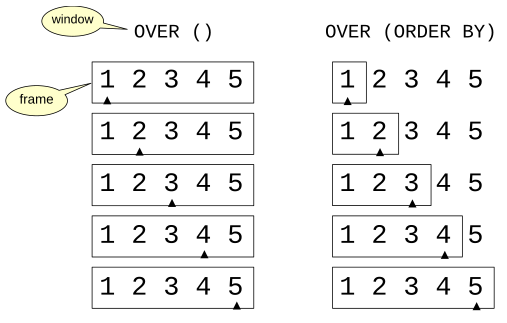
With OVER (), there is no PARTITION BY and no ORDER BY. There is therefore one partition containing all rows, and the default frame is the entire partition.
If the window definition contains an ORDER BY clause that orders the rows, the default window frame covers rows from the first row through the current row.
Consider a running sum of booking amounts:
The window function is evaluated by WindowAgg. Here its child Sort establishes the order required by the window. The sort can use any suitable sort strategy. A small input can stay in memory:
A large input may require an external sort:
For nodes that use internal row storage, such as WindowAgg, CTE Scan, or Recursive Union, the Storage line shows the maximum amount of storage used and its type: Memory when the data fits in memory, or Disk when temporary files are used.
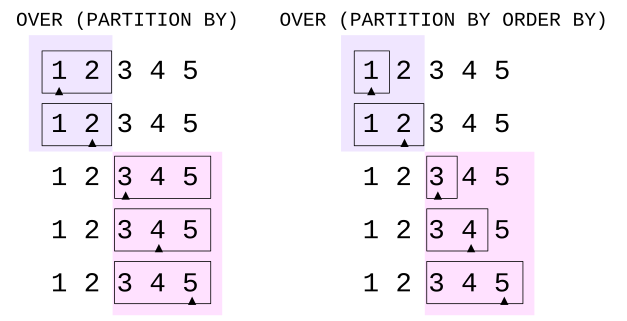
PARTITION BY divides the input into independent groups of rows. For each group, the frame boundaries change within that group. Unless specified otherwise, the frame occupies the entire group.
If the window definition also contains ORDER BY, the rows are processed in the corresponding order. In this case, the frame covers the rows from the first to the current one.
Unlike regular GROUP BY, PARTITION BY always employs sorting: the plan is chosen so that the WindowAgg node receives a set of rows sorted first by the PARTITION BY keys and then by the ORDER BY keys. Hashing is not used even when there is no ORDER BY clause.
5 Join Methods
1. What Join Methods Are
Getting rows with the access methods discussed in the previous chapters is only part of the job. We also need to combine row sets.
A join method is an algorithm for combining two row sets. PostgreSQL uses these algorithms not only to implement SQL JOIN operations, but also for other SQL constructs, such as EXISTS. There are two separate levels: an SQL join is a logical operation that defines which rows belong in the result; a join method is one possible physical algorithm for producing that result efficiently.
We often say that PostgreSQL joins tables. This is convenient shorthand, but the executor actually joins row sets. A row set may come directly from a table through an access method, or it may be the result of another join, aggregation, subquery, or other plan subtree.
Joins are binary: each join node combines two inputs. For ordinary inner joins, the order in which several relations are joined often does not change the logical result, but it can change performance dramatically. The order of the two inputs to one physical join can matter as well.
PostgreSQL has three main join methods: nested loop, hash join, and merge join.
2. Nested Loop Join
The basic nested-loop algorithm is simple: for each row from one input, scan the other input and return the matching rows. Conceptually, it is two nested loops, hence the name.
The first input is conventionally called the outer input; the second is the inner input. A nested loop becomes especially attractive when PostgreSQL can use values from the current outer row to perform a cheap lookup in the inner input. An index is the classic example. If the inner side has to be scanned from beginning to end for every outer row, the same unrelated rows may be examined many times.
For very small inputs, even a repeated scan may still be cheap. Here is a typical nested-loop plan for a small result. We find the segments belonging to two tickets:
Outer input: Index Scan on tickets t. Inner input: Index Scan on segments tf.
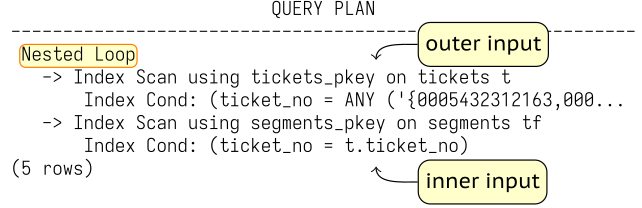
This is a parameterized nested loop. The outer Index Scan produces a ticket row. The value of t.ticket_no from that row becomes a parameter of the inner Index Scan on segments. On each iteration, the inner lookup is effectively performed with a condition of the form ticket_no = constant.
The process continues until the outer input is exhausted.
Now consider another nested loop. We list airplanes whose range is sufficient for two required distances:
This join is not parameterized. The inner input does not have an access condition derived from the current outer row. Instead, the inner row set is read repeatedly and the pair is checked by Join Filter. Materialize keeps the tiny VALUES result available for repeated scans, so PostgreSQL does not reconstruct it from scratch on every iteration. Conceptually, this is a Cartesian product followed by filtering.
A nested loop does not require an equality condition. It can implement essentially any join predicate that PostgreSQL can evaluate.
Memoize
If a parameterized inner lookup is executed many times with the same parameter values, repeatedly doing the same work is wasteful. PostgreSQL can cache the results in a Memoize node placed above the inner plan.
If the planner’s estimates incorrectly suggest that memoization is useful, it can be disabled with enable_memoize = off.
Consider a join between routes and airports:
Caching: Memoize. Inner input: Index Scan on airports_data.
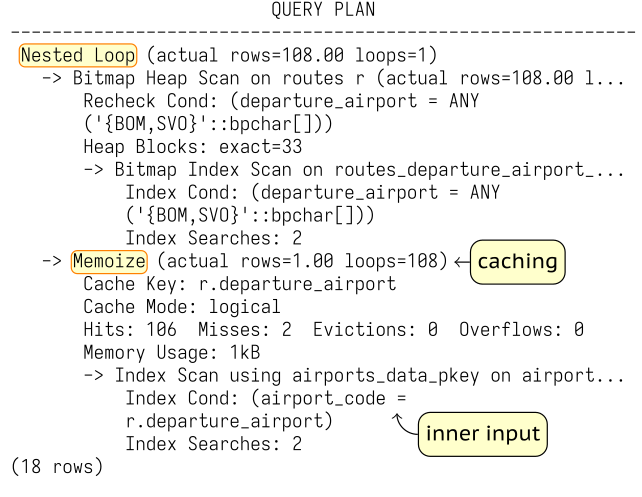
The example is deliberately chosen so that only two distinct parameter values reach the inner side: BOM and SVO.
The first lookup for each value is a cache miss: Misses: 2.
The remaining 106 lookups are served from the cache: Hits: 106.
No entries had to be evicted (Evictions: 0), no cached result overflowed its space (Overflows: 0), and the cache used only 1 kB.
Internally, the cache is keyed by the parameter values of the inner scan. If the outer side repeats the same keys, Memoize can turn repeated inner scans into cheap cache lookups.
Execution Cost
A good first approximation is , where N is the number of outer rows. If the inner side is rescanned completely and contains about M rows, this becomes the familiar comparison pattern.
For a parameterized nested loop, however, the cost of one inner probe may be much smaller than scanning M rows. A unique B-tree lookup, for example, can find at most one matching row after a short tree descent. Repeated probes may also benefit from caching or Memoize.
Nested loop join is effective when the outer input is small and rows of the inner input can be accessed cheaply. In particular, this method, combined with index access, is typical of OLTP queries that need to return a small number of rows very quickly.
Nested Loop in Parallel Plans
Nested loop can participate in a parallel plan.
The outer row set is scanned by several worker processes in parallel. Each worker receives some outer rows and performs the corresponding inner scans independently.
Find tickets associated with inexpensive segments:
Outer input: Parallel Seq Scan on segments s. Inner input: Index Only Scan on tickets t.
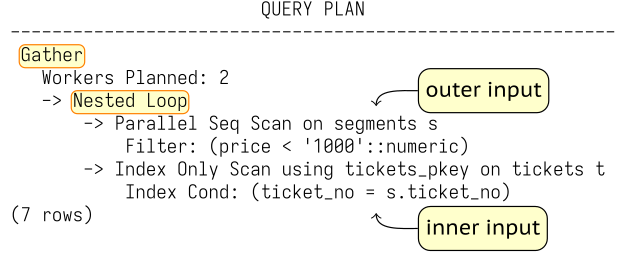
Each participating process scans part of segments. For every qualifying segment it performs its own index-only lookup in tickets. The inner side is not automatically shared just because the outer scan is parallel; each process executes the inner plan for the outer rows assigned to it.
3. Hash Join
Single-Batch Hash Join
In the build phase PostgreSQL reads the inner rows and computes hash values from the join keys.
The in-memory hash table stores the data needed later by the join: the hash value and the projected inner-row data required by the join or by nodes above it.
The memory budget for a hash operation is based on work_mem × hash_mem_multiplier.
For a serial hash join, the best case is that the complete hash table fits in that budget. In that case EXPLAIN ANALYZE reports Batches: 1.
In the probe phase, PostgreSQL reads the outer input sequentially. For each outer row it computes the corresponding hash value, locates the candidate bucket, and then checks the actual join condition.
Checking the hash code alone is not enough. First, not every join condition in the query can be used by a hash join: because a hash function does not preserve value order, hash joins support only equijoins. Second, collisions are possible, when different values receive the same hash code. The probability is small, but it cannot be ruled out.
In the following example large portions of both inputs are needed, so a hash join is a natural choice:
Hash table: the Hash node above Seq Scan on airplanes_data.
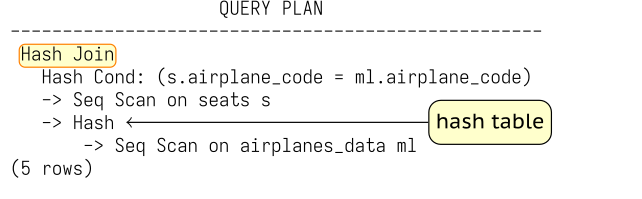
Hash Join first asks its Hash child to consume the inner input and build the hash table. It then reads the outer input and probes that table, returning matches as they are found.
Run the query:
The hash table fits in memory. It uses 1024 buckets and about 10 kB. The planner chose the much smaller airplanes_data input for the build side.
The planner chose the much smaller airplanes_data input for the build side.
Multi-Batch Hash Join
If the planner estimates that the hash table will not fit in the memory of size work_mem × hash_mem_multiplier, the inner input is divided into batches, each of which is processed separately. The number of batches, like the number of buckets, is always a power of two; the batch number is determined by bits of the hash value. Rows that can match each other always belong to the same batch. Ideally, each batch contains approximately the same number of rows, but if values in the rows repeat, skew is possible.
When planning a query, the minimum required number of batches is calculated in advance so that the hash table for each individual batch fits in memory. This number is not reduced even if the planner’s estimate turns out to be pessimistic, but can be increased dynamically as needed.
First, PostgreSQL reads the inner input and builds the hash table. Rows belonging to the first batch remain in memory. Rows belonging to other batches are written to separate temporary files.
Then PostgreSQL reads the outer input. Rows belonging to the first batch are immediately matched against the first batch of the hash table, which resides in memory. Rows belonging to other batches are written to separate temporary files. Thus, with N batches, up to temporary files are used; there may be fewer if some batches are empty.
Disk space used by temporary files in a session is limited by the value of temp_file_limit; temporary tables are not included in this limit.
After that, the memory occupied by the hash table is released. At this point the join already has a partial result for the first batch.
PostgreSQL then processes the batches saved on disk one by one. It loads the inner rows of a batch from its temporary file into the hash table, reads the matching outer rows from another temporary file, and joins them. The temporary files that have been processed are removed. The procedure repeats until all batches have been joined.
Join bookings and tickets, both large tables:
The hash join uses 32 batches. The Hash node spills build-side data, while the Hash Join node also reads and writes temporary data as the batches are processed.
Now return only one column:
Memory consumption decreased, since the hash table now contains only one field (instead of the three that make up a row of the bookings table).
It is therefore important that:
Only the fields that are actually needed are placed in the hash table
The hash table is built on the smaller input
The first is the query author’s responsibility; the second, the planner’s.
Execution Cost
With a good hash distribution and an in-memory table, the expected amount of basic build-and-probe work is roughly proportional to for the two input sizes.
However, the hash table has to be built before the join can start, so for a small number of rows a nested loop is more efficient.
Hash join, combined with full table scans, is typical of OLAP queries that process many rows, where overall throughput is more important than response time.
Parallel Hash Join
Unlike other join methods, hash join not only can participate in parallel plans but also has an efficient parallel-aware algorithm. It parallelizes both phases of the join: building the hash table from the inner input and probing it with rows from the outer input. It is controlled by enable_parallel_hash and is enabled by default.
The memory budget is work_mem × hash_mem_multiplier × number of processes in this case. All processes can help scan the inner input and build one shared hash table. Once the build phase is complete, they cooperatively scan the outer input and probe that shared table.
Increase the amount of memory available to each process for building the hash table and run an aggregate query:
Note that the allocated memory exceeds the budget of one process: work_mem × hash_mem_multiplier = 64 MB in this example. Batches: 1 shows that the join stayed single-batch.
If the combined memory available to the parallel processes is still not enough for the whole hash table, PostgreSQL uses a multi-batch parallel algorithm.
First, the processes read the inner input in parallel, divide it into batches, and write the batches to temporary files. Unlike the serial algorithm, all batches, including the first one, are written to disk: each process reads only part of the inner input, so no process has a complete batch by itself.
After that, the outer input is also read in parallel, divided into batches, and written to temporary files. After the outer input has been read, there are 2N temporary files for N batches: one inner and one outer file per batch.
Each process then chooses an unprocessed batch, loads its inner rows into a hash table, reads the corresponding outer rows, and performs the join. In the multi-batch algorithm, each process has its own hash table of size work_mem × hash_mem_multiplier, but these tables reside in shared memory, meaning every parallel worker process can access each table.
When a process finishes one batch, it chooses another. If no unprocessed batches remain, a free process can help with a batch that another process is still processing, because the hash tables are in shared memory.
Using several smaller hash tables in this way makes coordination simpler and reduces synchronization overhead compared with having all processes work with one large shared hash table.
Reduce the memory setting:
Run the same query:
The join now uses eight batches.
4. Merge Join
The third main join method is merge join. Merge join exploits ordered inputs. If both row sets are ordered by compatible join keys, PostgreSQL can advance through them in key order and combine matching groups. The Gather Merge node works in a similar way: it merges already sorted streams into one sorted stream.
Sorting can be expensive—comparison sorting is typically —but explicit sorting is not always necessary.
A B-tree index may already provide the required order, or an earlier plan node may preserve it.
A simplified mental model is that the input with the smaller current key advances until the keys catch up. When the keys are equal, matching rows are produced. Duplicate join keys complicate this picture. If one or both inputs contain several rows with the same key, PostgreSQL must produce all matching combinations for that key.
Consider a join in which both inputs are already available in the required order:
One input: Index Scan on tickets t. The other input: Index Scan on segments tf.
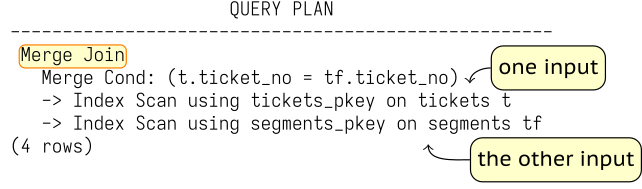
An important property of merge join is that it returns the join result in sorted order. In particular, the resulting row set can be used for another merge join without additional sorting or, as in this example, returned directly to the client.
In the following example, one Merge Join receives a sorted row set from another Merge Join:
Here segments are joined with boarding_passes, and tickets are then joined to this row set, which is already sorted by ticket number.
Execution Cost
If both inputs are already sorted on the merge keys, the basic merge pass is linear in the input sizes: . Unlike hash join, merge join does not need to build a hash table first. Merge join can therefore work successfully in both OLTP and OLAP queries.
However, if sorting is required, the cost becomes proportional to N log N, and for large data volumes this method will most likely lose to hash join.
Merge Join in Parallel Plans
Merge join can participate in parallel plans, but the Merge Join node itself is not a parallel-aware join algorithm in the same sense as Parallel Hash Join.
A common pattern is that one input is scanned in parallel, while each worker independently reads the complete other input far enough to find the matches it needs.
For large joins this duplicated work can make parallel hash join more attractive, because parallel hash was designed to share both the build and probe work.
Create an index that allows PostgreSQL to obtain tickets in book_ref order cheaply:
Now consider:
The scan of bookings_pkey is parallel. The grouped subquery on tickets, however, is read independently by each participating process that executes the merge join.
Remove the demonstration index:
6 Statistics
1. Basic Statistics
PostgreSQL collects basic planner statistics at two levels: for the relation as a whole and for individual columns.
Table-Level Statistics
Relation-level statistics include the estimated size of the relation: the reltuples and relpages columns of pg_class. These values matter enough that PostgreSQL updates them not only during VACUUM and ANALYZE, but also after some DDL operations such as CREATE INDEX and CREATE TABLE AS.
The planner can also scale the stored row count estimate when the current physical file size differs from the relpages value on which that estimate was based. This lets the estimate react to table growth even before the next full statistics refresh.
ANALYZE examines a random sample of rows rather than reading the entire table for every column statistic. The required sample size is not growing with the table, and is set by default_statistics_target (100 by default), multiplied by 300.
For a large table, estimates derived from a sample will not be exact. The planner usually needs an estimate accurate enough to distinguish competing plans. An order-of-magnitude mistake can be disastrous; a small sampling error often is not.
Consider a query with no predicate:
The row estimate comes from pg_class:
In this case it happens to match the exact count:
The remaining basic statistics are collected per column by ANALYZE. Their internal representation is stored in pg_statistic; the pg_stats view presents the most useful fields in a friendlier and privilege-safe form.
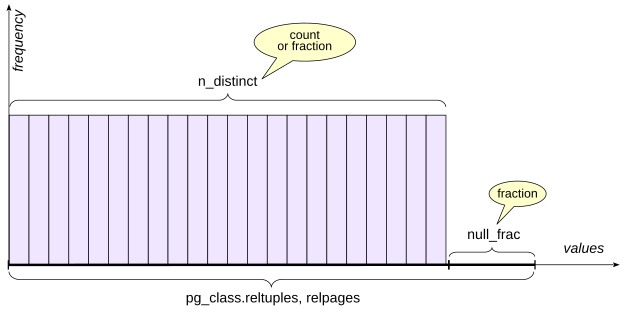
Fraction of Null Values
pg_stats.null_frac stores the fraction of rows in which the column is null, ranging from 0 to 1.
Some flights have not departed yet, so actual_departure is still null:
The planner obtains the estimate by multiplying the relation row count estimate by null_frac:
The exact value is close but not identical:
Number of Distinct Values
pg_stats.n_distinct stores an estimate of the number of distinct non-null values in a column. A positive value is an estimated absolute count. A negative value represents the ratio of distinct values to rows. For example, −1 means that all values are unique, which is typical for a primary key. The negative representation is useful because it scales naturally as the table grows.
Most Common Values
If every value occurred with the same frequency, the number of distinct values would already tell us a great deal about equality predicates. Real data is rarely so cooperative. PostgreSQL therefore stores two more pieces of information:
pg_stats.most_common_vals: an array of the most common values, also called the MCV list
pg_stats.most_common_freqs: an array of their frequencies
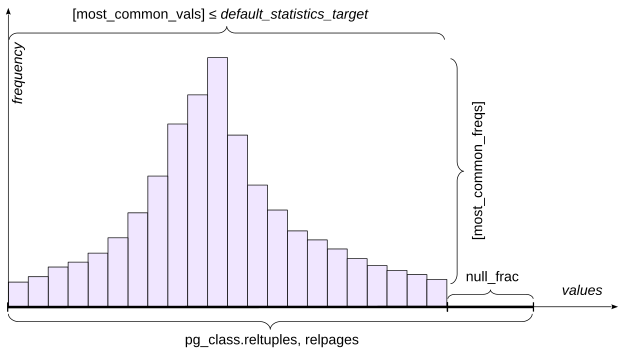
For a value that appears in the MCV list, its stored frequency can be used directly as the selectivity estimate. The maximum number of entries is controlled by the statistics target. default_statistics_target supplies the default, and ALTER TABLE ... ALTER COLUMN ... SET STATISTICS can override it for an individual column. Increasing a target also increases the sample size used by ANALYZE.
To avoid increasing the size of pg_statistic and burdening the planner with useless work, values larger than 1 kB are excluded from statistics and analysis. Such large values are most likely unique and have little chance of appearing in most_common_vals anyway.
For an experiment, reduce the statistics target for the arrival airport:
Mumbai (BOM) is common enough to appear in the MCV list:
The exact count is also 55:
Inspect the most common values and frequencies:
The cardinality estimate is the number of rows in routes multiplied by the stored frequency:
MCV data also contributes to inequality estimates: PostgreSQL can sum the frequencies of MCV entries that satisfy the range condition.
If a value is not in the MCV list, the planner estimates it from the remaining population under a uniform-distribution assumption.
Santiago (SCL) does not appear in our ten-value MCV list:
The exact result is 18:
To obtain the estimate, the planner first sums the frequencies of the most common values:
The column has 73 distinct values:
Ten of them are already represented explicitly in the MCV list. With no nulls, the remaining probability mass is spread approximately uniformly over the remaining 63 values:
Histogram
When there are too many distinct values to describe usefully with an MCV list, PostgreSQL also builds a histogram.
A histogram consists of several buckets containing values. The number of histogram buckets is controlled by the same default_statistics_target parameter.
Bucket boundaries are chosen so that approximately the same number of values falls into each bucket; in the figure this is shown by rectangles of equal area. With this construction, PostgreSQL only needs to store the array of boundary values in pg_stats.histogram_bounds. The frequency of one bucket is 1/number of buckets.
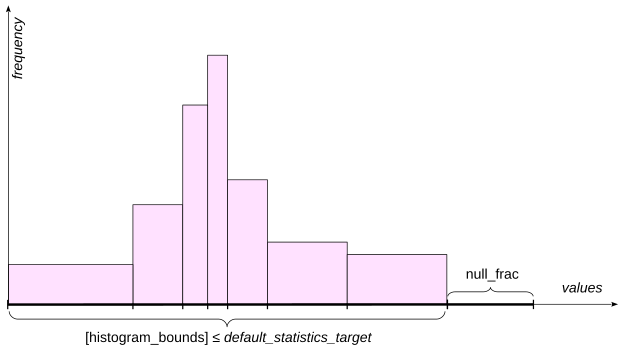
For an inequality such as field < value the planner estimates how much of the histogram lies to the left of the boundary value. It can interpolate within the containing bucket rather than counting only whole buckets.
The MCV values and nulls are excluded from the histogram population:
That is why range selectivity combines information from both the MCV list and the histogram.
Consider:
The exact count is:
The MCV values inside the requested interval contribute this frequency:
DFW is exactly the right boundary of the second bucket in this example, so two of ten histogram buckets lie in the interval. There are no nulls. The estimate is therefore:
For a boundary inside a bucket, PostgreSQL refines the estimate with interpolation appropriate to the data type and operator.
A histogram is much less useful for an equality condition on a value that is not in the MCV list. In that case PostgreSQL falls back to an estimate based on the remaining number of distinct values.
Additional Statistics Fields
Several other statistics fields affect planning.
pg_stats.correlation measures statistical correlation between the logical order of column values and the physical order of rows. Values near 1 or −1 indicate strong physical ordering; values near zero indicate little correlation. This matters when costing index scans because strong correlation reduces expected random heap access.
pg_class.relallvisible stores the number of table pages marked all-visible in the visibility map. An all-visible page is one all of whose tuples are known to be visible to all current and future transactions. If this number is not large enough, the planner may choose a bitmap scan instead of an index-only scan.
pg_stats.avg_width stores the average size of values in the column, in bytes, for estimating the memory required by an operation.
Custom and Generic Plans
With the simple query protocol (see Chapter II, “Planning and Execution”), a statement is normally parsed, planned, and executed as a new statement each time.
The extended protocol allows statements to be prepared, and those statements can have parameters. The parse tree is kept in the local memory of the backend process. Planning can then happen later when parameter values are known.
A custom plan is generated for one execution using its actual parameter values. This is useful when data is skewed, because different parameter values can make different access methods optimal. For example, an index may be excellent for a rare value but worse than a sequential scan for a very common value.
A generic plan is created without using the actual parameter values. It can be reused across executions and therefore saves planning time. A generic plan works especially well with a uniform distribution, when the selectivity of a condition does not depend on the particular parameter value.
Prepare a query and create an index:
Cancelled flights are rare enough for an index scan:
Arrived flights are common, so a custom plan chooses a sequential scan:
Execute the statement three more times so that the total number of custom executions reaches five:
The counters are visible in pg_prepared_statements:
On the next execution this example switches to a generic plan. A generic plan shows parameter symbols instead of concrete values:
For skewed data this switch can be undesirable. To handle it, plan_cache_mode can override the automatic heuristic:
2. Extended Statistics
Basic statistics that are collected automatically may not be enough to produce accurate cardinality and selectivity estimates.
PostgreSQL allows the administrator to manually determine which additional—extended—statistics are needed. You can gather statistics that span multiple columns at once (multivariate statistics), or statistics on an arbitrary expression.
Note that basic statistics are collected for tables and their columns, but not for indexes, except for indexes on expressions. Therefore, creating an index on several columns does not by itself create multivariate statistics.
Extended statistics are created with the CREATE STATISTICS command. Their definitions are stored in pg_statistic_ext; collected data is stored in pg_statistic_ext_data.
There are several kinds of multivariate statistics available.
Functional Dependencies
A functional dependency describes how strongly values in one column determine values in another.
| city | index |
|---|---|
| Samara | 443000 |
| Kazan | 420000 |
| Nizhny Novgorod | 603000 |
| Veliky Novgorod | 173000 |
For example, if a postal code uniquely determines a city, predicates on city and postal_code are correlated, as shown in the figure.
Consider two predicates on routes:
Without extended statistics, the estimate is much too low:
The reason is that the planner assumes predicates are independent and calculates the resulting selectivity as the product of the selectivities of conditions combined with logical AND. This is visible in the plan: the estimate in the Bitmap Index Scan node for the route_no condition is correct, but after filtering in the Bitmap Heap Scan node by arrival_airport, it is underestimated. We know, however, that the route number uniquely determines the arrival airport, so the second condition is in fact redundant, assuming the airport is specified correctly.
Create dependency statistics:
Inspect the dependency:
The number after the colon is the measured degree of dependency for the attribute mapping. Now the estimate improves:
psql meta-command \d routes also lists statistics objects defined on the table. The Statistics objects section shows their names, columns, and nondefault statistics targets:
Most Common Combinations
Columns can be correlated without either functionally determining the other. The figure shows possible city-river pairs. The predicates on city and river are clearly correlated, but unlike the previous example neither column determines the other: cities and rivers have a many-to-many relationship.
| city | river |
|---|---|
| Samara | Volga |
| Kazan | Volga |
| Nizhny Novgorod | Oka |
| Nizhny Novgorod | Volga |
| Veliky Novgorod | Volkhov |
Here is a similar example in the demo database:
The planner underestimates the number of rows. With an MCV statistic on the pair the estimate is now correct:
The multivariate MCV data can be inspected with the pg_mcv_list_items function:
Distinct Combinations
Another situation in which the planner can make an error is grouping. Multivariate ndistinct statistics can improve estimates for grouping by several columns.
In the example in the figure, the number of possible combinations of all fields clearly cannot be determined by simply multiplying the number of distinct values in each column separately.
| city | region | index |
|---|---|---|
| Samara | Samara Oblast | 443000 |
| Kazan | Republic of Tatarstan | 420000 |
| Nizhny Novgorod | Nizhny Novgorod Oblast | 603000 |
| Veliky Novgorod | Novgorod Oblast | 173000 |
Count the distinct direct airport pairs:
Without multivariate distinct statistics, the planner badly underestimates the number of groups:
Create an extended statistics object. If no kind is specified, PostgreSQL includes all supported multivariate kinds that apply:
The estimate improves. Inspect the stored estimate:
\dX lists extended statistics objects. The values themselves are stored in the pg_statistic_ext_data view.
Statistics on Expressions
Extended statistics can also collect ordinary univariate statistics for an expression, much as if the table had a stored column containing that expression.
| city | index | address |
|---|---|---|
| Samara | 443000 | 443000, Samara |
| Kazan | 420000 | 420000, Kazan |
| Nizhny Novgorod | 603000 | 603000, Nizhny Novgorod |
| Veliky Novgorod | 173000 | 173000, Veliky Novgorod |
Expressions can also participate in multivariate statistics together with columns or other expressions.
Without expression statistics, a predicate whose operand is an expression may force the planner to use a generic default selectivity because it has no distribution data for the expression itself. For example:
The estimate is far too small. One way to provide statistics is an expression index, but an index costs storage and maintenance even if it is not needed for access. If the goal is only to improve estimates, create expression statistics instead:
The estimate is now close to the actual value.
Expression statistics are visible in the pg_stats_ext_exprs view:
Clean up the objects created in this chapter:
Referenced resources
7 Profiling
1. What Profiling Is
In the previous chapters we looked at how queries work, which building blocks make up an execution plan, and what affects the planner’s choice among alternative plans. This is the hardest and most important part. Once you understand the mechanisms, logic and common sense go a long way: you can work out whether a query is executing efficiently and what might improve it.
But how do you find the query that is actually worth optimizing?
Any optimization task—not only database optimization— starts with profiling, even if we do not always use that word. We break the problematic task into smaller parts and measure how much of the total work each part consumes. It is also useful to know how often each part is executed.
The larger a component’s share of the total cost, the larger the potential gain from optimizing it. In practice, the optimization effort matters too: a theoretically large gain may be expensive or risky to obtain.
Sometimes a component is individually fast but executed far too often. This is common, for example, with queries generated by ORMs. Then a more useful question may be: should this operation be executed this many times at all? Changing application architecture is rarely easy, but it can produce a much larger gain than tuning one query invocation.
A profile of overall database activity is also valuable to an administrator who is not investigating one complaint but looking for the largest consumers of system resources. A monitoring system should make such a profile visible.
Andrey Zubkov’s pg_profile extension is one tool for this job. It builds on PostgreSQL statistics views and stores periodic activity snapshots. Comparing snapshots can reveal both performance problems and the conditions under which they appeared. A full discussion of monitoring architecture, tools, and metric selection is beyond this book.
Postgres Professional also publishes Alexey Lesovsky’s Russian-language book Monitoring PostgreSQL, which goes much deeper into that subject. When investigating one concrete problem, however, the profile should be scoped to the actions needed to reproduce that problem.
To solve a specific problem, the profile should be built so that measurements cover only the actions needed to reproduce that particular problem.
2. What to Measure
What unit should we use for the cost of a component? For the end user, the most meaningful measure is response time: how many seconds pass between an action and the result.
In this sense, it can be more convenient to look at the amount of I/O, that is, the number of pages read and written. This measure is more stable: with the same data and configuration parameters, it does not depend on hardware characteristics or current server load.
It is also important to investigate realistic data volumes. Tools such as Postgres.ai’s Database Lab Engine make it possible to create thin database clones quickly, which can be useful when reproducing production-scale behavior without duplicating all storage.
I/O usually reflects the amount of work required to execute a query reasonably well, because much of the time is spent reading and processing data pages. This measure, however, has little meaning to the end user.
3. Application Profile
Performance problems often are in the database: one bad execution plan can change runtime by orders of magnitude. But not always. A slow client connection, serialization, application-server work, client-side rendering, queueing, remote service calls, and network transfer can all dominate the user’s response time. A complete profile should therefore cover the client, application server, network, and database.
Obtaining such an end-to-end profile is difficult unless every component of the system exposes useful telemetry. At a minimum, measure total response time and compare it with the time accounted for by database work. Check for obvious network delays and time spent outside PostgreSQL before assuming that the database is the bottleneck.
From here on, assume that the problem has already been localized to the database.
4. PL/pgSQL Profile
One user action usually executes more than one SQL statement. To find the statement worth optimizing, we need a profile with statement-level detail.
The server-side application may also contain procedural code rather than SQL alone.
For PL/pgSQL code, Jan Wieck’s PL Profiler can profile scripts and live sessions. It produces HTML reports and can visualize call relationships as flame graphs.
Pavel Stěhule’s plpgsql_check is another useful extension. It can perform additional checks on PL/pgSQL code, detect some performance problems, and includes profiling facilities.
5. Query Profile
PostgreSQL provides two main built-in paths to a profile of executed SQL: server logging and cumulative statement statistics, most commonly through pg_stat_statements.
Server Log
Configuration parameters can enable logging of statements and their execution durations. log_min_duration_statement is a common starting point.
How can we identify in the log exactly the queries that belong to a user’s actions? Changing log_min_duration_statement in a session affects only that same session; there is no standard way for a performance specialist to change it from another session for an arbitrary backend. The common stream of log messages can be filtered to select only the required ones. For this purpose, it is useful to include additional identifying information in log_line_prefix, such as process ID, session ID, user, database, or application name. Connection pooling makes the situation even more complicated. Nested SQL executed inside functions is a separate problem. The auto_explain module can log plans, including nested statements when configured with auto_explain.log_nested_statements.
A busy server log can become enormous. External tools such as pgBadger can aggregate and analyze PostgreSQL log data.
Application code can also emit its own correlation identifiers and diagnostic messages when that helps connect user-visible work to database activity.
Statement Statistics
The second approach is statement execution statistics collected by the pg_stat_statements extension. The word statistics here means something different from Chapter VI, “Statistics.” Planner statistics describe the distribution of data and help predict future execution. pg_stat_statements records aggregated information about work that actually happened. The collected query execution statistics include information about I/O in terms of pages.
Because the number of distinct queries can be very large, storage is bounded by pg_stat_statements.max. When the table fills, information about less frequently executed statement entries is discarded.
Queries are considered the same when they have the same parse tree except for constants. Keep in mind that such queries may have different execution plans and may take different amounts of time to execute.
When compute_query_id is set to auto or on, query identifiers are computed by the PostgreSQL core. This makes it possible to correlate information obtained from different extensions using unified identifiers.
Enable the pg_stat_statements extension, which we will use to build the profile:
The server must then be restarted.
For the following example, we are going to collect nested statements too:
Create a compact view over the fields we want to inspect:
Now consider a report that shows the number of passengers by airplane model and fare class. First define a function that counts passengers for one airplane and fare class:
Then build a table function around it:
Reset statement statistics and execute the report:
Now inspect the profile:
Three entries matter:
The top-level
report()callThe query inside
qty, executed 30 timesThe query driving the PL/pgSQL loop
Almost all execution time and buffer work comes from the qty query. That repeated work is the obvious target: the report should be restructured around one set-oriented query.
6. Profile of Single Query
Once profiling has identified the statement worth optimizing, we need a profile inside that query. EXPLAIN ANALYZE provides one. The components of this profile are plan nodes. But the plan is a tree, not a flat list, and that matters when interpreting times.
For each node, actual time, rows, and loops tell us what happened during execution.
The buffers option of EXPLAIN shows the amount of I/O; if track_io_timing is enabled, it also shows the time spent on I/O operations.
For plan diagnosis, cardinality estimates are at least as important as runtime. Compare estimated rows with actual rows, taking loops into account. A large error low in the plan tree can propagate upward and distort join-method, access-path, aggregation, and memory decisions.
Start with the deepest node where the estimates first become badly wrong rather than blaming every parent node that inherits the error.
Good cardinality estimates do not guarantee a good plan— cost parameters and the cost model can still be wrong—but large cardinality errors are one of the first things to investigate.
Sometimes a query runs so long that using EXPLAIN ANALYZE is impractical. In that case we have to settle for plain EXPLAIN and try to understand the cause of inefficiency without complete information.
Now rewrite the passenger report as one SQL query and examine it:
As the next page clearly shows, large plans are not always convenient to work with in text form. For better visibility, third-party tools can be used; one of them is explain.tensor.ru.
Notice how much the query execution time decreased and how many fewer pages had to be read after redundant reads were eliminated:
For perspective, count the heap pages of the main tables involved:
This number can serve as a rough upper estimate for a query that needs all rows: processing substantially more pages may indicate that the same data is scanned several times.
In this case the plan is already close to optimal. It can still be improved, but not nearly as radically.
Referenced resources
- explain.tensor.ru/about
- github.com/bigsql/plprofiler
- github.com/darold/pgbadger
- github.com/okbob/plpgsql_check
- github.com/postgres-ai/database-lab-engine
- github.com/zubkov-andrei/pg_profile
- postgrespro.ru/education/books/monitoring
- www.postgresql.org/docs/18/auto-explain
- www.postgresql.org/docs/18/pgstatstatements
- www.postgresql.org/docs/18/runtime-config-statistics
8 Materialization and Functions
1. Materialization
Materialization means saving an intermediate row set so that it can be used again, often more than once. The saved result can live at different scopes: inside one query, for a session, or as a database object.
Most executor nodes work as a pipeline. A parent asks a child for the next row, and the request propagates down the plan tree. Some nodes, however, need to consume a complete input, save it, and read the saved result repeatedly. PostgreSQL uses the Materialize node for this purpose.
A materialized row set is kept in backend local memory while it fits within the memory budget available to the operation. If it grows beyond that budget, PostgreSQL uses temporary storage. temp_file_limit limits temporary-file space used by an individual PostgreSQL process, including any parallel worker processes active within a single client session.
In the figure below, the upper Nested Loop has no efficient parameterized access to its inner input. That inner input is itself produced by another operation.
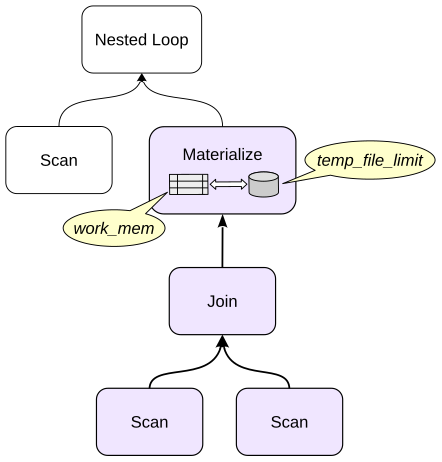
Recomputing it for every outer row would be wasteful, so PostgreSQL can materialize it once and rescan the saved rows.
For example, find pairs of airports where one airport uses Moscow time and the other lies beyond the Arctic Circle:
There is no useful index for the inner predicate in this example. Reusing the small inner result is cheaper than scanning and filtering it again for every outer row.
CTE Materialization
Common table expressions (CTEs), also known as WITH subqueries, are a great way to structure a query and make it more readable. Unlike regular subqueries, using CTEs does not lead to deep nesting.
Whenever possible, the planner folds a CTE into the parent query instead of materializing it. This lets the planner choose an optimal join order.
By default, a CTE is materialized in the following cases:
The main query refers to the CTE more than once, so its result does not have to be computed repeatedly. In this case materialization can be disabled with
AS NOT MATERIALIZEDThe CTE has side effects, including data modification or calls to volatile functions, so the side effect happens exactly once. In this case materialization cannot be disabled
Materialization can always be forced with AS MATERIALIZED.
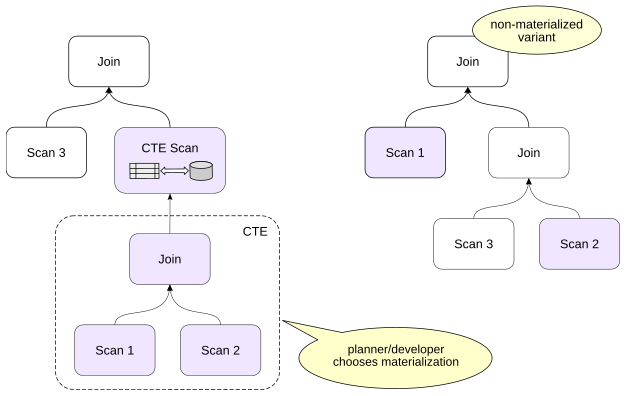
Consider a CTE used once:
There is no CTE Scan: the CTE was folded right into the main query.
Force materialization:
The CTE is now planned as a separate unit, and the parent query reads it through CTE Scan. Materialization is often a good choice when an expensive result is reused. But it can be disastrous if the parent query needs only a tiny fraction of a large CTE.
For example:
The entire bookings table is materialized even though the parent query asks for one key. Now allow the two references to be optimized independently:
The planner can now push the key restriction into both scans and use the primary-key index. Compare the Buffers values with the previous variant.
However, if a CTE modifies data, it is materialized in any case: the modification must happen exactly once.
Temporary Tables
If data has to be reused by several queries, it cannot be computed in a CTE for all of them, but it can be placed in a temporary table and used by those queries. Temporary tables have several useful properties:
They belong to a session
ON COMMITcan preserve rows, delete rows, or drop the table at transaction endTheir data is not WAL-logged in the ordinary way
- Their buffers are backend local rather than part of shared buffers
They are not free. PostgreSQL still creates catalog entries and relation files.
Workloads that create and drop temporary tables at very high rates can create catalog and filesystem pressure. Some application ecosystems have historically carried PostgreSQL patches or specialized designs to reduce that overhead; this is an application-specific engineering issue rather than a reason to avoid temporary tables in general.
temp_buffers limits the amount of local buffer memory a session can use for temporary relations. Its value can be changed only before the session first accesses a temporary table.
Create a temporary table containing airports in the Northern Hemisphere:
The table is created in the temporary pg_temp schema.
It often makes sense to analyze a newly filled temporary table before using it in queries. A backend process’s local memory is not accessible to autovacuum processes, so vacuuming and analysis of temporary tables must be performed manually.
Compare the cardinality estimates before and after running the analysis:
Materialized Views
A materialized view is a named query result stored as a database relation. It can be queried like an ordinary read-only table.
Indexes can be created on a materialized view, but integrity constraints cannot be added: constraints must be checked on the base tables. PostgreSQL also collects planner statistics for a materialized view.
Unlike an ordinary view, the rows of a materialized view do not change when the base tables change. Refresh is explicit.
A full refresh can be expensive. Core PostgreSQL does not currently maintain materialized views incrementally row by row as their base tables change. The pg_ivm extension by Yugo Nagata implements incremental view maintenance for supported cases.
Create a materialized view over airports:
Create an index:
Now change a base-table value. In August 2025, Manas International Airport changed its IATA code from FRU to BSZ; the demo database lets us use that as a convenient example.
The stored materialized-view rows do not change. Synchronization is explicit; refresh the materialized view:
2. Functions
Volatility Categories
Every function has a volatility category. The category is a promise to the optimizer about how the function behaves.
VOLATILE is the default. A volatile function can return different results on successive calls with the same arguments and can have side effects. PostgreSQL must not assume that two calls are interchangeable.
STABLE promises that, for the same arguments, the function returns the same result throughout one statement and does not modify the database. Such a function can be executed once during query execution and the computed value can then be reused.
IMMUTABLE is stronger: for the same arguments the result is promised to be the same forever. Constant calls can therefore be folded during planning.
These are only permissions, not exact execution schedules. STABLE does not mean that every stable function is universally executed exactly once; it means that the optimizer is allowed to treat repeated same-argument evaluations as equivalent where the plan permits it.
Incorrect labels can produce incorrect results. Marking a function IMMUTABLE when it depends on time, configuration, table contents, or other changing state can freeze a stale value into a reusable plan.
Create a wrapper around random():
With the correct VOLATILE label, the predicate is evaluated for each row:
A run might return any subset of the ten rows:
Now lie to PostgreSQL:
In this plan the stable expression becomes a One-Time Filter, so the result is either all ten rows or none:
Marking the wrapper IMMUTABLE gives the planner even more freedom:
Two separate planning attempts can freeze different random outcomes. The surprising plans are not a PostgreSQL bug: we gave the optimizer a false contract.
Function Inlining
PostgreSQL can inline the body of suitable SQL-language functions into the surrounding query, both for scalar and set-returning functions. In both cases there are many restrictions: the function must be written in SQL, use a single SELECT statement, and satisfy other conditions. A scalar function must not access database tables or call functions with a less strict volatility category; a set-returning function must be STABLE or IMMUTABLE.
Inlining matters because it removes the function boundary from the planner’s point of view. Predicates from the outer query can then sometimes be pushed into the function body, and joins can be reordered across the former boundary.
The body of a simple scalar SQL function can be substituted directly into the main SQL statement immediately before planning. In that case, there is no function-call overhead.
For scalar SQL functions, restrictions include volatility consistency. A function declared STABLE cannot safely inline a body that invokes a volatile operation such as random(). With rnd() marked STABLE:
The wrapper remains visible.
Restore the truthful volatility:
Now the filter references random(), which is called directly, bypassing the rnd() wrapper.
Calling Set-Returning Functions
When a set-returning function appears as a table expression in FROM, PostgreSQL represents it with Function Scan. In this case all rows returned by the function are materialized first and only then passed to the parent plan node. This is a current implementation limitation.
When a set-returning expression appears in the target list, PostgreSQL uses ProjectSet and can produce rows on demand. SQL functions, most built-in functions written in C, and PL/Python functions that return an iterator work this way. Functions in other programming languages can use the same interface if the language implementation supports it.
The difference can be enormous under LIMIT. Call generate_series in FROM:
Now put the set-returning function in the target list:
In the first plan, Function Scan obtains all rows from the function before Limit is applied. In the second plan, ProjectSet produces ten rows—exactly as many as Limit requests.
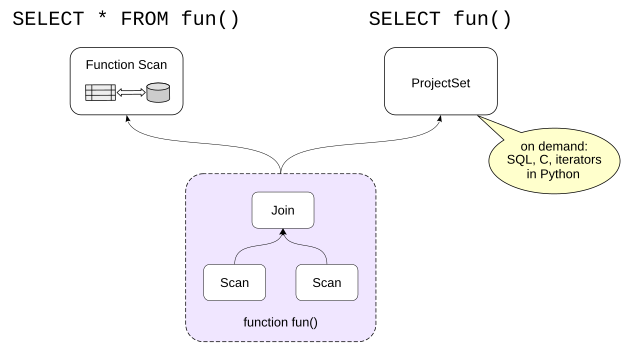
The query execution time decreases by orders of magnitude. The Result node represents the omitted FROM clause and passes exactly one row to its parent.
This does not mean that every function language can stream rows. PL/pgSQL set-returning functions, for example, currently materialize their complete result before returning it to the calling executor interface.
The plan still contains ProjectSet, but the function implementation has already done the expensive work before the first row can emerge. The execution time shows this clearly.
COST and ROWS
When a function cannot be inlined, the planner often has to treat it largely as a black box. CREATE FUNCTION lets us provide two important estimates.
COST is the estimated execution cost in units of cpu_operator_cost. For a set-returning function, it is the cost per returned row. The default is 1 for C-language and internal functions and 100 for functions in other languages.
ROWS is the estimated number of rows returned by a set-returning function. The default is 1000.
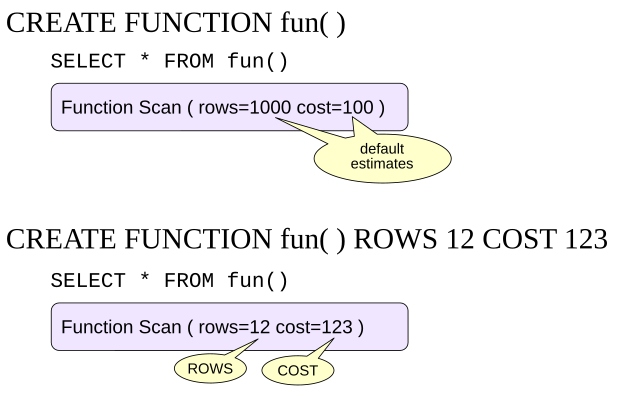
Create a PL/pgSQL function that returns the days of the week:
The query plan:
The server estimates the cardinality of this function’s result as 1000 rows, although the actual value is seven.
The startup component reflects the function-cost estimate:
Raise the function cost:
Set the expected number of rows returned by the function:
The resulting estimated cost is:
Check these values in pg_proc or via the meta-command:
Planner Support Functions
The COST and ROWS clauses let us specify function cost and row count as constants. Fixed values are not always good enough, however.
In PostgreSQL, a target function can have a planner support function that supplies the planner with information that depends on the argument values of the target function.
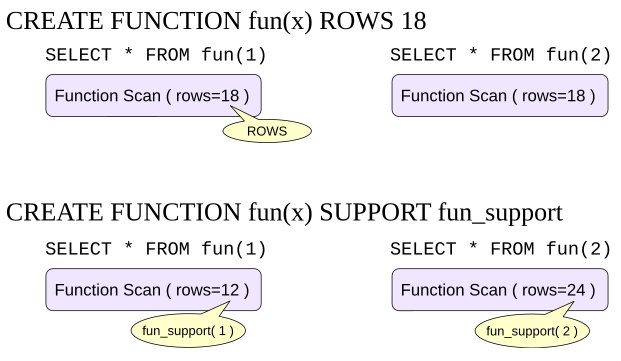
A support function can provide, among other things:
An estimate of the function’s cost
An estimate of the number of rows returned
An expression equivalent to the function call
For boolean functions, it can additionally provide:
A selectivity estimate
An equivalent predicate that uses an indexable operator
Planner support functions use PostgreSQL’s internal planner API and currently must be written in C.
Parallel-Safety Labels
Not every query can run in parallel. The planner cannot safely infer every possible effect of a user-defined function. Parallel execution therefore relies on an explicit function label.
A function can be:
PARALLEL UNSAFE: its presence prevents a parallel plan for the queryPARALLEL RESTRICTED: it can participate in a query that uses parallelism, but it may execute only in the parallel group leaderPARALLEL SAFE: it may execute in parallel workers
The default for user-defined functions is PARALLEL UNSAFE. Parallel-safety labels are also specified for user-defined aggregate functions.
All basic standard functions are parallel safe.
The exact counts depend on installed extensions and PostgreSQL minor version.
psql also shows the label:
Now create a function that sums segment prices for one ticket:
Use it in one subquery and compare that total with the total booking amount from another subquery:
With the function marked safe, both subqueries can use parallel plans.
Mark it unsafe:
A single unsafe function disables parallel query for the statement.
Now mark it restricted:
The subquery that calls the restricted function must run in the leader, while the independent bookings subquery can still use parallel workers.
The safe label is not merely a performance hint. Mislabeling a function can cause errors or wrong answers. When in doubt, use the stricter label.
Referenced resources
- github.com/sraoss/pg_ivm
- postgrespro.ru/docs/enterprise/16/sql-createfunction
- wiki.postgresql.org/wiki/Inlining_of_SQL_functions
- www.postgresql.org/docs/18/parallel-safety
- www.postgresql.org/docs/18/queries-with
- www.postgresql.org/docs/18/sql-creatematerializedview
- www.postgresql.org/docs/18/sql-createtable
- www.postgresql.org/docs/18/xfunc-optimization
- www.postgresql.org/docs/18/xfunc-volatility
9 Tuning Approaches
1. What Should We Tune?
Performance is a property of the whole information system, not just of one SQL statement.
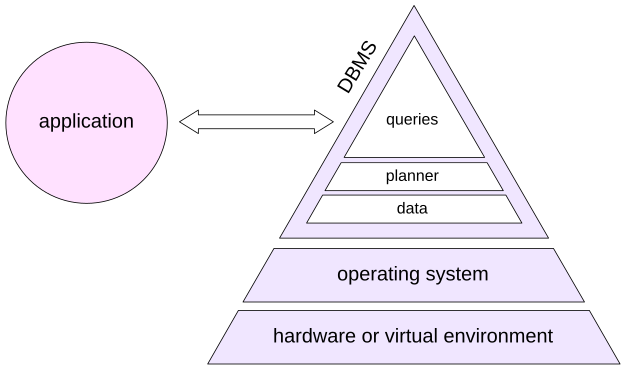
This book does not attempt to cover two important lower layers in detail: hardware and the operating system. PostgreSQL ultimately reaches storage through the operating system and filesystem, and the latency, bandwidth, durability characteristics, cache hierarchy, virtualization layer, and storage topology all affect database behavior. If the underlying resources are insufficient or badly configured, SQL tuning cannot compensate indefinitely.
At the PostgreSQL server level, the goal is to distribute resources sensibly, keep maintenance work healthy, and give the planner a realistic model of the machine and the data. At the application level, connection management, request shape, schema design, and the number of round trips can matter as much as one execution plan.
Finally, individual queries can be profiled and tuned. A developer often starts from a query currently being written; an administrator usually starts from the queries that consume the largest share of system resources.
Chapter VII, “Profiling” showed why those are not always the same queries.
2. Server Tuning
CPU and I/O Resources
Parallel query lets PostgreSQL use more than one CPU core for eligible parts of a plan. The principal worker limits are:
max_parallel_workers_per_gather= 2max_parallel_workers= 8max_worker_processes= 8
These are limits, not promises. A plan may request workers that are unavailable at execution time, and more workers are not automatically better. Each parallel worker is a real PostgreSQL process that consumes CPU, memory, and I/O bandwidth. The use of background processes for application development is covered in the Background Processes lesson of the DEV2 course.
Two I/O settings are fundamental: the number of operations that can run concurrently (effective_io_concurrency for ordinary work and maintenance_io_concurrency for maintenance work), and the number of consecutive pages that can be read by one operation (io_combine_limit).
Several asynchronous I/O implementations are available through io_method, together with a number of finer settings. When tuning them, take into account the capabilities of the server’s I/O subsystem and the workload profile.
Memory
work_mem determines the amount of memory available to individual operations. It was discussed in the corresponding chapters. It also affects plan choice: with small values, sorting may be preferred to hashing because the sorting algorithm is less sensitive to insufficient memory. For operations that use hashing, the memory limit can be increased with hash_mem_multiplier.
maintenance_work_mem affects the speed of index creation and the work of maintenance processes.
The shared_buffers parameter determines the size of the buffer cache.
In any OLTP database, no matter how large, there is usually a fairly compact set of actively used data. If shared_buffers is set too low, that data will not fit into the buffer cache, pages will be constantly evicted, and this puts a strain on I/O (though the OS page cache does smooth this out to some extent). But making the buffer cache too large isn’t a good idea either, since the overhead of maintaining it grows accordingly.
Therefore, the optimal buffer cache size depends on many factors: there is no universal formula for picking a shared_buffers value that suits any system. Tuning this parameter is covered in the DBA2 course, but one thing is certain: the default value is far too small.
effective_cache_size tells PostgreSQL the total amount of data that can be cached, both in the buffer cache and in the operating system cache. The larger this value is, the more attractive index access becomes to the planner. The parameter does not allocate memory.
Physical Placement
Physical organization can affect performance even when the SQL schema is unchanged.
Tablespaces can place selected relations or indexes on different storage. For example, frequently used data can be stored on SSDs and archival data on slower HDDs. Tablespace-specific planner parameters such as random_page_cost and effective_io_concurrency can describe different devices when that is genuinely useful.
Partitioning makes it possible to work with very large volumes of data. The main performance benefit comes from replacing a full scan of the entire table with a scan of a single partition. Partitions can also be placed in different tablespaces.
Sharding is another option: partitions can be spread across different servers, with the ability to run distributed queries. Standard PostgreSQL includes only the basic mechanisms for setting up sharding: partitioning and the postgres_fdw extension. Sharding is implemented more efficiently and fully with third-party solutions. This topic is surveyed in the final lesson of the DBA3 course.
Planner Statistics
The planner relies on statistics for its estimates, as discussed in Chapter VI, “Statistics.” That means statistics need to be gathered often enough—something you control by tuning autovacuum and auto-analyze. The details are covered in depth in the DBA2 course.
Statistics also need to be accurate enough. Absolute accuracy cannot be achieved (and is not necessary), but the errors shouldn’t be bad enough to produce incorrect plans. A sign of stale or inaccurate statistics is a serious mismatch between the expected and actual row counts in leaf plan nodes.
To improve accuracy, it may be necessary to change statistics target, either globally or for individual table columns. Sometimes an expression index can come in handy, since it has its own statistics. In certain cases, extended statistics can be used.
Planner Cost Model
Planner cost parameters describe the machine and workload relative to one another. They are not intended to predict elapsed milliseconds.
seq_page_cost is 1 and should normally be left unchanged. The relatively high default value of random_page_cost (4) reflects typical HDD characteristics. For SSDs, and when data is very likely to be cached, this value should be reduced substantially, for example to 1.1.
CPU cost parameters define the weights used to account for processing the data that has been read. They are usually left unchanged because the effect of changing them is difficult to predict. However, as we saw in Chapter VIII, “Materialization and Functions,” it is sometimes useful to specify the cost of a user-defined function in cpu_operator_cost units.
Change cost parameters when there is evidence of a systematic modeling error across representative queries, especially when cardinality estimates are already good. For example:
The row estimate is good. The planner has enough statistical information and chooses a sequential scan.
For diagnosis, temporarily discourage sequential scans. The enable_* parameters are deliberately coarse: they do not remove every plan containing a node type in every circumstance; they strongly discourage that choice.
Their best use is experimentation: “What alternative plan does PostgreSQL think is next best, and how does it actually behave?”
Now the same query uses bitmap access:
Chances are the result will favor an index scan, since all the data is cached and random access is fast. The same situation is possible when using fast SSDs.
It is incorrect to draw conclusions based on a single query, but if the error keeps showing up, that’s a reason to investigate global settings. In that case, you can try lowering random_page_cost so the planner stops overestimating the cost of index access, or raising effective_cache_size to make index scans more attractive.
3. Application Tuning
Clients and Connections
Opening database connections is not free, and a PostgreSQL backend is a process with meaningful memory and scheduling cost. Applications that create large numbers of short-lived connections often benefit from a connection pool. However, a connection pool imposes certain restrictions on the application. This topic is covered in the DEV2 course.
Cursors are useful when the application genuinely needs only an initial part of a result or consumes the result incrementally. cursor_tuple_fraction tells the planner approximately what fraction of cursor rows is expected to be fetched, which can change the trade-off between startup and total cost.
Another common performance problem is not one slow SQL statement but thousands of individually fast statements. ORMs can produce this pattern, for example through N + 1 query behavior. Back in Chapter VII, “Profiling,” we saw a similar example with a function being called in a loop.
In such cases, the database server has almost no means for optimization (except for prepared statements which can reduce overhead of repeating queries).
In this case, the effective approach is to get rid of procedural code in the application and move the work to the database server as a small number of larger SQL commands. This gives the planner an opportunity to use more efficient access and join methods and avoids numerous data transfers between the client and the server. Unfortunately, such a change can be expensive.
Data Model
At the logical level, the database should be normalized: informally, stored data should not be redundant. Otherwise this is a design error, because checking data consistency becomes difficult and various update anomalies become possible.
At the storage level, performance can sometimes justify deliberate redundancy, provided that the system has a clear mechanism for keeping redundant data consistent.
Indexes are the most familiar example: they duplicate information from the table in another physical structure, and PostgreSQL maintains them automatically.
Other forms include generated columns, values maintained by triggers, and materialized views. Data can also be duplicated at the application level by caching query results. This is a popular technique, but it is often used because the application works with the database poorly, for example through an ORM. The application then becomes responsible for timely cache updates, access control for cached data, and related consistency issues.
Choosing the right data type is also part of query optimization. For example, representing an interval as a PostgreSQL range type such as daterange or tstzrange exposes interval semantics directly and makes GiST or SP-GiST indexing available for operations such as overlap.
Arrays and JSON can sometimes avoid joins and reduce tuple-header overhead, but they also change constraints, statistics, update granularity, indexing, and query semantics. Use complex types because they match the data model, not merely to avoid a join.
Integrity constraints matter for correctness first. They can also give the planner useful guarantees:
Primary keys and unique constraints come with unique indexes and guarantee that all key column values are distinct (accurate statistics). Those guarantees also allow joins to be performed more efficiently.
A foreign key together with
NOT NULLconstraints can in some cases eliminate unnecessary joins, which is especially important for views, and can improve selectivity estimates when a join spans multiple columns.A
CHECKconstraint together with theconstraint_exclusionparameter makes it possible to avoid scanning tables (or partitions) if they are guaranteed not to contain the required data.
Here is an example of an accurate cardinality estimate for a join on a composite key:
However, if the foreign key is removed, the estimate becomes inadequate. This is another manifestation of the correlated-predicates problem:
4. Queries
Paths to Optimization
The immediate goal of query tuning is an adequate execution plan, but there are different ways to get there.
One approach is tactical: inspect a bad plan, identify a bad choice, and force or encourage an alternative. Unfortunately, the culprit is not always obvious and the tuning often comes down to a struggle with the planner. If you go this way, you would like to be able to disable the planner completely or partially and build the execution plan yourself. This feature is called hints and PostgreSQL doesn’t offer it explicitly.
Another approach is explanatory: find out why the planner believed that the bad plan was cheap. Correct cardinality estimates, statistics, expressions, and cost assumptions so that the planner can arrive at the better plan itself.
The second approach is more robust because it preserves planner freedom as data and conditions change, but it is not always easy. Sometimes a production incident needs a tactical workaround first.
Both approaches are useful. The distinction is whether you are fixing the planner’s information or constraining its choice.
Short Queries
Here, “short” and “long” are informal categories, not formal PostgreSQL concepts.
A short query is typical of latency-sensitive OLTP work: it reads a small amount of data and usually returns a few rows. It may access huge tables, but its predicates normally have high selectivity: only a small fraction of input rows qualifies.
Short queries usually serve a user interface, so it is important that they execute as quickly as possible. Response time has priority.
Typical efficient building blocks are: scans of tiny relations; index lookups into large relations; nested loops with cheap parameterized inner probes.
Joins are usually performed with nested loops, which require no preparatory work unlike a hash join and work well when only a small number of rows are joined. Consider a query that returns the list of segments booked during one particular hour. We disable parallel execution for this short-query example.
Consider a query that returns boarding passes for flights departing within a one-hour interval (parallel execution is disabled because it is not useful for this short query):
This is a short query: it needs much less than one percent of two large tables. Yet both tables are scanned in full, and the estimated cardinality differs sharply from the actual value.
Start with the innermost Seq Scan on bookings. The problem is date_trunc: there is no planner support function for it, so PostgreSQL uses a fixed selectivity estimate of 0.5%.
The estimate is now close to reality, but PostgreSQL still has no access path to avoid scanning the table. Create one:
That’s exactly what we wanted: the planner goes with an index scan, and the data is joined using a nested loop.
One possible improvement is to avoid touching the bookings table at all by scanning only the index. Including the join key in the index makes it covering for the first lookup:
This saves about another 15% of reads. PostgreSQL can now use an index-only scan on bookings. Whether that extra index payload is worth its maintenance and storage cost depends on how often this access pattern occurs. A micro-optimization that saves a few buffer accesses on a rare query may be a bad trade.
Long Queries
A long query means a throughput-oriented query that must process a large volume of data to produce its answer. A long query can return one row after aggregation while still reading millions of rows.
Such queries often have low-selectivity predicates: a large fraction of the input passes. Full scans and hash joins therefore become more attractive, and total throughput matters more than returning the first row immediately.
Again, these are tendencies, not rules. A long plan can contain a highly selective index lookup for one dimension, or a nested loop over a genuinely tiny input. The most important warning is repeated work. Correlated subqueries, hidden function calls, or a poor nested-loop plan can make the same large data set get read many times.
Long queries process a lot of data and usually aggregate it—users rarely need millions of rows—so they can benefit from parallel execution.
Consider this query: count passengers on flights whose departure and arrival were both delayed by between one minute and four hours.
The query returns the correct result, but its execution time is unsatisfactory.
First determine the shape of the problem. Total rows in the flights table:
The predicates keep a substantial number of rows:
About 70% of flights qualifies. The other joined tables are large and have no selective restrictions.
Obviously, this is a long query. But the plan looks like a selective OLTP lookup:
The core error is visible immediately: the planner estimates one qualifying flight instead of more than 26,000. Given that estimate, nested loops and indexed probes look perfectly reasonable.
As a diagnostic experiment, discourage nested loops:
Now run the EXPLAIN again:
The table accesses automatically switched to sequential scan, and things got faster. If you check the plan with the buffers option, you’ll see the query had to read about 110,000 pages. We didn’t look at the execution plan of the first version with buffers, but it reads almost 200 times more data—go check it yourself!
The huge improvement confirms the diagnosis, but why was selectivity estimated so badly? Both predicates apply arithmetic expressions to timestamp columns, and the planner has no distribution statistics for them. Collect the expression statistics as described in Chapter VI, “Statistics”:
The planner now estimates many more qualifying flights and chooses the hash-join shape without being forced. But statistics are not the end of query optimization. Ask another question: are we reading more data than we need? For this schema, boarding_passes already contains flight_id, and the foreign-key relationships guarantee the data integrity needed for the result. The segments join does not filter any additional rows in this query, so flights can be joined directly to boarding_passes:
The two heap relations contain this many pages:
With the buffers option, we can see that this version reads roughly the amount of data expected from the relations involved. The first version was not shown with buffers, but you can check that it reads almost 200 times more data.
In general, rewriting a query is the most varied way to influence performance. The planner can perform some equivalent transformations itself, but we can, for example:
Rewrite conditions so that they can, or conversely cannot, use an index
Replace correlated subqueries, which are essentially nested loops, with joins
Eliminate redundant scans, as in this example or by using window functions
Use transformations unavailable to the planner, such as replacing
ORconditions withUNION
After the examples, clean up:
Planner Advice and Hints
PostgreSQL 18 has no core SQL hint syntax that lets a query text directly prescribe a particular join order, scan method, or join method. The familiar enable_* settings are useful as coarse diagnostic controls, and explicit JOIN structure plus join_collapse_limit can constrain join-order search in some cases, but these are not a general hint language.
PostgreSQL 19 includes the pg_plan_advice module, which can describe and constrain selected planner decisions, and pg_stash_advice, which can associate such advice with query identifiers without modifying application SQL text.
Third-party extensions have long provided hint mechanisms; pg_hint_plan, originally developed by Kyotaro Horiguchi, is a well-known example.
Hints and plan advice are valuable tools when the planner repeatedly makes a known bad choice and the risks are understood. They are less attractive when used to hide an unexplained cardinality or cost-model problem. A hint freezes a decision; good statistics and a good model preserve the ability to adapt.
Referenced resources
Conclusion
Query optimization is a continuous process that requires ongoing monitoring and tuning. A query that performs optimally today cannot be expected to remain optimal forever: the amount of data in the tables may change, the DBMS or operating system may be upgraded, and the hardware may change. Maintaining high performance requires continuing attention.
This book was conceived as an introduction to query optimization. It introduces the fundamentals of the PostgreSQL planner: access methods, join methods, the use of statistics, and the main approaches to query optimization.
The topics covered here provide a foundation for understanding how the planner works. But do not stop with this book. Follow the changes in every PostgreSQL release and keep extending your knowledge.
Among additional sources, we recommend starting with the official PostgreSQL documentation. The documentation gives concise, precise information from the people who develop PostgreSQL, and it is carefully kept up to date.
Reading the documentation straight through from the first page to the last is difficult and often unnecessary. Logically related information is frequently spread across different chapters. This is one reason we create training courses: each course presents a particular subject less exhaustively than the complete documentation, but in a coherent and understandable sequence.
If you want to continue studying PostgreSQL, take a look at our other courses:
DBA1. PostgreSQL Administration. Basic Course, covering the server architecture, installation, basic configuration, and administration;
DBA2. PostgreSQL Administration. Configuration and Monitoring, including server upgrades, localization, and extension management;
DBA3. PostgreSQL Administration. Backup and Replication, including an introduction to cluster architectures;
DBS. PostgreSQL Administration. Access Control, including authentication and integration with external authentication systems;
DEV1. PostgreSQL Backend Development. Basic Course, covering server-side programming in SQL and PL/pgSQL;
DEV2. PostgreSQL Backend Development. Advanced Course, covering more advanced ways to implement application logic on the server;
PGPRO.Postgres Pro Enterprise Features, covering the capabilities that distinguish our company’s product from the community PostgreSQL DBMS.
Referenced resources
About Postgres Professional
Postgres Professional was founded in 2015 and brought together leading Russian PostgreSQL developers whose contributions to PostgreSQL are recognized by the international community. The company trains highly qualified database-system developers in Russia. Today it employs about 400 programmers, architects, engineers, and other specialists.
Postgres Professional develops several editions of Postgres Pro, a DBMS based on PostgreSQL, contributes at the database-core and extension levels, and provides services for application-system design and support as well as migration to PostgreSQL.
The company invests heavily in education, organizes Pg-Conf.Russia, the largest annual international PostgreSQL conference in Moscow, and participates in PostgreSQL conferences around the world.
Contact information:
23 Obrucheva St., Bldg. 1, Premises 33N, Moscow, 117630, Russia
+7 495 150-06-91
Postgres Pro DBMS
Postgres Pro by Postgres Professional is a commercial Russian DBMS based on the open-source PostgreSQL DBMS and developed with enterprise requirements in mind. It is included in the Russian software registry.
Postgres Pro Standard includes all PostgreSQL functionality and adds extensions and patches, including some that have not yet been accepted by the PostgreSQL community. Customers gain access to useful functionality and performance improvements without waiting for the next PostgreSQL release.
Postgres Pro Enterprise is a substantially enhanced edition designed for demanding production workloads that require greater reliability and performance.
Both Postgres Pro editions are available with the information-security facilities required for FSTEC certification in Russia.
Use of either Postgres Pro edition requires a license. An evaluation version can be obtained free of charge for testing, studying the DBMS capabilities, and application development.
Educational institutions can obtain a free academic license for Postgres Pro Standard.
Postgres Pro Enterprise Manager
Postgres Pro Enterprise Manager (PPEM) is an integrated management console for Postgres Pro Enterprise.
PPEM provides a single console with a straightforward monitoring and management interface, supports common administrative operations from a web browser, and provides centralized access to database instances and databases. PPEM improves the productivity of database operations teams and simplifies routine administrative work.
Postgres Pro Backup Enterprise
Postgres Pro Backup Enterprise (pg_probackup) is a utility for managing backup and recovery of PostgreSQL database clusters.
The utility works with a centralized backup catalog, which can be stored locally or remotely, including in S3 storage.
It supports page-level incremental backups, backup-retention policies, data-integrity checks, point-in-time recovery, parallel backup and restore, compression, and the CFS file system.
Shardman
Shardman is a distributed relational DBMS based on PostgreSQL and enhanced with Postgres Pro capabilities.
Shardman is compatible with PostgreSQL, provides strict isolation and data-consistency guarantees, supports horizontal scaling, and includes built-in high availability.
Services
High-availability solutions for Postgres
Design and participation in the development of high-load, high-performance, fault-tolerant production systems; consulting services; Postgres deployment and configuration tuning.
Vendor technical support
24×7 technical support for Postgres Pro and PostgreSQL. Monitoring, service recovery, incident analysis, performance improvement, and fixes for database and extension defects.
Migration of application systems to Postgres
Assessment of migration complexity from other DBMSs to Postgres. Design of the target architecture and required application changes. Migration of application systems to Postgres and support during the migration process.
Postgres training
Training for database administrators, developers, and application architects on Postgres features and effective use of its capabilities.
Database audit
Expert assessment of database systems. Information-security audits for systems based on Postgres.
Referenced resources
About Dharma of Data
Data done right!

Dharma of Data (DoD) is a PostgreSQL-focused company based in Nepal.
For us, Dharma means doing the right thing—for customers, engineers, and open source. In practice, that means open standards, upstream-first contributions, transparent architectures, and long-term sustainability.
We build open, reliable data foundations with vanilla community PostgreSQL, without proprietary forks or vendor lock-in. We also work to grow PostgreSQL expertise in Nepal through training, university partnerships, and the local PostgreSQL community.
This English edition was prepared and printed with support from Dharma of Data.
Publication and Credits
Pavel Tolmachev
PostgreSQL 18: Query Optimization
Course authors: Pavel Luzanov, Egor Rogov, Pavel Tolmachev, Ilya Bashtanov
Cover designer: Maria Lukashenko
postgrespro.com/community/books/qptbook
© Postgres Professional, 2026
Moscow, 2026