9 Tuning Approaches
1. What Should We Tune?
Performance is a property of the whole information system, not just of one SQL statement.
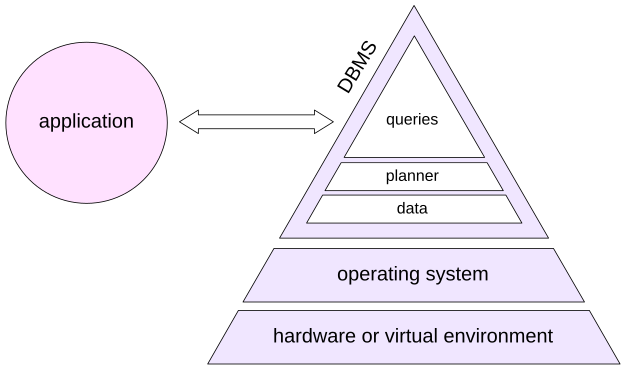
This book does not attempt to cover two important lower layers in detail: hardware and the operating system. PostgreSQL ultimately reaches storage through the operating system and filesystem, and the latency, bandwidth, durability characteristics, cache hierarchy, virtualization layer, and storage topology all affect database behavior. If the underlying resources are insufficient or badly configured, SQL tuning cannot compensate indefinitely.
At the PostgreSQL server level, the goal is to distribute resources sensibly, keep maintenance work healthy, and give the planner a realistic model of the machine and the data. At the application level, connection management, request shape, schema design, and the number of round trips can matter as much as one execution plan.
Finally, individual queries can be profiled and tuned. A developer often starts from a query currently being written; an administrator usually starts from the queries that consume the largest share of system resources.
Chapter VII, “Profiling” showed why those are not always the same queries.
2. Server Tuning
CPU and I/O Resources
Parallel query lets PostgreSQL use more than one CPU core for eligible parts of a plan. The principal worker limits are:
max_parallel_workers_per_gather= 2max_parallel_workers= 8max_worker_processes= 8
These are limits, not promises. A plan may request workers that are unavailable at execution time, and more workers are not automatically better. Each parallel worker is a real PostgreSQL process that consumes CPU, memory, and I/O bandwidth. The use of background processes for application development is covered in the Background Processes lesson of the DEV2 course.
Two I/O settings are fundamental: the number of operations that can run concurrently (effective_io_concurrency for ordinary work and maintenance_io_concurrency for maintenance work), and the number of consecutive pages that can be read by one operation (io_combine_limit).
Several asynchronous I/O implementations are available through io_method, together with a number of finer settings. When tuning them, take into account the capabilities of the server’s I/O subsystem and the workload profile.
Memory
work_mem determines the amount of memory available to individual operations. It was discussed in the corresponding chapters. It also affects plan choice: with small values, sorting may be preferred to hashing because the sorting algorithm is less sensitive to insufficient memory. For operations that use hashing, the memory limit can be increased with hash_mem_multiplier.
maintenance_work_mem affects the speed of index creation and the work of maintenance processes.
The shared_buffers parameter determines the size of the buffer cache.
In any OLTP database, no matter how large, there is usually a fairly compact set of actively used data. If shared_buffers is set too low, that data will not fit into the buffer cache, pages will be constantly evicted, and this puts a strain on I/O (though the OS page cache does smooth this out to some extent). But making the buffer cache too large isn’t a good idea either, since the overhead of maintaining it grows accordingly.
Therefore, the optimal buffer cache size depends on many factors: there is no universal formula for picking a shared_buffers value that suits any system. Tuning this parameter is covered in the DBA2 course, but one thing is certain: the default value is far too small.
effective_cache_size tells PostgreSQL the total amount of data that can be cached, both in the buffer cache and in the operating system cache. The larger this value is, the more attractive index access becomes to the planner. The parameter does not allocate memory.
Physical Placement
Physical organization can affect performance even when the SQL schema is unchanged.
Tablespaces can place selected relations or indexes on different storage. For example, frequently used data can be stored on SSDs and archival data on slower HDDs. Tablespace-specific planner parameters such as random_page_cost and effective_io_concurrency can describe different devices when that is genuinely useful.
Partitioning makes it possible to work with very large volumes of data. The main performance benefit comes from replacing a full scan of the entire table with a scan of a single partition. Partitions can also be placed in different tablespaces.
Sharding is another option: partitions can be spread across different servers, with the ability to run distributed queries. Standard PostgreSQL includes only the basic mechanisms for setting up sharding: partitioning and the postgres_fdw extension. Sharding is implemented more efficiently and fully with third-party solutions. This topic is surveyed in the final lesson of the DBA3 course.
Planner Statistics
The planner relies on statistics for its estimates, as discussed in Chapter VI, “Statistics.” That means statistics need to be gathered often enough—something you control by tuning autovacuum and auto-analyze. The details are covered in depth in the DBA2 course.
Statistics also need to be accurate enough. Absolute accuracy cannot be achieved (and is not necessary), but the errors shouldn’t be bad enough to produce incorrect plans. A sign of stale or inaccurate statistics is a serious mismatch between the expected and actual row counts in leaf plan nodes.
To improve accuracy, it may be necessary to change statistics target, either globally or for individual table columns. Sometimes an expression index can come in handy, since it has its own statistics. In certain cases, extended statistics can be used.
Planner Cost Model
Planner cost parameters describe the machine and workload relative to one another. They are not intended to predict elapsed milliseconds.
seq_page_cost is 1 and should normally be left unchanged. The relatively high default value of random_page_cost (4) reflects typical HDD characteristics. For SSDs, and when data is very likely to be cached, this value should be reduced substantially, for example to 1.1.
CPU cost parameters define the weights used to account for processing the data that has been read. They are usually left unchanged because the effect of changing them is difficult to predict. However, as we saw in Chapter VIII, “Materialization and Functions,” it is sometimes useful to specify the cost of a user-defined function in cpu_operator_cost units.
Change cost parameters when there is evidence of a systematic modeling error across representative queries, especially when cardinality estimates are already good. For example:
The row estimate is good. The planner has enough statistical information and chooses a sequential scan.
For diagnosis, temporarily discourage sequential scans. The enable_* parameters are deliberately coarse: they do not remove every plan containing a node type in every circumstance; they strongly discourage that choice.
Their best use is experimentation: “What alternative plan does PostgreSQL think is next best, and how does it actually behave?”
Now the same query uses bitmap access:
Chances are the result will favor an index scan, since all the data is cached and random access is fast. The same situation is possible when using fast SSDs.
It is incorrect to draw conclusions based on a single query, but if the error keeps showing up, that’s a reason to investigate global settings. In that case, you can try lowering random_page_cost so the planner stops overestimating the cost of index access, or raising effective_cache_size to make index scans more attractive.
3. Application Tuning
Clients and Connections
Opening database connections is not free, and a PostgreSQL backend is a process with meaningful memory and scheduling cost. Applications that create large numbers of short-lived connections often benefit from a connection pool. However, a connection pool imposes certain restrictions on the application. This topic is covered in the DEV2 course.
Cursors are useful when the application genuinely needs only an initial part of a result or consumes the result incrementally. cursor_tuple_fraction tells the planner approximately what fraction of cursor rows is expected to be fetched, which can change the trade-off between startup and total cost.
Another common performance problem is not one slow SQL statement but thousands of individually fast statements. ORMs can produce this pattern, for example through N + 1 query behavior. Back in Chapter VII, “Profiling,” we saw a similar example with a function being called in a loop.
In such cases, the database server has almost no means for optimization (except for prepared statements which can reduce overhead of repeating queries).
In this case, the effective approach is to get rid of procedural code in the application and move the work to the database server as a small number of larger SQL commands. This gives the planner an opportunity to use more efficient access and join methods and avoids numerous data transfers between the client and the server. Unfortunately, such a change can be expensive.
Data Model
At the logical level, the database should be normalized: informally, stored data should not be redundant. Otherwise this is a design error, because checking data consistency becomes difficult and various update anomalies become possible.
At the storage level, performance can sometimes justify deliberate redundancy, provided that the system has a clear mechanism for keeping redundant data consistent.
Indexes are the most familiar example: they duplicate information from the table in another physical structure, and PostgreSQL maintains them automatically.
Other forms include generated columns, values maintained by triggers, and materialized views. Data can also be duplicated at the application level by caching query results. This is a popular technique, but it is often used because the application works with the database poorly, for example through an ORM. The application then becomes responsible for timely cache updates, access control for cached data, and related consistency issues.
Choosing the right data type is also part of query optimization. For example, representing an interval as a PostgreSQL range type such as daterange or tstzrange exposes interval semantics directly and makes GiST or SP-GiST indexing available for operations such as overlap.
Arrays and JSON can sometimes avoid joins and reduce tuple-header overhead, but they also change constraints, statistics, update granularity, indexing, and query semantics. Use complex types because they match the data model, not merely to avoid a join.
Integrity constraints matter for correctness first. They can also give the planner useful guarantees:
Primary keys and unique constraints come with unique indexes and guarantee that all key column values are distinct (accurate statistics). Those guarantees also allow joins to be performed more efficiently.
A foreign key together with
NOT NULLconstraints can in some cases eliminate unnecessary joins, which is especially important for views, and can improve selectivity estimates when a join spans multiple columns.A
CHECKconstraint together with theconstraint_exclusionparameter makes it possible to avoid scanning tables (or partitions) if they are guaranteed not to contain the required data.
Here is an example of an accurate cardinality estimate for a join on a composite key:
However, if the foreign key is removed, the estimate becomes inadequate. This is another manifestation of the correlated-predicates problem:
4. Queries
Paths to Optimization
The immediate goal of query tuning is an adequate execution plan, but there are different ways to get there.
One approach is tactical: inspect a bad plan, identify a bad choice, and force or encourage an alternative. Unfortunately, the culprit is not always obvious and the tuning often comes down to a struggle with the planner. If you go this way, you would like to be able to disable the planner completely or partially and build the execution plan yourself. This feature is called hints and PostgreSQL doesn’t offer it explicitly.
Another approach is explanatory: find out why the planner believed that the bad plan was cheap. Correct cardinality estimates, statistics, expressions, and cost assumptions so that the planner can arrive at the better plan itself.
The second approach is more robust because it preserves planner freedom as data and conditions change, but it is not always easy. Sometimes a production incident needs a tactical workaround first.
Both approaches are useful. The distinction is whether you are fixing the planner’s information or constraining its choice.
Short Queries
Here, “short” and “long” are informal categories, not formal PostgreSQL concepts.
A short query is typical of latency-sensitive OLTP work: it reads a small amount of data and usually returns a few rows. It may access huge tables, but its predicates normally have high selectivity: only a small fraction of input rows qualifies.
Short queries usually serve a user interface, so it is important that they execute as quickly as possible. Response time has priority.
Typical efficient building blocks are: scans of tiny relations; index lookups into large relations; nested loops with cheap parameterized inner probes.
Joins are usually performed with nested loops, which require no preparatory work unlike a hash join and work well when only a small number of rows are joined. Consider a query that returns the list of segments booked during one particular hour. We disable parallel execution for this short-query example.
Consider a query that returns boarding passes for flights departing within a one-hour interval (parallel execution is disabled because it is not useful for this short query):
This is a short query: it needs much less than one percent of two large tables. Yet both tables are scanned in full, and the estimated cardinality differs sharply from the actual value.
Start with the innermost Seq Scan on bookings. The problem is date_trunc: there is no planner support function for it, so PostgreSQL uses a fixed selectivity estimate of 0.5%.
The estimate is now close to reality, but PostgreSQL still has no access path to avoid scanning the table. Create one:
That’s exactly what we wanted: the planner goes with an index scan, and the data is joined using a nested loop.
One possible improvement is to avoid touching the bookings table at all by scanning only the index. Including the join key in the index makes it covering for the first lookup:
This saves about another 15% of reads. PostgreSQL can now use an index-only scan on bookings. Whether that extra index payload is worth its maintenance and storage cost depends on how often this access pattern occurs. A micro-optimization that saves a few buffer accesses on a rare query may be a bad trade.
Long Queries
A long query means a throughput-oriented query that must process a large volume of data to produce its answer. A long query can return one row after aggregation while still reading millions of rows.
Such queries often have low-selectivity predicates: a large fraction of the input passes. Full scans and hash joins therefore become more attractive, and total throughput matters more than returning the first row immediately.
Again, these are tendencies, not rules. A long plan can contain a highly selective index lookup for one dimension, or a nested loop over a genuinely tiny input. The most important warning is repeated work. Correlated subqueries, hidden function calls, or a poor nested-loop plan can make the same large data set get read many times.
Long queries process a lot of data and usually aggregate it—users rarely need millions of rows—so they can benefit from parallel execution.
Consider this query: count passengers on flights whose departure and arrival were both delayed by between one minute and four hours.
The query returns the correct result, but its execution time is unsatisfactory.
First determine the shape of the problem. Total rows in the flights table:
The predicates keep a substantial number of rows:
About 70% of flights qualifies. The other joined tables are large and have no selective restrictions.
Obviously, this is a long query. But the plan looks like a selective OLTP lookup:
The core error is visible immediately: the planner estimates one qualifying flight instead of more than 26,000. Given that estimate, nested loops and indexed probes look perfectly reasonable.
As a diagnostic experiment, discourage nested loops:
Now run the EXPLAIN again:
The table accesses automatically switched to sequential scan, and things got faster. If you check the plan with the buffers option, you’ll see the query had to read about 110,000 pages. We didn’t look at the execution plan of the first version with buffers, but it reads almost 200 times more data—go check it yourself!
The huge improvement confirms the diagnosis, but why was selectivity estimated so badly? Both predicates apply arithmetic expressions to timestamp columns, and the planner has no distribution statistics for them. Collect the expression statistics as described in Chapter VI, “Statistics”:
The planner now estimates many more qualifying flights and chooses the hash-join shape without being forced. But statistics are not the end of query optimization. Ask another question: are we reading more data than we need? For this schema, boarding_passes already contains flight_id, and the foreign-key relationships guarantee the data integrity needed for the result. The segments join does not filter any additional rows in this query, so flights can be joined directly to boarding_passes:
The two heap relations contain this many pages:
With the buffers option, we can see that this version reads roughly the amount of data expected from the relations involved. The first version was not shown with buffers, but you can check that it reads almost 200 times more data.
In general, rewriting a query is the most varied way to influence performance. The planner can perform some equivalent transformations itself, but we can, for example:
Rewrite conditions so that they can, or conversely cannot, use an index
Replace correlated subqueries, which are essentially nested loops, with joins
Eliminate redundant scans, as in this example or by using window functions
Use transformations unavailable to the planner, such as replacing
ORconditions withUNION
After the examples, clean up:
Planner Advice and Hints
PostgreSQL 18 has no core SQL hint syntax that lets a query text directly prescribe a particular join order, scan method, or join method. The familiar enable_* settings are useful as coarse diagnostic controls, and explicit JOIN structure plus join_collapse_limit can constrain join-order search in some cases, but these are not a general hint language.
PostgreSQL 19 includes the pg_plan_advice module, which can describe and constrain selected planner decisions, and pg_stash_advice, which can associate such advice with query identifiers without modifying application SQL text.
Third-party extensions have long provided hint mechanisms; pg_hint_plan, originally developed by Kyotaro Horiguchi, is a well-known example.
Hints and plan advice are valuable tools when the planner repeatedly makes a known bad choice and the risks are understood. They are less attractive when used to hide an unexplained cardinality or cost-model problem. A hint freezes a decision; good statistics and a good model preserve the ability to adapt.
Referenced resources
- postgrespro.ru/docs/postgresql/16/postgres-fdw
- github.com/ossc-db/pg_hint_plan
- postgrespro.ru/docs/postgresql/18/runtime-config-query
- www.postgresql.org/docs/18/ddl-partitioning
- www.postgresql.org/docs/18/runtime-config-query
- www.postgresql.org/docs/19/pgplanadvice.html