# Materialization and Functions
> Examine materialization, CTEs, function volatility, set-returning functions, COST and ROWS estimates, planner support, and function inlining.
---
LLMS index: [llms.txt](/en/llms.txt)
---
## 1. Materialization {#qpt-section-8-1}
**Materialization** means saving an intermediate row set so that it can be used again, often more than once. The saved result can live at different scopes: inside one query, for a session, or as a database object.
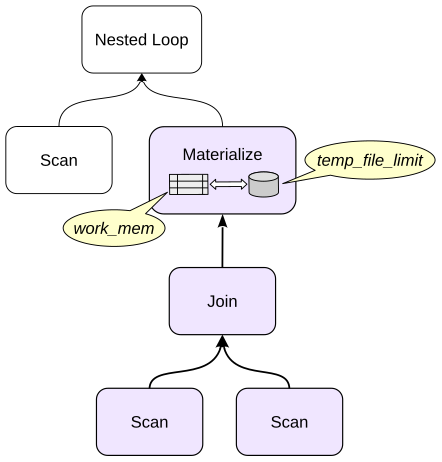
Most executor nodes work as a pipeline. A parent asks a child for the next row, and the request propagates down the plan tree. Some nodes, however, need to consume a complete input, save it, and read the saved result repeatedly. PostgreSQL uses the `Materialize` node for this purpose.
A materialized row set is kept in backend local memory while it fits within the memory budget available to the operation. If it grows beyond that budget, PostgreSQL uses temporary storage. `temp_file_limit` limits temporary-file space used by an individual PostgreSQL process, including any parallel worker processes active within a single client session.
In the figure below, the upper `Nested Loop` has no efficient parameterized access to its inner input. That inner input is itself produced by another operation.
{#qpt-fig-8-1 num="8.1" caption="Materializing an Intermediate Result" .book-original-figure .d-flex .flex-column .align-items-center width=295 height=308}
Recomputing it for every outer row would be wasteful, so PostgreSQL can materialize it once and rescan the saved rows.
For example, find pairs of airports where one airport uses Moscow time and the other lies beyond the Arctic Circle:
```sql
EXPLAIN (costs off)
SELECT a1.city, a2.city
FROM airports a1, airports a2
WHERE a1.timezone = 'Europe/Moscow'
AND abs(a2.coordinates[1]) > 66.652;
QUERY PLAN
------------------------------------------------------------
Nested Loop
-> Seq Scan on airports_data ml_1
Filter: (abs(coordinates[1]) > '66.652'::double p...
-> Materialize
-> Seq Scan on airports_data ml
Filter: (timezone = 'Europe/Moscow'::text)
(6 rows)
```
There is no useful index for the inner predicate in this example. Reusing the small inner result is cheaper than scanning and filtering it again for every outer row.
### CTE Materialization {#qpt-p144-cte-materialization}
Common table expressions (CTEs), also known as `WITH` subqueries, are a great way to structure a query and make it more readable. Unlike regular subqueries, using CTEs does not lead to deep nesting.
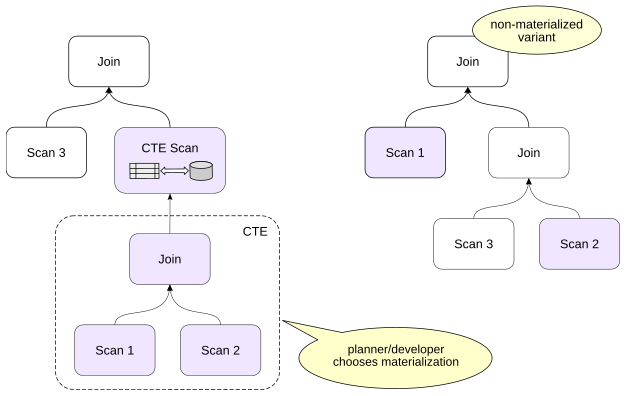
Whenever possible, the planner folds a CTE into the parent query instead of materializing it. This lets the planner choose an optimal join order.
By default, a CTE is materialized in the following cases:
- The main query refers to the CTE more than once, so its result does not have to be computed repeatedly. In this case materialization can be disabled with `AS NOT MATERIALIZED`
- The CTE has side effects, including data modification or calls to volatile functions, so the side effect happens exactly once. In this case materialization cannot be disabled
Materialization can always be forced with `AS MATERIALIZED`.
{#qpt-fig-8-2 num="8.2" caption="Materialized and Inlined CTE Plans" .book-original-figure .d-flex .flex-column .align-items-center width=418 height=264}
Consider a CTE used once:
```sql
EXPLAIN (costs off)
WITH q AS (
SELECT r.route_no, a.airplane_code
FROM routes r
JOIN airplanes a ON a.airplane_code = r.airplane_code
)
SELECT *
FROM q
JOIN seats s ON s.airplane_code = q.airplane_code
WHERE s.seat_no = '1A';
QUERY PLAN
-------------------------------------------------------
Hash Join
Hash Cond: (ml.airplane_code = s.airplane_code)
-> Hash Join
Hash Cond: (r.airplane_code = ml.airplane_code)
-> Seq Scan on routes r
-> Hash
-> Seq Scan on airplanes_data ml
-> Hash
-> Seq Scan on seats s
Filter: (seat_no = '1A'::text)
(10 rows)
```
There is no `CTE Scan`: the CTE was folded right into the main query.
Force materialization:
```sql
EXPLAIN (costs off)
WITH q AS MATERIALIZED (
SELECT r.route_no, a.airplane_code
FROM routes r
JOIN airplanes a ON a.airplane_code = r.airplane_code
)
SELECT *
FROM q
JOIN seats s ON s.airplane_code = q.airplane_code
WHERE s.seat_no = '1A';
QUERY PLAN
---------------------------------------------------------
Hash Join
Hash Cond: (q.airplane_code = s.airplane_code)
CTE q
-> Hash Join
Hash Cond: (r.airplane_code = ml.airplane_code)
-> Seq Scan on routes r
-> Hash
-> Seq Scan on airplanes_data ml
-> CTE Scan on q
-> Hash
-> Seq Scan on seats s
Filter: (seat_no = '1A'::text)
(12 rows)
```
The CTE is now planned as a separate unit, and the parent query reads it through `CTE Scan`. Materialization is often a good choice when an expensive result is reused. But it can be disastrous if the parent query needs only a tiny fraction of a large CTE.
For example:
```sql
EXPLAIN (analyze, costs off, buffers)
WITH b AS (
SELECT * FROM bookings
)
SELECT *
FROM b AS b1
JOIN b AS b2 ON b1.book_ref = b2.book_ref
WHERE b2.book_ref = '000112';
QUERY PLAN
------------------------------------------------------------
Nested Loop (actual time=228.999..229.000 rows=0.00 loo...
Buffers: shared read=15856, temp written=9746
CTE b
-> Seq Scan on bookings (actual time=0.064..71.089 ...
Buffers: shared read=15856
-> CTE Scan on b b1 (actual time=228.999..228.999 row...
Filter: (book_ref = '000112'::bpchar)
Rows Removed by Filter: 2486710
Storage: Disk Maximum Storage: 77968kB
Buffers: shared read=15856, temp written=9746
-> CTE Scan on b b2 (never executed)
Filter: (book_ref = '000112'::bpchar)
Storage: Disk Maximum Storage: 77968kB
Planning:
Buffers: shared hit=23 read=1
Planning Time: 0.106 ms
Execution Time: 232.733 ms
(17 rows)
```
The entire `bookings` table is materialized even though the parent query asks for one key. Now allow the two references to be optimized independently:
```sql
EXPLAIN (analyze, costs off, buffers)
WITH b AS NOT MATERIALIZED (
SELECT * FROM bookings
)
SELECT *
FROM b AS b1
JOIN b AS b2 ON b1.book_ref = b2.book_ref
WHERE b2.book_ref = '000112';
```
```text
QUERY PLAN
------------------------------------------------------------
Nested Loop (actual time=0.020..0.020 rows=0.00 loops=1)
Buffers: shared read=3
-> Index Scan using bookings_pkey on bookings (actual...
Index Cond: (book_ref = '000112'::bpchar)
Index Searches: 1
Buffers: shared read=3
-> Index Scan using bookings_pkey on bookings booking...
Index Cond: (book_ref = '000112'::bpchar)
Index Searches: 0
Planning:
Buffers: shared hit=5
Planning Time: 0.075 ms
Execution Time: 0.028 ms
(13 rows)
```
The planner can now push the key restriction into both scans and use the primary-key index. Compare the `Buffers` values with the previous variant.
However, if a CTE modifies data, it is materialized in any case: the modification must happen exactly once.
### Temporary Tables {#qpt-p148-temporary-tables}
If data has to be reused by several queries, it cannot be computed in a CTE for all of them, but it can be placed in a temporary table and used by those queries. Temporary tables have several useful properties:
- They belong to a session
- `ON COMMIT` can preserve rows, delete rows, or drop the table at transaction end
- Their data is not WAL-logged in the ordinary way
- Their buffers are backend local rather than part of shared buffers
They are not free. PostgreSQL still creates catalog entries and relation files.
Workloads that create and drop temporary tables at very high rates can create catalog and filesystem pressure. Some application ecosystems have historically carried PostgreSQL patches or specialized designs to reduce that overhead; this is an application-specific engineering issue rather than a reason to avoid temporary tables in general.
`temp_buffers` limits the amount of local buffer memory a session can use for temporary relations. Its value can be changed only before the session first accesses a temporary table.
Create a temporary table containing airports in the Northern Hemisphere:
```sql
CREATE TEMP TABLE airports_nh -- Northern Hemisphere
ON COMMIT PRESERVE ROWS -- default
AS SELECT *
FROM airports
WHERE coordinates[1] > 0;
SELECT 4328
```
The table is created in the temporary `pg_temp` schema.
It often makes sense to analyze a newly filled temporary table before using it in queries. A backend process’s local memory is not accessible to autovacuum processes, so vacuuming and analysis of temporary tables must be performed manually.
Compare the cardinality estimates before and after running the analysis:
```sql
EXPLAIN SELECT *
FROM airports_nh;
QUERY PLAN
------------------------------------------
Seq Scan on airports_nh
(cost=0.00..91.52 rows=2752 width=160)
(2 rows)
ANALYZE airports_nh;
EXPLAIN SELECT *
FROM airports_nh;
QUERY PLAN
------------------------------------------
Seq Scan on airports_nh
(cost=0.00..107.28 rows=4328 width=63)
(2 rows)
```
### Materialized Views {#qpt-p150-materialized-views}
A materialized view is a named query result stored as a database relation. It can be queried like an ordinary read-only table.
Indexes can be created on a materialized view, but integrity constraints cannot be added: constraints must be checked on the base tables. PostgreSQL also collects planner statistics for a materialized view.
Unlike an ordinary view, the rows of a materialized view do not change when the base tables change. Refresh is explicit.
A full refresh can be expensive. Core PostgreSQL does not currently maintain materialized views incrementally row by row as their base tables change. The `pg_ivm` extension by Yugo Nagata implements incremental view maintenance for supported cases.
Create a materialized view over airports:
```sql
CREATE MATERIALIZED VIEW airports_mv AS
SELECT * FROM airports;
SELECT 5501
```
Create an index:
```sql
CREATE UNIQUE INDEX ON airports_mv(airport_code);
EXPLAIN (costs off) SELECT *
FROM airports_mv
ORDER BY airport_code
LIMIT 3;
QUERY PLAN
------------------------------------------------------------
Limit
-> Index Scan using airports_mv_airport_code_idx on a...
(2 rows)
```
Now change a base-table value. In August 2025, Manas International Airport changed its IATA code from `FRU` to `BSZ`; the demo database lets us use that as a convenient example.
```sql
UPDATE airports_data
SET airport_code = 'BSZ'
WHERE airport_code = 'FRU';
UPDATE 1
SELECT count(*)
FROM airports_mv
WHERE airport_code = 'BSZ';
count
-------
0
(1 row)
```
The stored materialized-view rows do not change. Synchronization is explicit; refresh the materialized view:
```text
REFRESH MATERIALIZED VIEW CONCURRENTLY airports_mv;
```
```sql
SELECT count(*) FROM airports_mv
WHERE airport_code = 'BSZ';
count
-------
1
(1 row)
```
## 2. Functions {#qpt-section-8-2}
### Volatility Categories {#qpt-p152-volatility-categories}
Every function has a volatility category. The category is a **promise to the optimizer** about how the function behaves.
`VOLATILE` is the default. A volatile function can return different results on successive calls with the same arguments and can have side effects. PostgreSQL must not assume that two calls are interchangeable.
`STABLE` promises that, for the same arguments, the function returns the same result throughout one statement and does not modify the database. Such a function can be executed once during query execution and the computed value can then be reused.
`IMMUTABLE` is stronger: for the same arguments the result is promised to be the same forever. Constant calls can therefore be folded during planning.
These are only permissions, not exact execution schedules. `STABLE` does not mean that every stable function is universally executed exactly once; it means that the optimizer is allowed to treat repeated same-argument evaluations as equivalent where the plan permits it.
Incorrect labels can produce incorrect results. Marking a function `IMMUTABLE` when it depends on time, configuration, table contents, or other changing state can freeze a stale value into a reusable plan.
Create a wrapper around `random()`:
```sql
CREATE FUNCTION rnd() RETURNS float
LANGUAGE sql VOLATILE
RETURN random();
```
With the correct `VOLATILE` label, the predicate is evaluated for each row:
```sql
EXPLAIN (costs off)
SELECT * FROM generate_series(1,10) WHERE rnd() > 0.5;
QUERY PLAN
------------------------------------------------
Function Scan on generate_series
Filter: (random() > '0.5'::double precision)
(2 rows)
```
A run might return any subset of the ten rows:
```sql
SELECT * FROM generate_series(1,10) WHERE rnd() > 0.5;
generate_series
-----------------
1
3
4
9
10
(5 rows)
```
Now lie to PostgreSQL:
```sql
ALTER FUNCTION rnd() STABLE;
```
```sql
EXPLAIN (costs off)
SELECT * FROM generate_series(1,10) WHERE rnd() > 0.5;
QUERY PLAN
------------------------------------------------------
Result
One-Time Filter: (rnd() > '0.5'::double precision)
-> Function Scan on generate_series
(3 rows)
```
In this plan the stable expression becomes a `One-Time Filter`, so the result is either all ten rows or none:
```sql
SELECT * FROM generate_series(1,10) WHERE rnd() > 0.5;
generate_series
-----------------
(0 rows)
```
Marking the wrapper `IMMUTABLE` gives the planner even more freedom:
```sql
ALTER FUNCTION rnd() IMMUTABLE;
EXPLAIN (costs off)
SELECT * FROM generate_series(1,10) WHERE rnd() > 0.5;
QUERY PLAN
--------------------------
Result
One-Time Filter: false
(2 rows)
EXPLAIN (costs off)
SELECT * FROM generate_series(1,10) WHERE rnd() > 0.5;
QUERY PLAN
---------------------------------
Function Scan on generate_series
(2 rows)
```
Two separate planning attempts can freeze different random outcomes. The surprising plans are not a PostgreSQL bug: we gave the optimizer a false contract.
### Function Inlining {#qpt-p155-function-inlining}
PostgreSQL can inline the body of suitable SQL-language functions into the surrounding query, both for scalar and set-returning functions. In both cases there are many restrictions: the function must be written in SQL, use a single `SELECT` statement, and satisfy other conditions. A scalar function must not access database tables or call functions with a less strict volatility category; a set-returning function must be `STABLE` or `IMMUTABLE`.
Inlining matters because it removes the function boundary from the planner’s point of view. Predicates from the outer query can then sometimes be pushed into the function body, and joins can be reordered across the former boundary.
The body of a simple scalar SQL function can be substituted directly into the main SQL statement immediately before planning. In that case, there is no function-call overhead.
For scalar SQL functions, restrictions include volatility consistency. A function declared `STABLE` cannot safely inline a body that invokes a volatile operation such as `random()`. With `rnd()` marked `STABLE`:
```sql
ALTER FUNCTION rnd() STABLE;
EXPLAIN (costs off)
SELECT * FROM generate_series(1,10) WHERE rnd() > 0.5;
QUERY PLAN
------------------------------------------------------
Result
One-Time Filter: (rnd() > '0.5'::double precision)
-> Function Scan on generate_series
(3 rows)
```
The wrapper remains visible.
Restore the truthful volatility:
```sql
ALTER FUNCTION rnd() VOLATILE;
EXPLAIN (costs off)
SELECT * FROM generate_series(1,10) WHERE rnd() > 0.5;
QUERY PLAN
------------------------------------------------
Function Scan on generate_series
Filter: (random() > '0.5'::double precision)
(2 rows)
```
Now the filter references `random()`, which is called directly, bypassing the `rnd()` wrapper.
### Calling Set-Returning Functions {#qpt-p156-calling-set-returning-functions}
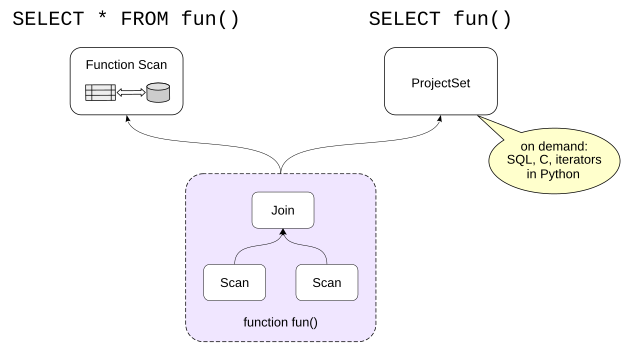
When a set-returning function appears as a table expression in `FROM`, PostgreSQL represents it with `Function Scan`. In this case all rows returned by the function are materialized first and only then passed to the parent plan node. This is a current implementation limitation.
When a set-returning expression appears in the target list, PostgreSQL uses `ProjectSet` and can produce rows on demand. SQL functions, most built-in functions written in C, and PL/Python functions that return an iterator work this way. Functions in other programming languages can use the same interface if the language implementation supports it.
The difference can be enormous under `LIMIT`. Call `generate_series` in `FROM`:
```sql
EXPLAIN (analyze, costs off, buffers off)
SELECT * FROM generate_series(1,10_000_000)
LIMIT 10;
```
```text
QUERY PLAN
------------------------------------------------------------
Limit (actual time=290.495..290.497 rows=10.00 loops=1)
-> Function Scan on generate_series (actual time=290....
Planning Time: 0.025 ms
Execution Time: 296.988 ms
(4 rows)
```
Now put the set-returning function in the target list:
```sql
EXPLAIN (analyze, costs off, buffers off)
SELECT generate_series(1,10_000_000)
LIMIT 10;
QUERY PLAN
------------------------------------------------------------
Limit (actual time=0.002..0.003 rows=10.00 loops=1)
-> ProjectSet (actual time=0.001..0.002 rows=10.00 lo...
-> Result (actual time=0.000..0.000 rows=1.00 loo...
Planning Time: 0.020 ms
Execution Time: 0.010 ms
(5 rows)
```
In the first plan, `Function Scan` obtains all rows from the function before `Limit` is applied. In the second plan, `ProjectSet` produces ten rows—exactly as many as `Limit` requests.
{#qpt-fig-8-3 num="8.3" caption="Function Scan and ProjectSet" .book-original-figure .d-flex .flex-column .align-items-center width=422 height=237}
The query execution time decreases by orders of magnitude. The `Result` node represents the omitted `FROM` clause and passes exactly one row to its parent.
This does not mean that every function language can stream rows. PL/pgSQL set-returning functions, for example, currently materialize their complete result before returning it to the calling executor interface.
```sql
CREATE FUNCTION plpgsql_rows() RETURNS SETOF integer
AS $$
BEGIN
RETURN QUERY
SELECT * FROM generate_series(1,10_000_000);
END
$$ LANGUAGE plpgsql;
CREATE FUNCTION
EXPLAIN (analyze, costs off, buffers off)
SELECT plpgsql_rows() LIMIT 10;
QUERY PLAN
------------------------------------------------------------
Limit (actual time=652.500..652.502 rows=10.00 loops=1)
-> ProjectSet (actual time=652.499..652.500 rows=10.0...
-> Result (actual time=0.000..0.000 rows=1.00 loo...
Planning Time: 0.020 ms
Execution Time: 660.376 ms
(5 rows)
```
The plan still contains `ProjectSet`, but the function implementation has already done the expensive work before the first row can emerge. The execution time shows this clearly.
### COST and ROWS {#qpt-p158-cost-and-rows}
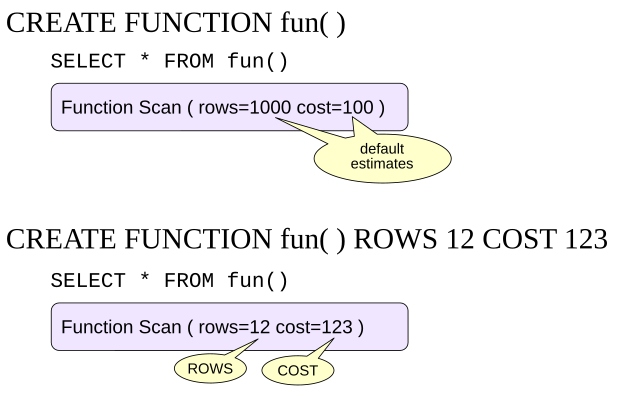
When a function cannot be inlined, the planner often has to treat it largely as a black box. `CREATE FUNCTION` lets us provide two important estimates.
`COST` is the estimated execution cost in units of `cpu_operator_cost`. For a set-returning function, it is the cost per returned row. The default is 1 for C-language and internal functions and 100 for functions in other languages.
`ROWS` is the estimated number of rows returned by a set-returning function. The default is 1000.
{#qpt-fig-8-4 num="8.4" caption="Function COST and ROWS Estimates" .book-original-figure .d-flex .flex-column .align-items-center width=414 height=265}
Create a PL/pgSQL function that returns the days of the week:
```sql
CREATE FUNCTION days_of_week() RETURNS SETOF text
AS $$
BEGIN
FOR i IN 7 .. 13 LOOP
RETURN NEXT to_char(to_date(i::text,'J'),'TMDy');
END LOOP;
END;
$$ LANGUAGE plpgsql;
CREATE FUNCTION
```
```sql
SELECT * FROM days_of_week();
days_of_week
--------------
Mon
Tue
Wed
Thu
Fri
Sat
Sun
(7 rows)
```
The query plan:
```sql
EXPLAIN SELECT * FROM days_of_week();
QUERY PLAN
-----------------------------------------
Function Scan on days_of_week
(cost=0.25..10.25 rows=1000 width=32)
(2 rows)
```
The server estimates the cardinality of this function’s result as 1000 rows, although the actual value is seven.
The startup component reflects the function-cost estimate:
```sql
SELECT 100 * current_setting('cpu_operator_cost')::float;
?column?
----------
0.25
(1 row)
```
Raise the function cost:
```sql
ALTER FUNCTION days_of_week COST 10000;
EXPLAIN SELECT * FROM days_of_week();
QUERY PLAN
------------------------------------------
Function Scan on days_of_week
(cost=25.00..35.00 rows=1000 width=32)
(2 rows)
```
Set the expected number of rows returned by the function:
```sql
ALTER FUNCTION days_of_week ROWS 10;
EXPLAIN SELECT * FROM days_of_week();
QUERY PLAN
----------------------------------------
Function Scan on days_of_week
(cost=25.00..25.10 rows=10 width=32)
(2 rows)
```
The resulting estimated cost is:
```sql
SELECT 10000 * current_setting('cpu_operator_cost')::float
+ 10 * current_setting('cpu_tuple_cost')::float;
?column?
----------
25.1
(1 row)
```
Check these values in `pg_proc` or via the meta-command:
```sql
SELECT procost, prorows
FROM pg_proc WHERE proname='days_of_week';
procost | prorows
---------+---------
10000 | 10
(1 row)
```
```sql
\sf days_of_week
CREATE OR REPLACE FUNCTION bookings.days_of_week()
RETURNS SETOF text
LANGUAGE plpgsql
COST 10000 ROWS 10
AS $function$
BEGIN
FOR i IN 7 .. 13 LOOP
RETURN NEXT to_char(to_date(i::text,'J'),'TMDy');
END LOOP;
END;
$function$
```
### Planner Support Functions {#qpt-p162-planner-support-functions}
The `COST` and `ROWS` clauses let us specify function cost and row count as constants. Fixed values are not always good enough, however.
In PostgreSQL, a target function can have a **planner support function** that supplies the planner with information that depends on the argument values of the target function.
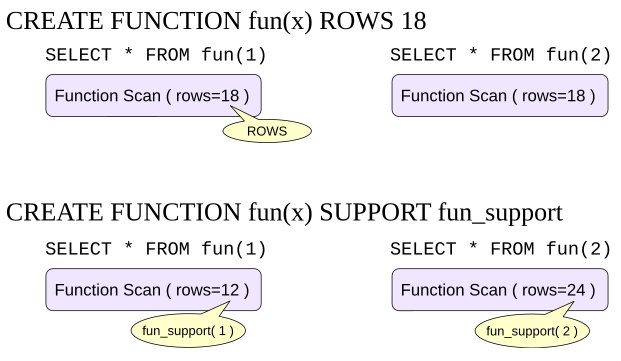
{#qpt-fig-8-5 num="8.5" caption="Argument-Aware Planner Support" .book-original-figure .d-flex .flex-column .align-items-center width=414 height=240}
A support function can provide, among other things:
- An estimate of the function’s cost
- An estimate of the number of rows returned
- An expression equivalent to the function call
For `boolean` functions, it can additionally provide:
- A selectivity estimate
- An equivalent predicate that uses an indexable operator
Planner support functions use PostgreSQL’s internal planner API and currently must be written in C.
### Parallel-Safety Labels {#qpt-p163-parallel-safety-labels}
Not every query can run in parallel. The planner cannot safely infer every possible effect of a user-defined function. Parallel execution therefore relies on an explicit function label.
A function can be:
- `PARALLEL UNSAFE`: its presence prevents a parallel plan for the query
- `PARALLEL RESTRICTED`: it can participate in a query that uses parallelism, but it may execute only in the parallel group leader
- `PARALLEL SAFE`: it may execute in parallel workers
The default for user-defined functions is `PARALLEL UNSAFE`. Parallel-safety labels are also specified for user-defined aggregate functions.
All basic standard functions are parallel safe.
```sql
SELECT proparallel, count(*)
FROM pg_proc
GROUP BY proparallel;
proparallel | count
-------------+-------
r | 202
s | 3374
u | 109
(3 rows)
```
The exact counts depend on installed extensions and PostgreSQL minor version.
`psql` also shows the label:
```text
\x \df+ random numeric \x
Expanded display is on.
List of functions
-[ RECORD 1 ]-------+-------------------------
Schema | pg_catalog
Name | random
Result data type | numeric
Argument data types | min numeric, max numeric
Type | func
Volatility | volatile
Parallel | restricted
Owner | postgres
Security | invoker
Leakproof? | no
Access privileges |
Language | internal
Internal name | numeric_random
Description | random numeric in range
Expanded display is off.
```
Now create a function that sums segment prices for one ticket:
```sql
CREATE FUNCTION ticket_price(ticket_no char(13))
RETURNS numeric
LANGUAGE plpgsql STABLE PARALLEL SAFE
AS $$
BEGIN
RETURN (SELECT sum(price)
FROM segments s
WHERE s.ticket_no = ticket_price.ticket_no
);
END;
$$;
CREATE FUNCTION
```
Use it in one subquery and compare that total with the total booking amount from another subquery:
```sql
EXPLAIN (costs off) SELECT
(SELECT sum(ticket_price(ticket_no)) FROM tickets) =
(SELECT sum(total_amount) FROM bookings);
QUERY PLAN
--------------------------------------------------
Result
InitPlan 1
-> Finalize Aggregate
-> Gather
Workers Planned: 2
-> Partial Aggregate
-> Parallel Seq Scan on tickets
InitPlan 2
-> Finalize Aggregate
-> Gather
Workers Planned: 2
-> Partial Aggregate
-> Parallel Seq Scan on bookings
(13 rows)
```
With the function marked safe, both subqueries can use parallel plans.
Mark it unsafe:
```sql
ALTER FUNCTION ticket_price PARALLEL UNSAFE;
EXPLAIN (costs off) SELECT
(SELECT sum(ticket_price(ticket_no)) FROM tickets) =
(SELECT sum(total_amount) FROM bookings);
QUERY PLAN
---------------------------------
Result
InitPlan 1
-> Aggregate
-> Seq Scan on tickets
InitPlan 2
-> Aggregate
-> Seq Scan on bookings
(7 rows)
```
A single unsafe function disables parallel query for the statement.
Now mark it restricted:
```sql
ALTER FUNCTION ticket_price PARALLEL RESTRICTED;
EXPLAIN (costs off) SELECT
(SELECT sum(ticket_price(ticket_no)) FROM tickets) =
(SELECT sum(total_amount) FROM bookings);
QUERY PLAN
--------------------------------------------------
Result
InitPlan 1
-> Aggregate
-> Seq Scan on tickets
InitPlan 2
-> Finalize Aggregate
-> Gather
Workers Planned: 2
-> Partial Aggregate
-> Parallel Seq Scan on bookings
(10 rows)
```
The subquery that calls the restricted function must run in the leader, while the independent `bookings` subquery can still use parallel workers.
The safe label is not merely a performance hint. Mislabeling a function can cause errors or wrong answers. When in doubt, use the stricter label.
## Referenced resources {#referenced-resources}
- [github.com/sraoss/pg\_ivm]()
- [postgrespro.ru/docs/enterprise/16/sql-createfunction]()
- [wiki.postgresql.org/wiki/Inlining\_of\_SQL\_functions]()
- [www.postgresql.org/docs/18/parallel-safety]()
- [www.postgresql.org/docs/18/queries-with]()
- [www.postgresql.org/docs/18/sql-creatematerializedview]()
- [www.postgresql.org/docs/18/sql-createtable]()
- [www.postgresql.org/docs/18/xfunc-optimization]()
- [www.postgresql.org/docs/18/xfunc-volatility]()