# Statistics
> Read planner statistics, most common values, histograms, functional dependencies, distinct counts, multivariate statistics, and expression statistics.
---
LLMS index: [llms.txt](/en/llms.txt)
---
## 1. Basic Statistics {#qpt-section-6-1}
PostgreSQL collects basic planner statistics at two levels: for the relation as a whole and for individual columns.
### Table-Level Statistics {#qpt-p104-table-level-statistics}
Relation-level statistics include the estimated size of the relation: the `reltuples` and `relpages` columns of `pg_class`. These values matter enough that PostgreSQL updates them not only during `VACUUM` and `ANALYZE`, but also after some DDL operations such as `CREATE INDEX` and `CREATE TABLE AS`.
The planner can also scale the stored row count estimate when the current physical file size differs from the `relpages` value on which that estimate was based. This lets the estimate react to table growth even before the next full statistics refresh.
`ANALYZE` examines a random sample of rows rather than reading the entire table for every column statistic. The required sample size is not growing with the table, and is set by `default_statistics_target` (100 by default), multiplied by 300.
```sql
SELECT current_setting('default_statistics_target')::int
* 300 AS rows_in_sample;
rows_in_sample
----------------
30000
(1 row)
```
For a large table, estimates derived from a sample will not be exact. The planner usually needs an estimate accurate enough to distinguish competing plans. An order-of-magnitude mistake can be disastrous; a small sampling error often is not.
Consider a query with no predicate:
```sql
EXPLAIN SELECT * FROM flights;
QUERY PLAN
-------------------------------------------
Seq Scan on flights
(cost=0.00..744.71 rows=37671 width=51)
(2 rows)
```
The row estimate comes from `pg_class`:
```sql
SELECT reltuples, relpages FROM pg_class
WHERE relname = 'flights';
reltuples | relpages
-----------+----------
37671 | 368
(1 row)
```
In this case it happens to match the exact count:
```sql
SELECT count(*) FROM flights;
count
-------
37671
(1 row)
```
The remaining basic statistics are collected per column by `ANALYZE`. Their internal representation is stored in `pg_statistic`; the `pg_stats` view presents the most useful fields in a friendlier and privilege-safe form.
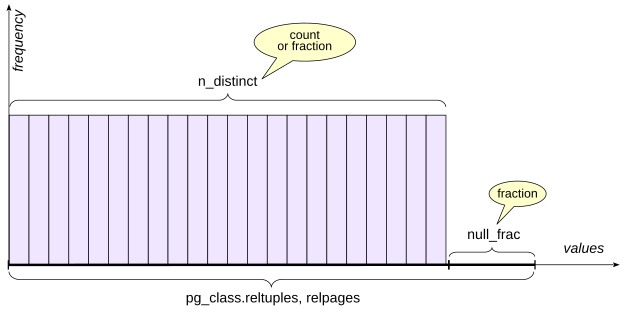
{#qpt-fig-6-1 num="6.1" caption="Distinct Values and Null Fraction" .book-original-figure .d-flex .flex-column .align-items-center width=421 height=208}
### Fraction of Null Values {#qpt-p106-fraction-of-null-values}
`pg_stats.null_frac` stores the fraction of rows in which the column is null, ranging from 0 to 1.
Some flights have not departed yet, so `actual_departure` is still null:
```sql
EXPLAIN SELECT *
FROM flights WHERE actual_departure IS NULL;
QUERY PLAN
-------------------------------------------
Seq Scan on flights
(cost=0.00..744.71 rows=10755 width=51)
Filter: (actual_departure IS NULL)
(3 rows)
```
The planner obtains the estimate by multiplying the relation row count estimate by `null_frac`:
```sql
SELECT round(37671 * null_frac) FROM pg_stats
WHERE tablename = 'flights'
AND attname = 'actual_departure';
round
-------
10755
(1 row)
```
The exact value is close but not identical:
```sql
SELECT count(*) FROM flights
WHERE actual_departure IS NULL;
count
-------
10806
(1 row)
```
### Number of Distinct Values {#qpt-p107-number-of-distinct-values}
`pg_stats.n_distinct` stores an estimate of the number of distinct non-null values in a column. A positive value is an estimated absolute count. A negative value represents the ratio of distinct values to rows. For example, −1 means that all values are unique, which is typical for a primary key. The negative representation is useful because it scales naturally as the table grows.
### Most Common Values {#qpt-p107-most-common-values}
If every value occurred with the same frequency, the number of distinct values would already tell us a great deal about equality predicates. Real data is rarely so cooperative. PostgreSQL therefore stores two more pieces of information:
- `pg_stats.most_common_vals`: an array of the most common values, also called the MCV list
- `pg_stats.most_common_freqs`: an array of their frequencies
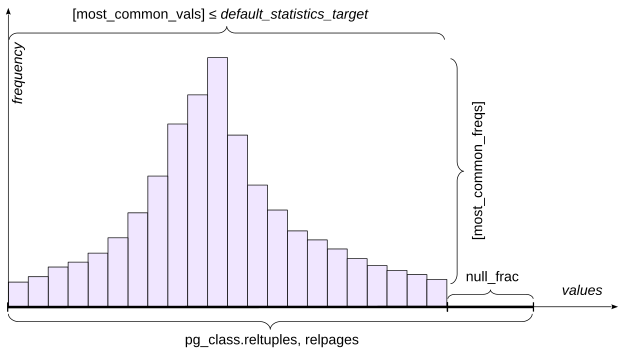
{#qpt-fig-6-2 num="6.2" caption="Most Common Values and Their Frequencies" .book-original-figure .d-flex .flex-column .align-items-center width=417 height=236}
For a value that appears in the MCV list, its stored frequency can be used directly as the selectivity estimate. The maximum number of entries is controlled by the statistics target. `default_statistics_target` supplies the default, and `ALTER TABLE ... ALTER COLUMN ... SET STATISTICS` can override it for an individual column. Increasing a target also increases the sample size used by `ANALYZE`.
To avoid increasing the size of `pg_statistic` and burdening the planner with useless work, values larger than 1 kB are excluded from statistics and analysis. Such large values are most likely unique and have little chance of appearing in `most_common_vals` anyway.
For an experiment, reduce the statistics target for the arrival airport:
```sql
ALTER TABLE routes
ALTER COLUMN arrival_airport SET STATISTICS 10;
ANALYZE routes;
```
Mumbai (`BOM`) is common enough to appear in the MCV list:
```sql
EXPLAIN SELECT *
FROM routes WHERE arrival_airport = 'BOM';
QUERY PLAN
---------------------------------------------
Seq Scan on routes
(cost=0.00..59.38 rows=55 width=103)
Filter: (arrival_airport = 'BOM'::bpchar)
(3 rows)
```
The exact count is also 55:
```sql
SELECT count(*) FROM routes WHERE arrival_airport = 'BOM';
count
-------
55
(1 row)
```
Inspect the most common values and frequencies:
```sql
SELECT unnest(most_common_vals::text::text[]) AS mcv,
unnest(most_common_freqs::text::float[]) AS mcf
FROM pg_stats
WHERE tablename = 'routes'
AND attname = 'arrival_airport'
ORDER BY 2 DESC;
mcv | mcf
-----+-------------
BOM | 0.027093597
FRA | 0.026108375
SVO | 0.026108375
DEL | 0.021182265
ATL | 0.020689655
BLR | 0.020689655
CAN | 0.020689655
TFU | 0.020197045
CDG | 0.019211823
HND | 0.019211823
(10 rows)
```
The cardinality estimate is the number of rows in `routes` multiplied by the stored frequency:
```sql
SELECT round(
2030 * most_common_freqs[
array_position((most_common_vals::text::text[]),'BOM')
]
)
FROM pg_stats
WHERE tablename = 'routes'
AND attname = 'arrival_airport';
round
-------
55
(1 row)
```
MCV data also contributes to inequality estimates: PostgreSQL can sum the frequencies of MCV entries that satisfy the range condition.
If a value is not in the MCV list, the planner estimates it from the remaining population under a uniform-distribution assumption.
Santiago (`SCL`) does not appear in our ten-value MCV list:
```sql
EXPLAIN SELECT *
FROM routes
WHERE arrival_airport = 'SCL';
QUERY PLAN
---------------------------------------------
Seq Scan on routes
(cost=0.00..59.38 rows=25 width=103)
Filter: (arrival_airport = 'SCL'::bpchar)
(3 rows)
```
The exact result is 18:
```sql
SELECT count(*) FROM routes
WHERE arrival_airport = 'SCL';
count
-------
18
(1 row)
```
To obtain the estimate, the planner first sums the frequencies of the most common values:
```sql
SELECT sum(f)
FROM pg_stats s, unnest(s.most_common_freqs) f
WHERE s.tablename = 'routes'
AND s.attname = 'arrival_airport';
sum
------------
0.22118227
(1 row)
```
The column has 73 distinct values:
```sql
SELECT n_distinct
FROM pg_stats
WHERE tablename = 'routes' AND attname = 'arrival_airport';
n_distinct
------------
73
(1 row)
```
Ten of them are already represented explicitly in the MCV list. With no nulls, the remaining probability mass is spread approximately uniformly over the remaining 63 values:
```sql
SELECT round( 2030 * (1 - 0.22118227) / (73 - 10) );
round
-------
25
(1 row)
```
### Histogram {#qpt-p112-histogram}
When there are too many distinct values to describe usefully with an MCV list, PostgreSQL also builds a histogram.
A histogram consists of several buckets containing values. The number of histogram buckets is controlled by the same `default_statistics_target` parameter.
Bucket boundaries are chosen so that approximately the same number of values falls into each bucket; in the figure this is shown by rectangles of equal area. With this construction, PostgreSQL only needs to store the array of boundary values in `pg_stats.histogram_bounds`. The frequency of one bucket is 1/number of buckets.
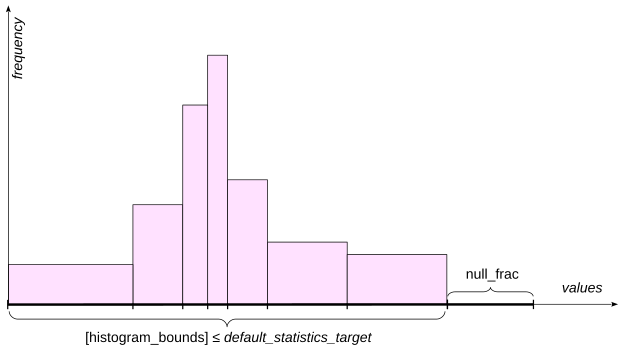
{#qpt-fig-6-3 num="6.3" caption="Histogram of the Remaining Values" .book-original-figure .d-flex .flex-column .align-items-center width=417 height=235}
For an inequality such as field < value the planner estimates how much of the histogram lies to the left of the boundary value. It can interpolate within the containing bucket rather than counting only whole buckets.
The MCV values and nulls are excluded from the histogram population:
```sql
SELECT histogram_bounds FROM pg_stats
WHERE tablename = 'routes'
AND attname = 'arrival_airport';
histogram_bounds
-----------------------------------------------
{AER,CKG,DFW,HEL,KZN,LHR,MXP,PKX,SVX,YEG,YYZ}
(1 row)
```
That is why range selectivity combines information from both the MCV list and the histogram.
Consider:
```sql
EXPLAIN SELECT *
FROM routes WHERE arrival_airport <= 'DFW';
QUERY PLAN
----------------------------------------------
Seq Scan on routes
(cost=0.00..59.38 rows=579 width=103)
Filter: (arrival_airport <= 'DFW'::bpchar)
(3 rows)
```
The exact count is:
```sql
SELECT count(*) FROM routes WHERE arrival_airport <= 'DFW';
count
-------
609
(1 row)
```
The MCV values inside the requested interval contribute this frequency:
```sql
SELECT sum( s.most_common_freqs[
array_position( (s.most_common_vals::text::text[]),v )
] )
FROM pg_stats s,
unnest(s.most_common_vals::text::text[]) v
WHERE s.tablename = 'routes'
AND s.attname = 'arrival_airport'
AND v <= 'DFW';
```
```text
sum
------------
0.12955666
(1 row)
```
`DFW` is exactly the right boundary of the second bucket in this example, so two of ten histogram buckets lie in the interval. There are no nulls. The estimate is therefore:
```sql
SELECT round(
2030 * ( 0.12955666 + (1 - 0.22118227) * (2.0 / 10.0) )
);
round
-------
579
(1 row)
```
For a boundary inside a bucket, PostgreSQL refines the estimate with interpolation appropriate to the data type and operator.
A histogram is much less useful for an equality condition on a value that is not in the MCV list. In that case PostgreSQL falls back to an estimate based on the remaining number of distinct values.
### Additional Statistics Fields {#qpt-p114-additional-statistics-fields}
Several other statistics fields affect planning.
`pg_stats.correlation` measures statistical correlation between the logical order of column values and the physical order of rows. Values near 1 or −1 indicate strong physical ordering; values near zero indicate little correlation. This matters when costing index scans because strong correlation reduces expected random heap access.
`pg_class.relallvisible` stores the number of table pages marked **all-visible** in the visibility map. An all-visible page is one all of whose tuples are known to be visible to all current and future transactions. If this number is not large enough, the planner may choose a bitmap scan instead of an index-only scan.
`pg_stats.avg_width` stores the average size of values in the column, in bytes, for estimating the memory required by an operation.
### Custom and Generic Plans {#qpt-p115-custom-and-generic-plans}
With the simple query protocol (see [Chapter II, “Planning and Execution”](/en/02-planning-and-execution/#qpt-chapter-2)), a statement is normally parsed, planned, and executed as a new statement each time.
The extended protocol allows statements to be prepared, and those statements can have parameters. The parse tree is kept in the local memory of the backend process. Planning can then happen later when parameter values are known.
A **custom plan** is generated for one execution using its actual parameter values. This is useful when data is skewed, because different parameter values can make different access methods optimal. For example, an index may be excellent for a rare value but worse than a sequential scan for a very common value.
A **generic plan** is created without using the actual parameter values. It can be reused across executions and therefore saves planning time. A generic plan works especially well with a uniform distribution, when the selectivity of a condition does not depend on the particular parameter value.
Prepare a query and create an index:
```sql
PREPARE f(text) AS
SELECT * FROM flights WHERE status = $1;
CREATE INDEX ON flights(status);
```
Cancelled flights are rare enough for an index scan:
```sql
EXPLAIN EXECUTE f('Cancelled');
QUERY PLAN
------------------------------------------------
Index Scan using flights_status_idx on flights
(cost=0.29..59.43 rows=210 width=51)
Index Cond: (status = 'Cancelled'::text)
(3 rows)
```
Arrived flights are common, so a custom plan chooses a sequential scan:
```sql
EXPLAIN EXECUTE f('Arrived');
QUERY PLAN
-------------------------------------------
Seq Scan on flights
(cost=0.00..838.89 rows=26900 width=51)
Filter: (status = 'Arrived'::text)
(3 rows)
```
Execute the statement three more times so that the total number of custom executions reaches five:
```text
EXECUTE f('Arrived');
EXECUTE f('Arrived');
EXECUTE f('Arrived');
```
The counters are visible in `pg_prepared_statements`:
```sql
SELECT name, generic_plans, custom_plans
FROM pg_prepared_statements;
```
```text
name | generic_plans | custom_plans
------+---------------+--------------
f | 0 | 5
(1 row)
```
On the next execution this example switches to a generic plan. A generic plan shows parameter symbols instead of concrete values:
```sql
EXPLAIN EXECUTE f('Arrived');
QUERY PLAN
------------------------------------------------------------
Index Scan using flights_status_idx on flights (cost=0...
Index Cond: (status = $1)
(2 rows)
```
```sql
SELECT name, generic_plans, custom_plans
FROM pg_prepared_statements;
name | generic_plans | custom_plans
------+---------------+--------------
f | 1 | 5
(1 row)
```
For skewed data this switch can be undesirable. To handle it, `plan_cache_mode` can override the automatic heuristic:
```sql
SHOW plan_cache_mode;
plan_cache_mode
-----------------
auto
(1 row)
SET plan_cache_mode = 'force_custom_plan';
EXPLAIN EXECUTE f('Arrived');
QUERY PLAN
------------------------------------------------------------
Seq Scan on flights (cost=0.00..838.89 rows=26900 widt...
Filter: (status = 'Arrived'::text)
(2 rows)
RESET plan_cache_mode;
```
## 2. Extended Statistics {#qpt-section-6-2}
Basic statistics that are collected automatically may not be enough to produce accurate cardinality and selectivity estimates.
PostgreSQL allows the administrator to manually determine which additional—extended—statistics are needed. You can gather statistics that span multiple columns at once (multivariate statistics), or statistics on an arbitrary expression.
Note that basic statistics are collected for tables and their columns, but not for indexes, except for indexes on expressions. Therefore, creating an index on several columns does not by itself create multivariate statistics.
Extended statistics are created with the `CREATE STATISTICS` command. Their definitions are stored in `pg_statistic_ext`; collected data is stored in `pg_statistic_ext_data`.
There are several kinds of multivariate statistics available.
### Functional Dependencies {#qpt-p118-functional-dependencies}
A functional dependency describes how strongly values in one column determine values in another.
| city | index |
| --- | --- |
| Samara | 443000 |
| Kazan | 420000 |
| Nizhny Novgorod | 603000 |
| Veliky Novgorod | 173000 |
{#qpt-tbl-6-1 num="6.1" caption="Functional Dependencies"}
For example, if a postal code uniquely determines a city, predicates on `city` and `postal_code` are correlated, as shown in the figure.
Consider two predicates on `routes`:
```sql
SELECT count(*) FROM routes
WHERE route_no = 'PG0085' AND arrival_airport = 'FCO';
count
-------
7
(1 row)
```
Without extended statistics, the estimate is much too low:
```sql
EXPLAIN SELECT * FROM routes
WHERE route_no = 'PG0085' AND arrival_airport = 'FCO';
QUERY PLAN
---------------------------------------------------------
Bitmap Heap Scan on routes
(cost=4.20..22.77 rows=1 width=103)
Recheck Cond: (route_no = 'PG0085'::text)
Filter: (arrival_airport = 'FCO'::bpchar)
-> Bitmap Index Scan on routes_route_no_validity_excl
(cost=0.00..4.20 rows=7 width=0)
Index Cond: (route_no = 'PG0085'::text)
(7 rows)
```
The reason is that the planner assumes predicates are independent and calculates the resulting selectivity as the product of the selectivities of conditions combined with logical `AND`. This is visible in the plan: the estimate in the `Bitmap Index Scan` node for the `route_no` condition is correct, but after filtering in the `Bitmap Heap Scan` node by `arrival_airport`, it is underestimated. We know, however, that the route number uniquely determines the arrival airport, so the second condition is in fact redundant, assuming the airport is specified correctly.
Create dependency statistics:
```sql
CREATE STATISTICS routes_dep(dependencies)
ON route_no, arrival_airport FROM routes;
ANALYZE routes;
```
Inspect the dependency:
```sql
SELECT dependencies FROM pg_stats_ext
WHERE statistics_name = 'routes_dep';
dependencies
----------------------
{"1 => 4": 1.000000}
(1 row)
```
The number after the colon is the measured degree of dependency for the attribute mapping. Now the estimate improves:
```sql
EXPLAIN SELECT * FROM routes
WHERE route_no = 'PG0085' AND arrival_airport = 'FCO';
QUERY PLAN
---------------------------------------------------------
Bitmap Heap Scan on routes
(cost=4.20..22.78 rows=7 width=103)
Recheck Cond: (route_no = 'PG0085'::text)
Filter: (arrival_airport = 'FCO'::bpchar)
-> Bitmap Index Scan on routes_route_no_validity_excl
(cost=0.00..4.20 rows=7 width=0)
Index Cond: (route_no = 'PG0085'::text)
(7 rows)
```
`psql` meta-command `\d routes` also lists statistics objects defined on the table. The `Statistics objects` section shows their names, columns, and nondefault statistics targets:
```text
...
Statistics objects:
"bookings.routes_dep" (dependencies) ON route_no,
arrival_airport FROM routes
```
### Most Common Combinations {#qpt-p121-most-common-combinations}
Columns can be correlated without either functionally determining the other. The figure shows possible city-river pairs. The predicates on `city` and `river` are clearly correlated, but unlike the previous example neither column determines the other: cities and rivers have a many-to-many relationship.
| city | river |
| --- | --- |
| Samara | Volga |
| Kazan | Volga |
| Nizhny Novgorod | Oka |
| Nizhny Novgorod | Volga |
| Veliky Novgorod | Volkhov |
{#qpt-tbl-6-2 num="6.2" caption="Most Common Combinations"}
Here is a similar example in the demo database:
```sql
EXPLAIN (analyze, timing off, summary off, buffers off)
SELECT * FROM routes
WHERE departure_airport = 'BOM' AND airplane_code = '7M7';
QUERY PLAN
------------------------------------------------------------
Bitmap Heap Scan on routes
(cost=4.69..40.71 rows=9 width=103)
(actual rows=17.00 loops=1)
Recheck Cond: (departure_airport = 'BOM'::bpchar)
Filter: (airplane_code = '7M7'::bpchar)
Rows Removed by Filter: 38
Heap Blocks: exact=27
-> Bitmap Index Scan on routes_departure_airport_lowe...
(cost=0.00..4.69 rows=55 width=0)
(actual rows=55.00 loops=1)
Index Cond: (departure_airport = 'BOM'::bpchar)
Index Searches: 1
(12 rows)
```
The planner underestimates the number of rows. With an MCV statistic on the pair the estimate is now correct:
```sql
CREATE STATISTICS (mcv)
ON departure_airport, airplane_code FROM routes;
ANALYZE routes;
EXPLAIN SELECT * FROM routes
WHERE departure_airport = 'BOM' AND airplane_code = '7M7';
QUERY PLAN
------------------------------------------------------------
Bitmap Heap Scan on routes
(cost=4.69..40.72 rows=17 width=103)
Recheck Cond: (departure_airport = 'BOM'::bpchar)
Filter: (airplane_code = '7M7'::bpchar)
-> Bitmap Index Scan on routes_departure_airport_lowe...
(cost=0.00..4.69 rows=55 width=0)
Index Cond: (departure_airport = 'BOM'::bpchar)
(7 rows)
```
The multivariate MCV data can be inspected with the `pg_mcv_list_items` function:
```sql
SELECT values, frequency
FROM pg_statistic_ext
JOIN pg_statistic_ext_data ON oid = stxoid,
pg_mcv_list_items(stxdmcv) m
WHERE stxname = 'routes_departure_airport_airplane_code_stat'
LIMIT 3;
values | frequency
-----------+----------------------
{FRA,77W} | 0.009852216748768473
{BOM,7M7} | 0.008374384236453201
{PVG,77W} | 0.008374384236453201
(3 rows)
```
### Distinct Combinations {#qpt-p122-distinct-combinations}
Another situation in which the planner can make an error is grouping. Multivariate `ndistinct` statistics can improve estimates for grouping by several columns.
In the example in the figure, the number of possible combinations of all fields clearly cannot be determined by simply multiplying the number of distinct values in each column separately.
| city | region | index |
| --- | --- | --- |
| Samara | Samara Oblast | 443000 |
| Kazan | Republic of Tatarstan | 420000 |
| Nizhny Novgorod | Nizhny Novgorod Oblast | 603000 |
| Veliky Novgorod | Novgorod Oblast | 173000 |
{#qpt-tbl-6-3 num="6.3" caption="Distinct Combinations"}
Count the distinct direct airport pairs:
```sql
SELECT count(*) FROM (
SELECT DISTINCT departure_airport, arrival_airport
FROM routes
);
count
-------
932
(1 row)
```
Without multivariate distinct statistics, the planner badly underestimates the number of groups:
```sql
EXPLAIN SELECT DISTINCT departure_airport, arrival_airport
FROM routes;
QUERY PLAN
-------------------------------------------------
HashAggregate
(cost=64.45..66.48 rows=203 width=8)
Group Key: departure_airport, arrival_airport
-> Seq Scan on routes
(cost=0.00..54.30 rows=2030 width=8)
(5 rows)
```
Create an extended statistics object. If no kind is specified, PostgreSQL includes all supported multivariate kinds that apply:
```sql
CREATE STATISTICS
ON departure_airport, arrival_airport FROM routes;
ANALYZE routes;
EXPLAIN SELECT DISTINCT departure_airport, arrival_airport
FROM routes;
QUERY PLAN
-------------------------------------------------
HashAggregate
(cost=64.45..73.77 rows=932 width=8)
Group Key: departure_airport, arrival_airport
-> Seq Scan on routes
(cost=0.00..54.30 rows=2030 width=8)
(5 rows)
```
The estimate improves. Inspect the stored estimate:
```sql
SELECT n_distinct
FROM pg_stats_ext
WHERE statistics_name =
'routes_departure_airport_arrival_airport_stat';
n_distinct
---------------
{"3, 4": 932}
(1 row)
```
`\dX` lists extended statistics objects. The values themselves are stored in the `pg_statistic_ext_data` view.
### Statistics on Expressions {#qpt-p124-statistics-on-expressions}
Extended statistics can also collect ordinary univariate statistics for an expression, much as if the table had a stored column containing that expression.
| city | index | address |
| --- | --- | --- |
| Samara | 443000 | 443000, Samara |
| Kazan | 420000 | 420000, Kazan |
| Nizhny Novgorod | 603000 | 603000, Nizhny Novgorod |
| Veliky Novgorod | 173000 | 173000, Veliky Novgorod |
{#qpt-tbl-6-4 num="6.4" caption="Statistics on Expressions"}
Expressions can also participate in multivariate statistics together with columns or other expressions.
Without expression statistics, a predicate whose operand is an expression may force the planner to use a generic default selectivity because it has no distribution data for the expression itself. For example:
```sql
EXPLAIN (analyze, timing off, summary off, buffers off)
SELECT * FROM flights
WHERE extract( month FROM scheduled_departure
AT TIME ZONE 'Europe/Moscow' ) = 1;
QUERY PLAN
------------------------------------------------------------
Seq Scan on flights
(cost=0.00..1027.24 rows=188 width=51)
(actual rows=5529.00 loops=1)
Filter: (EXTRACT(month FROM (scheduled_departure AT T...
Rows Removed by Filter: 32142
(5 rows)
```
The estimate is far too small. One way to provide statistics is an expression index, but an index costs storage and maintenance even if it is not needed for access. If the goal is only to improve estimates, create expression statistics instead:
```sql
CREATE STATISTICS
ON extract( month FROM scheduled_departure
AT TIME ZONE 'Europe/Moscow' )
FROM flights;
ANALYZE flights;
```
```sql
EXPLAIN
SELECT * FROM flights
WHERE extract( month FROM scheduled_departure
AT TIME ZONE 'Europe/Moscow' ) = 1;
QUERY PLAN
------------------------------------------------------------
Seq Scan on flights
(cost=0.00..1027.24 rows=5561 width=51)
Filter: (EXTRACT(month FROM (scheduled_departure AT T...
(3 rows)
```
The estimate is now close to the actual value.
Expression statistics are visible in the `pg_stats_ext_exprs` view:
```sql
SELECT statistics_name, left(expr,40) AS expr,
n_distinct, most_common_vals
FROM pg_stats_ext_exprs \gx
-[ RECORD 1 ]----+-----------------------------------------
statistics_name | flights_expr_stat
expr | EXTRACT(month FROM (scheduled_departure
n_distinct | 7
most_common_vals | {10,1,12,11,3,4,2}
```
Clean up the objects created in this chapter:
```sql
DROP INDEX flights_status_idx;
DROP INDEX
SELECT 'DROP STATISTICS ' || statistics_name
FROM pg_stats_ext \gexec
DROP STATISTICS
DROP STATISTICS
DROP STATISTICS
DROP STATISTICS
```
## Referenced resources {#referenced-resources}
- [www.postgresql.org/docs/18/planner-stats]()
- [www.postgresql.org/docs/18/planner-stats]()
- [www.postgresql.org/docs/18/planner-stats]()
- [www.postgresql.org/docs/18/planner-stats]()
- [www.postgresql.org/docs/18/row-estimation-examples]()
- [www.postgresql.org/docs/18/view-pg-stats]()