4 Sorting and Grouping
1. Sorting
A B-tree index can produce rows in index order. When that order matches the query’s ORDER BY, PostgreSQL can sometimes avoid an explicit sort:
If the required ordering is not available from an access path, PostgreSQL needs two separate steps: obtain the rows and sort them.
In-Memory Sort
In the simplest case, the data being sorted fits in the memory available to the sort operation under work_mem. PostgreSQL can then sort it in memory. EXPLAIN ANALYZE shows both the sort method and the amount of memory used:
A regular Sort node cannot return its first row until it has consumed and sorted its input. Its startup cost therefore includes the cost of reading the complete input. For a comparison sort, the typical amount of work grows on the order of , where M is the number of input rows.
If the query needs only the first N rows of the sorted result, for example because of LIMIT, PostgreSQL can use a bounded top-N sort rather than fully sorting every row:
The estimated query cost is lower, and the sort uses less memory. A top-N heapsort needs work on the order of rather than sorting all M rows completely.
External Sort
If the data set is too large to sort within the available memory, PostgreSQL uses an external sort.
The sorter reads as much input as it can handle in memory, sorts that portion, and writes a sorted run to a temporary file.
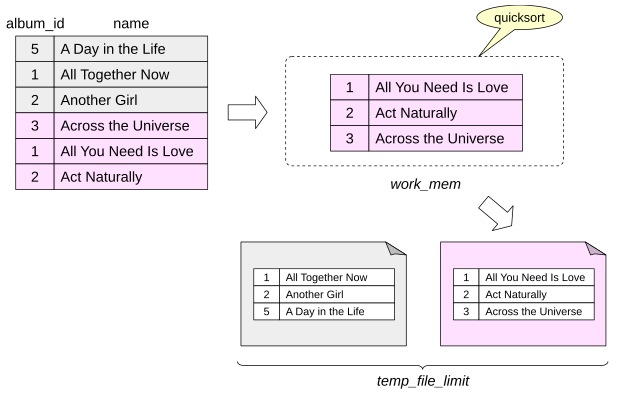
The process repeats until all input has been turned into individually sorted runs.
temp_file_limit limits the total space used at any one time by temporary files belonging to a PostgreSQL process. Explicit temporary tables are not counted against this limit.
The sorted runs are then merged. Conceptually, the merge keeps track of the next candidate from each input run, selects the smallest or largest one, returns it, and advances that run. The implementation reads data in buffered blocks rather than literally one row at a time so that I/O remains efficient.
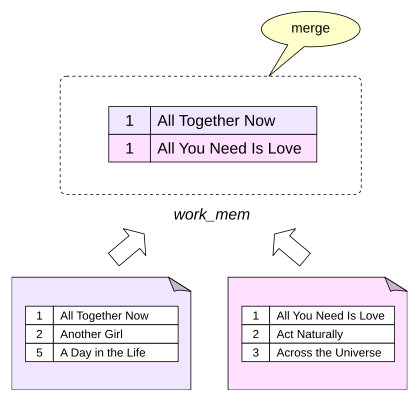
If memory is insufficient to merge all runs in one pass, PostgreSQL performs a multi-pass merge: groups of runs are merged into larger runs, which are then merged again until the final ordered stream can be produced. A large sort makes the use of temporary storage visible in EXPLAIN ANALYZE:
Sort Method: external merge tells us that the sort spilled to disk. The Disk value reports the temporary disk space used by the sort, while the temp buffer counters show temporary I/O.
Incremental Sort
Suppose a query requires ordering by keys, but its input is already ordered by the first m keys. There is no need to sort the entire data set again. PostgreSQL can divide the input into consecutive groups that have equal values of the presorted prefix and sort those groups only by the remaining keys . This is incremental sort.
Incremental sort can reduce memory requirements and the likelihood of spilling to disk because each sort works on a smaller portion of the input. It also has a latency advantage: PostgreSQL can begin returning rows after the first group has been sorted instead of waiting for the entire input to be sorted.
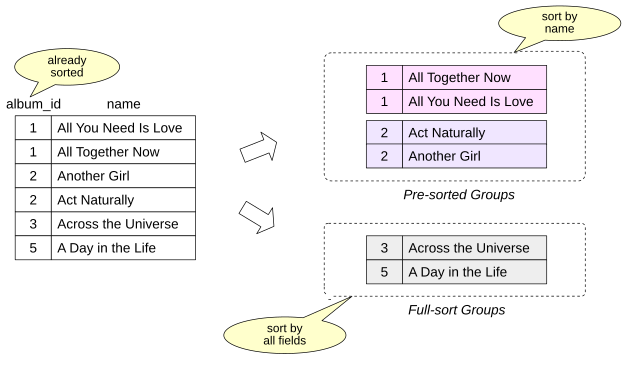
The trade-off is additional overhead from identifying and processing many groups.
PostgreSQL uses two strategies internally. Larger groups that share the same presorted prefix can be sorted individually. Small groups can be accumulated and fully sorted together to avoid excessive per-group overhead.
Incremental sort can be disabled with enable_incremental_sort.
Create an index on bookings.total_amount:
Now increase work_mem and sort by total_amount and book_date:
The index scan already provides rows ordered by total_amount, shown as Presorted Key. Incremental Sort only has to establish the remaining order by book_date.
Pre-sorted Groups describes the larger groups that were processed using the existing total_amount order and sorted further by book_date. Full-sort Groups describes small groups that were combined and sorted as complete groups.
In this example both groups fit entirely in memory and were quicksorted.
Now reduce work_mem:
Run the query again:
With less memory, the large presorted groups are now handled with external merge, and EXPLAIN reports their temporary disk usage explicitly.
Restore the setting and remove the demonstration index:
Building a B-tree
PostgreSQL could in principle build a B-tree index by starting with an empty tree and inserting entries one by one as it scans the table. For a bulk index build, that would be inefficient.
Instead, PostgreSQL forms the index entries, sorts them by index key, fills the leaf level in order, and then builds the upper levels until only the root remains. The sorting machinery is closely related to the sorting discussed above, but index creation uses maintenance_work_mem rather than ordinary work_mem. Maintenance operations are relatively infrequent, so it is often reasonable to give them a larger memory budget.
B-tree index construction can also run in parallel. The number of workers is chosen in the same way as for parallel queries, depending on the table size, but is limited by max_parallel_maintenance_workers.
For parallel index builds, maintenance_work_mem applies to the build as a whole rather than separately to every worker.
2. Grouping
Where Grouping Appears
SQL can divide rows into groups with GROUP BY. Aggregate functions are commonly used with those groups to compute one result per group. Window functions have a related concept through PARTITION BY, but unlike ordinary grouping, window functions do not collapse the rows of a partition into one result row.
Grouping also appears implicitly when duplicates must be removed, for example with: DISTINCT; UNION without ALL; INTERSECT without ALL; EXCEPT without ALL. PostgreSQL can use different physical strategies for grouping and duplicate elimination.
Two important ones are hashing and processing data in group-key order. The planner chooses among available alternatives based on estimated costs, memory, ordering already available from lower plan nodes, and other properties of the query.
Hash Aggregation
A hash table uses a hash function to map values into a finite set of buckets. For a lookup:
- Compute the hash value.
Use part of that value to choose a bucket.
Inspect entries in the bucket and use equality comparison to distinguish values whose hashes or bucket assignments collide.
With a reasonable load factor and a good distribution, lookup is expected to take approximately constant time. A poor distribution or an overloaded hash table increases collision work.
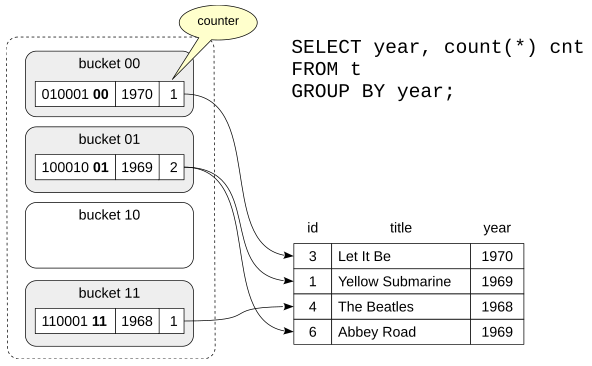
The plan node for hash-based aggregation is HashAggregate:
The startup cost is significant because HashAggregate has to consume its input and build aggregation state before it can produce the final groups.
EXPLAIN ANALYZE shows memory use:
Grouping Sorted Data
Duplicate elimination and grouping can also exploit rows that arrive ordered by the grouping keys.
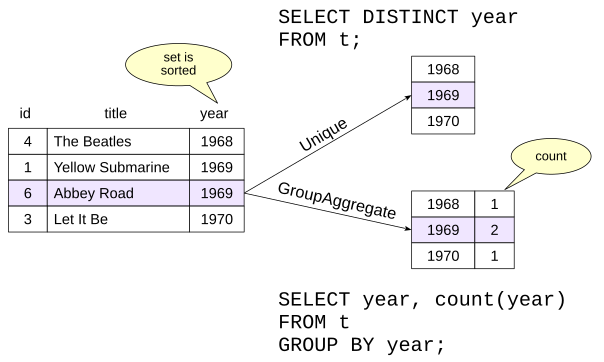
Unique removes adjacent duplicates. Because equal keys are next to one another, it only needs to compare the current value with the previous one.
The GroupAggregate node returns aggregated data. In the example in the figure, the node builds a list of distinct values of the year field and counts how many times each value occurs in the data set.
When the input already has the required order, Unique or GroupAggregate can be attractive because they need relatively little working memory and can process the stream incrementally. When the input must first be fully sorted, hash aggregation can often be cheaper, although the planner decides from the actual estimates rather than from a fixed rule.
These nodes preserve group-key ordering, which can sometimes satisfy a later ORDER BY without another sort.
Here is a GroupAggregate whose input order comes directly from an index:
A DISTINCT query can use Unique:
The index already produces ticket_no in the order required by ORDER BY, and Unique preserves that order, so no additional Sort node is necessary.
Window Functions
Unlike ordinary aggregate functions, window functions compute a value for each output row rather than reducing a group to one row. After the function name, the OVER clause specifies a window: a rule that determines, for each result row, which set of rows the window function should process. Such a set is called a frame.
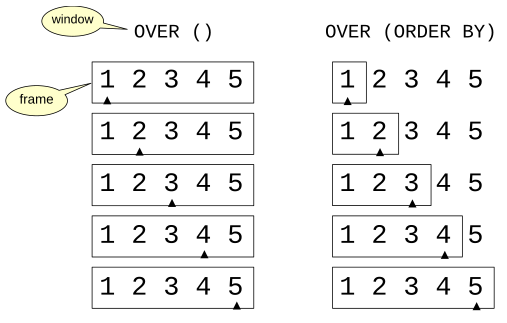
With OVER (), there is no PARTITION BY and no ORDER BY. There is therefore one partition containing all rows, and the default frame is the entire partition.
If the window definition contains an ORDER BY clause that orders the rows, the default window frame covers rows from the first row through the current row.
Consider a running sum of booking amounts:
The window function is evaluated by WindowAgg. Here its child Sort establishes the order required by the window. The sort can use any suitable sort strategy. A small input can stay in memory:
A large input may require an external sort:
For nodes that use internal row storage, such as WindowAgg, CTE Scan, or Recursive Union, the Storage line shows the maximum amount of storage used and its type: Memory when the data fits in memory, or Disk when temporary files are used.
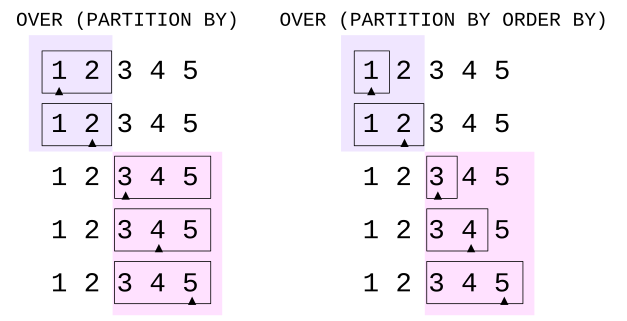
PARTITION BY divides the input into independent groups of rows. For each group, the frame boundaries change within that group. Unless specified otherwise, the frame occupies the entire group.
If the window definition also contains ORDER BY, the rows are processed in the corresponding order. In this case, the frame covers the rows from the first to the current one.
Unlike regular GROUP BY, PARTITION BY always employs sorting: the plan is chosen so that the WindowAgg node receives a set of rows sorted first by the PARTITION BY keys and then by the ORDER BY keys. Hashing is not used even when there is no ORDER BY clause.