3 Access Methods
1. Sequential Scan
The planner has several ways to access table data. The simplest is a sequential scan (Seq Scan).
A sequential scan reads the table’s main fork page by page. As usual, regular tables are read through the shared buffer cache; temporary tables use the session’s local buffers.
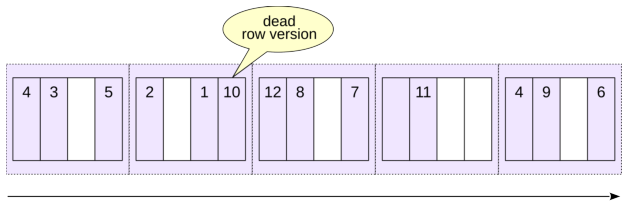
During a sequential scan PostgreSQL can prefetch neighboring pages efficiently using either operating system read-ahead or asynchronous I/O instead of issuing unrelated random reads.
A sequential scan is usually a good choice when a query must read the whole table or a large fraction of it, that is, when the predicate is non-selective: a large fraction of the input rows passes the predicate.
In a query plan, a sequential scan is represented by a Seq Scan node:
The values in parentheses are important:
costis the estimated cost.rowsis the estimated number of rows returned by the operation.widthis the estimated average row width in bytes.
Cost is measured in arbitrary planner units and has two components.
The first number is the startup cost: the cost that must be paid before the node can return its first row. For a sequential scan it is zero because no preparatory work is needed.
The second number is the total cost of producing all rows.
PostgreSQL’s cost model accounts for both I/O and CPU work. In the simplified calculation used by this example, the I/O component is the number of table pages multiplied by the cost assigned to one sequential page read:
The CPU component includes the cost of processing table rows:
Dead Row Versions
During a sequential scan PostgreSQL has to examine row versions in each page, including obsolete versions that have not yet been removed by vacuuming. If a table contains many dead row versions, scanning it can become noticeably more expensive.
This is one reason timely vacuuming can improve the performance of some queries.
Create a copy of flights and disable autovacuum so that dead row versions are not cleaned up automatically:
Delete every row:
The old row versions remain in the table file until vacuum reclaims them, so the file is still the same size:
Get the query plan with the analyze option. The implicit buffers option shows the number of blocks:
hit: a needed block was already in PostgreSQL’s cacheread: a needed block was not found in the buffer cache and was requested from the operating systemwritten: a previously dirty block was written by this backenddirtied: a previously clean block became dirty
The scan touched more than three hundred heap pages even though no live rows remain. Vacuum the table and check the size again:
Dead row versions have been removed, and the table size has decreased. Run the query again:
The table is empty, so there are no row versions to inspect and the estimated cost is minimal. On a much larger table, the work spent walking pages full of obsolete versions can be substantial.
Buffer Rings and Synchronized Scans
A large sequential scan can bring many single-use pages through the buffer cache and evict useful cached pages. To prevent this, PostgreSQL uses a bulk-read buffer access strategy for sufficiently large heap scans. When a relation is larger than one quarter of the buffer cache, only a part of the cache is used as a buffer ring within which replacement occurs, while the rest of the cached data remains unaffected.
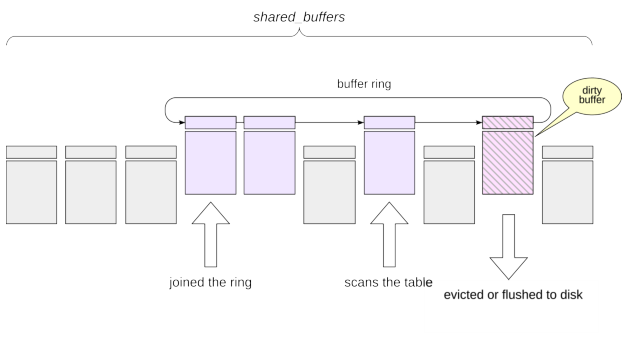
Large sequential scans can also use synchronized scanning. When several backends scan the same large table, a new scan can start near the position where another scan is currently reading, continue to the end, and then wrap around to the beginning. This increases the chance that several backends can use the same pages while they are still cached in the buffer ring.
Temporary tables use local buffers, so this buffer cache access strategy and synchronized-scan mechanism do not apply in the same way.
2. Index Scan
We will use one PostgreSQL index type, B-tree, to explain Index Scan. It is the most commonly used index type for scalar data.
Like other PostgreSQL indexes, a B-tree is a secondary structure. It occupies additional disk space and can be dropped and rebuilt from the table. Its purpose is to make operations that touch a relatively small part of a table cheaper, and B-tree indexes are also used to enforce primary-key and unique constraints.
An index associates indexed values—search keys—with references to table row versions. A B-tree keeps keys in a well-defined sort order so that PostgreSQL can navigate the tree to the required key and then follow the corresponding tuple identifiers into the table. A B-tree operator class must define a linear ordering for the data type. Numbers, strings, and dates are typical examples. A geometric point, by contrast, has no single natural total order suitable for the usual B-tree semantics; PostgreSQL provides other index types for spatial data.
A PostgreSQL B-tree is balanced and highly branching. Its depth depends on the key size and the number of entries, but in practice even very large indexes often need only a few levels.
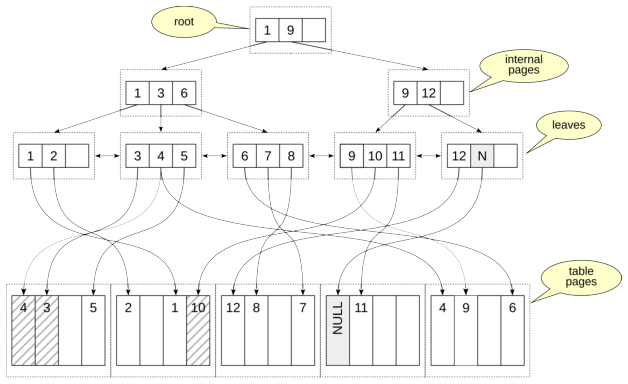
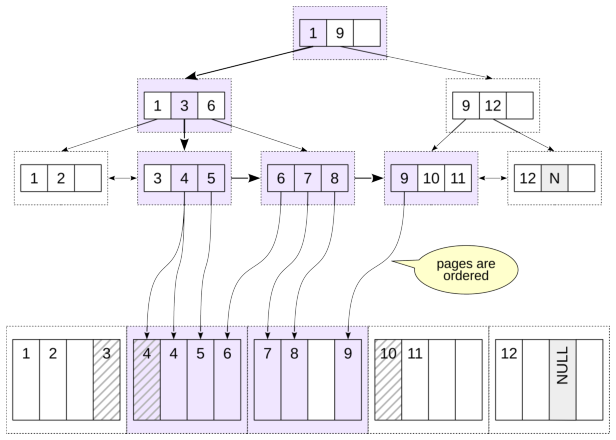
The figure shows an example B-tree. Its pages consist of index entries, each containing:
A key—values from the indexed (key) columns
Either a downlink to another index page or, at the leaf level, one or more references to table row versions
Keys within a page are ordered.
Leaf pages are the bottom level of the tree. Their entries refer to table row versions. Leaf pages are linked in both directions, which makes it efficient to scan keys forward or backward.
Internal pages point to pages on the next lower level. Separator keys tell the search which subtree can contain the requested value. The top page is the root.
A B-tree page need not be completely full; free space is useful for future inserts.
When a page cannot accommodate a new item, PostgreSQL splits the page. One half remains in the existing page and a new sibling page is allocated. B-tree pages are not normally merged back together after a split, so some workloads can cause index growth and fragmentation.
By default, B-tree indexes store null values after non-null values for ascending order (NULLS LAST). The ordering can be changed when the index is created with NULLS FIRST or NULLS LAST, together with ASC or DESC where needed.
Looking Up One Value
Suppose we want the row whose indexed value is 4.
The search starts at the root of the tree. The index entries in the root page define key ranges in the pages below: “from 1 to 9”and “9 and above.” We need the “from 1 to 9”range, which corresponds to the entry with key 1. The keys are ordered, so searching within the page is very efficient.
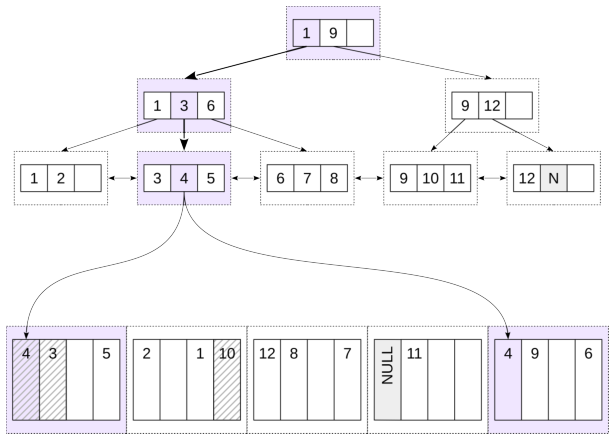
The reference from the entry we found takes us to a page on the second level. There we find the range “from 3 to 6”
(key 3) and move to a page on the third level. This is a leaf page. There we find key 4 and follow its reference to the table page.
Note that even unique indexes can have duplicate keys, because MVCC can create multiple versions of the same row. To save space, equal keys can be stored in the index page as a single entry containing several pointers.
Before a heap tuple can be returned, its visibility must be checked.
The figures highlight the pages and entries that had to be visited.
Consider the bookings table. Column book_ref is the primary key, so PostgreSQL automatically created the unique B-tree index bookings_pkey.
Check the plan for one key:
The chosen access method is Index Scan, and the plan names the index. Access to the index and to the heap is represented by one plan node. Index Cond shows the condition used by the index.
For this kind of lookup, the startup cost includes the work needed to descend to the relevant leaf page. The estimate is small because the planner expects upper B-tree pages to be cached and charges mainly CPU work for the descent.
The total cost adds the expected leaf page and heap page accesses.
Because this index is unique and the equality condition identifies at most one visible row, the simple cost intuition is roughly one leaf access plus one heap page access. Random page reads are costed using random_page_cost:
Its default is higher than seq_page_cost, reflecting the greater cost traditionally assigned to nonsequential access. On SSDs, or when most data is cached, installations often use a smaller difference between these parameters.
The correct values depend on the storage and workload rather than on a universal SSD rule.
Index Cond contains conditions that can drive the index scan, or otherwise be checked at the index level.
Conditions that require the heap row are shown separately as Filter:
Looking Up a Range
B-trees are efficient not only for equality lookups but also for ordered ranges: <, <=, >, >=, and BETWEEN.
First, we find a boundary key of the condition. For example, for the range from 4 to 9 we can choose 4 or 9, while for the condition “less than 9” we must choose 9. Then we descend to a leaf index page, as in the previous example, and obtain the first value from the table. From there we move through the leaf index pages to the right or left, depending on the condition, examining entries until we encounter a key outside the range.
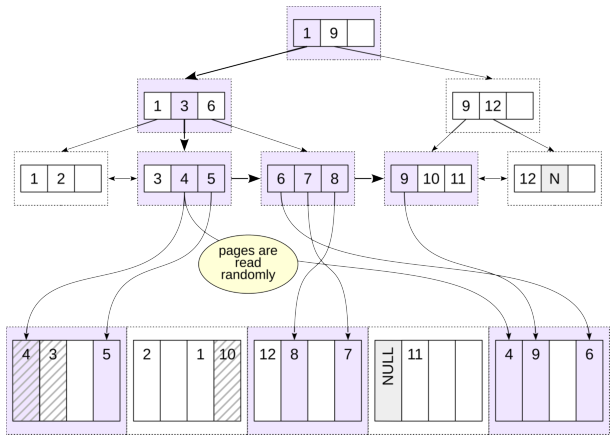
The figure shows a search for x BETWEEN 4 AND 9, equivalently x >= 4 AND x <= 9. PostgreSQL descends to the first qualifying key and then visits 5, 6, and so on through 9. When it reaches 10, the range scan stops.
Two properties make this work: keys are ordered on all pages, and leaf pages are linked in a doubly linked list. The search result is automatically sorted.
Notice that we had to access the same table page several times. We read the first table page for value 4, then the last page, also for value 4, then the first page again for value 5, then the last page again for value 6, and so on.
The ordering provided by a B-tree can eliminate a separate sort:
The same B-tree can be scanned backward:
Here the scan reaches the appropriate right-side leaf position and walks the leaf chain in the reverse direction. Buffers shows the page traffic, while Index Searches shows how many separate B-tree searches were initiated.
3. Bitmap Scan
Repeated visits to the same heap pages can make a plain index scan expensive. Even when a page is already in the buffer cache, PostgreSQL still has to locate and pin it and perform the required tuple work. A bitmap scan separates finding candidate tuple locations from visiting heap pages.
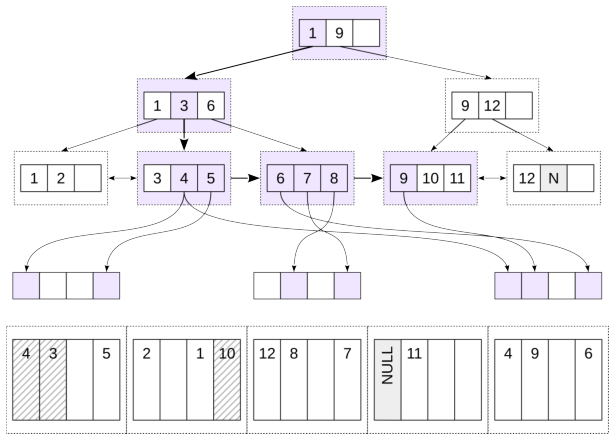
First, the index is scanned (Bitmap Index Scan) and a bitmap is built in the process’s local memory. The bitmap consists of chunks. Each chunk corresponds to a table page, and each bit in the chunk corresponds to a row version in that page. While the bitmap is being built, row versions that satisfy the condition and must be read are marked. Because the bitmap is divided into chunks, a bitmap with only a few marked row versions occupies little space.
Conceptually, exact bitmap entries identify heap pages and tuple offsets within those pages.
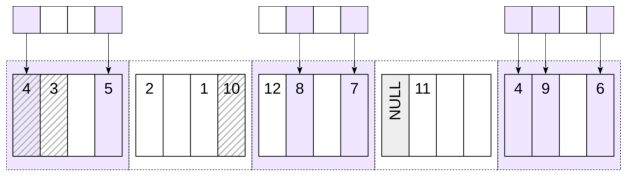
Once the bitmap is ready, Bitmap Heap Scan visits the heap pages.
A heap page may contain several candidate tuples, but the page itself need only be visited once. This is the main advantage over a plain index scan when many matching index entries are scattered across fewer heap pages.
The two indexes created above give the planner alternative bitmap sources. For a query that retrieves a substantial number of rows, it chooses a bitmap scan:
The plan has two relevant nodes:
Bitmap Index Scanreads the index and constructs the bitmap.Bitmap Heap Scanuses that bitmap to read heap pages.
The startup costs show the trade-off: the bitmap cannot be used until it has been built completely. Bitmap access gives up the streaming behavior of a plain index scan in exchange for more organized heap access.
Combining Bitmaps
A bitmap can also combine several index conditions. For two ranges on the same index:
PostgreSQL builds two bitmaps and combines them with BitmapOr.
Different indexes can participate in a combined bitmap scan as well:
Lossy Bitmap Pages
The bitmap is stored in backend local memory and is constrained by work_mem; bitmap scans do not spill their bitmap to temporary files.
If an exact bitmap grows too large, PostgreSQL can make parts of it lossy. An exact entry identifies individual tuple offsets in a heap page. A lossy entry remembers only that a heap page may contain matches.
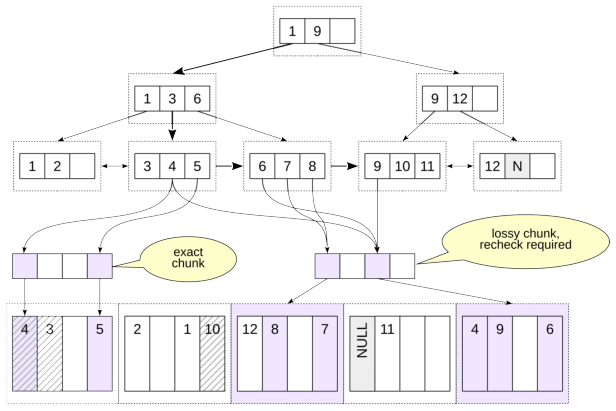
With a very small work_mem and a very large result, even a fully lossy bitmap may not fit. In that exceptional case PostgreSQL can exceed the work_mem budget and allocate enough memory to represent the required heap pages.
Lossy bitmap chunks save memory, but when Bitmap Heap Scan reaches such a chunk it must recheck the condition for every row version on the corresponding table page.
Lossy chunks require rechecking the condition for every row version in the table page, which affects performance. If two bitmaps are combined and a chunk in at least one bitmap is lossy, the resulting chunk must also be lossy. The value of work_mem can therefore have a large effect on bitmap scan performance.
Bitmap Heap Scan shows the recheck condition (Recheck Cond). The condition is not always rechecked, but only when precision has been lost because the bitmap does not fit in memory.
With the normal memory setting:
Heap Blocks: exact=15839 tells us that all heap page entries remained exact.
Now reduce the available memory and run the same query:
Now some heap pages are represented by lossy bitmap entries. Rows Removed by Index Recheck shows how many candidate rows failed the condition when PostgreSQL had to recheck it.
Restore the setting:
Clustering
A plain index scan becomes much more attractive when heap rows are physically correlated with index order.
Nearby index entries then tend to point to the same or neighboring heap pages, so the scan performs much less random heap access.
When the physical correlation is very high, the bitmap’s page grouping advantage can largely disappear and the planner may prefer a plain index scan.
The CLUSTER command can physically rewrite a table according to an index. Initially, the rows in bookings are not physically ordered, which is shown by the following query without ORDER BY:
Reorder the rows according to the index on total_amount.
We execute the code in a transaction so that clustering does not affect subsequent commands:
A plain sequential read now happens to encounter rows in the new physical order:
The ANALYZE above refreshes statistics so that the planner learns the new physical correlation. Before clustering, this predicate used a bitmap scan; with strong correlation, a plain index scan is cheaper. The final ROLLBACK restores the table for later examples.
Two practical points matter:
CLUSTERrewrites the table and requires anACCESS EXCLUSIVElock, much like other full-table rewrite operations;PostgreSQL does not maintain the clustering order automatically. Later inserts and updates can gradually reduce the correlation.
4. Covering Indexes
Index-Only Scan
If a query needs only values that are available from an index, the index can be covering for that query.
In principle PostgreSQL could then answer the query without visiting the heap. MVCC visibility complicates this. A B-tree leaf entry tells PostgreSQL which table tuple it refers to, but index entries do not carry enough visibility information to prove that the tuple is visible to the current snapshot.
The visibility map solves this for pages known to be all-visible. If the map says that every tuple in a table page is visible to all transactions, an index-only scan can skip following references to that heap page from leaf index entries.
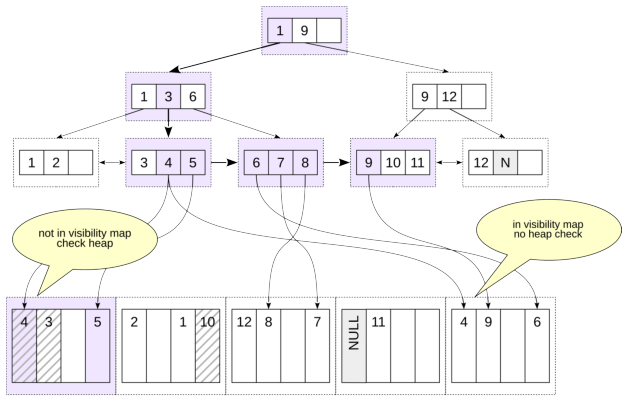
Vacuum activity therefore matters to index-only scans: updates and deletes clear all-visible information when necessary, while vacuum can set the all-visible bit again after it verifies a page.
The planner does not know the exact future number of heap fetches. It uses relation statistics, including the estimated fraction of all-visible pages, when costing an index-only scan. If it expects too many heap visits, a different access method may be considered cheaper.
For each matching index entry, the executor checks the visibility map. If the heap page is all-visible, no heap access is needed; otherwise the heap tuple must be fetched to check visibility. The plan node is still called Index Only Scan even when some heap visits are required.
Heap Fetches shows how many heap tuple fetches were required for visibility checks. Here the visibility map was sufficient and no heap visit was needed.
Now update one row:
The update clears the all-visible state for the affected heap page. When matching index entries point to that page, the executor has to visit the heap:
The executor did not scan every tuple in the modified page. Rather, index entries that needed visibility checks caused heap fetches because the page could no longer be trusted as all-visible.
INCLUDE Indexes
A covering index can make a query much cheaper, but adding every required column as an index key is not always appropriate. For example:
Adding a key column to a unique index changes what combination of values is declared unique.
The data type of an added column may not be supported by the index.
PostgreSQL lets an index carry non-key columns through the INCLUDE clause.
Included values do not participate in the search tree’s key semantics. They are stored as payload in leaf entries so that an index-only scan can return them without visiting the table.
In PostgreSQL 18, INCLUDE is supported by B-tree, GiST, and SP-GiST indexes.
An INCLUDE index and a covering index are not the same concept. An index can cover a particular query without using INCLUDE; conversely, an index with included columns may still fail to cover some other query.
The primary-key index tickets_pkey contains ticket_no but does not contain book_ref, so it is not covering for this query:
The Buffers line reports page accesses. Here a very large number of buffer hits reflects the cost of visiting the table for values that are not present in the index. Create a unique index with book_ref as payload:
The planner now chooses Index Only Scan and uses the newly created index. Because the relevant heap pages are all-visible, Heap Fetches is zero, and the number of pages touched is much smaller.
Because columns added with INCLUDE are not used by the index access method, an INCLUDE index can contain columns whose data types are not supported by B-tree, for example geometric types or xml.
5. Parallel Access
PostgreSQL can execute parts of a query plan in parallel. The leader process starts parallel worker processes, which execute the parallel-aware part of the plan. Their output is collected by a Gather or Gather Merge node.
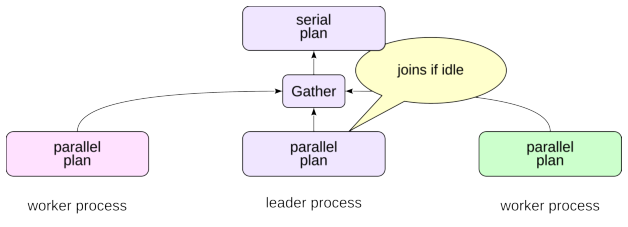
The leader can also participate in executing the parallel plan, especially when it is not fully occupied consuming tuples from workers.
Starting workers, coordinating them, and transferring tuples all have costs. Parallel execution is therefore not appropriate for every query. In addition, only some plan nodes and operations are parallel-aware; the rest of the plan runs serially in the leader.
Worker-Pool Limits
Several configuration parameters limit parallel execution.
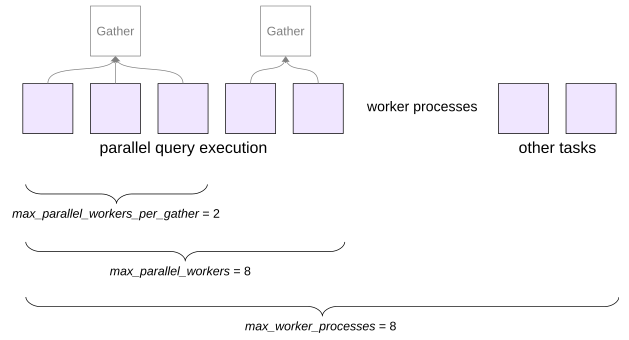
PostgreSQL worker processes are used for more than query parallelism. Logical replication and extensions can use background workers as well. Worker processes can also be used in application code; see the DEV2 course lesson Background Processes.
max_worker_processes limits the total number of background worker processes that can be active. Its default value is 8.
max_parallel_workers limits how many workers can be used for parallel query execution across the server. Its default is also 8.
max_parallel_workers_per_gather limits how many workers can run concurrently for one leader process. Its default value is 2.
The appropriate values depend on CPU capacity, I/O bandwidth, memory, the workload, and the number of concurrent sessions.
Raising a limit does not make every query faster; it changes the amount of parallel work the planner and executor are allowed to use.
Parallel Seq Scan
A Parallel Seq Scan lets several processes cooperate in scanning one table.
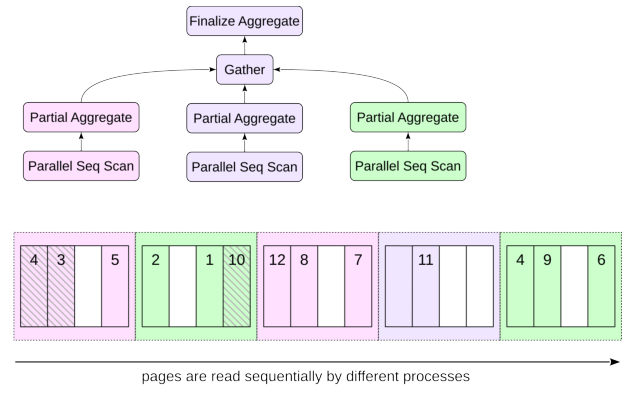
The name is not contradictory. Heap blocks are still visited sequentially, as an ordinary Seq Scan would do. The difference is that participating parallel processes read blocks concurrently. They share the same parallel scan state to stay in sync with each other.
The benefit is not simply that storage can be read by several processes. Each worker also performs predicate evaluation and other per-row CPU work on the pages it receives. Parallelism pays off when that saved execution time is larger than worker startup, synchronization, and tuple-transfer overhead. Aggregation is a good example because workers can scan and partially aggregate many rows while sending only compact partial results upward.
On a small table, count(*) is cheaper to execute serially:
Aggregate cannot return the final count until it has consumed all input, so its startup cost is close to its total cost.
Run the same kind of query on the much larger bookings table:
Everything below Gather is the parallel portion of the plan. It is executed by the planned workers and may also be executed by the leader. Gather and nodes above it run in the leader.
Each worker computes a partial count; the leader gathers those partial results and Finalize Aggregate produces the final value.
Not every query can use parallel execution. For example, many data-modifying or row-locking operations are not eligible, and parallel-safety rules for functions and other operations can make a plan serial. These restrictions evolve between PostgreSQL releases, so version-specific details should be checked against the current documentation.
Parallel Index Scan and Parallel Index-Only Scan
B-tree index access can also participate in a parallel plan.
A parallel B-tree scan works in two stages. First, the leader process descends from the root of the tree to a leaf page. Then worker processes read leaf index pages in parallel, moving along the list. A process that reads an index page also reads the required table pages.
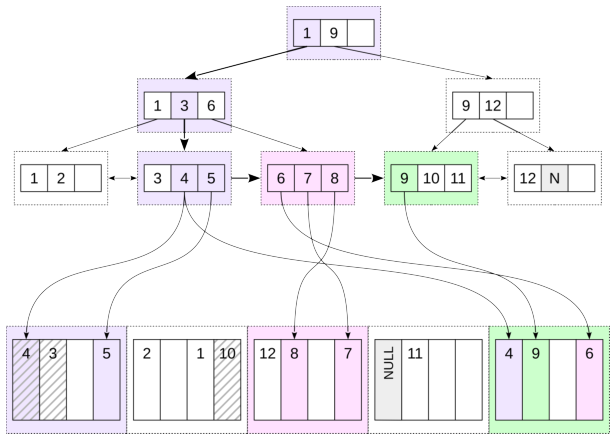
Several processes may need to read the same table page. The figure shows this case: the last table page contains rows referenced from several index pages read by different processes. Of course, the page itself is present in the buffer cache only once. A parallel index-only scan works similarly, except that heap visits can be avoided for entries whose heap pages are all-visible.
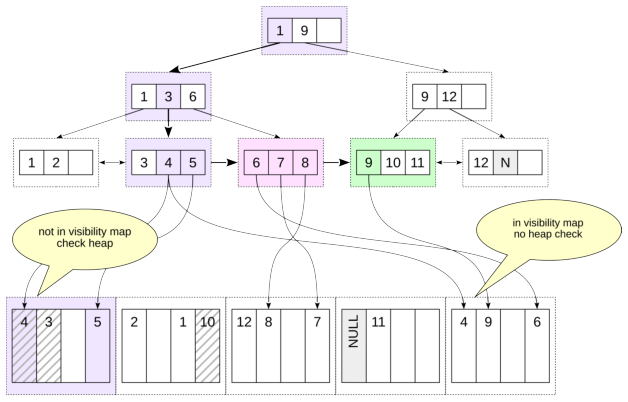
As an example, count bookings made during the last month:
The structure resembles the earlier parallel sequential-scan plan, but rows are obtained through Parallel Index Only Scan.
Parallel Bitmap Heap Scan
Bitmap heap access can also be parallel.
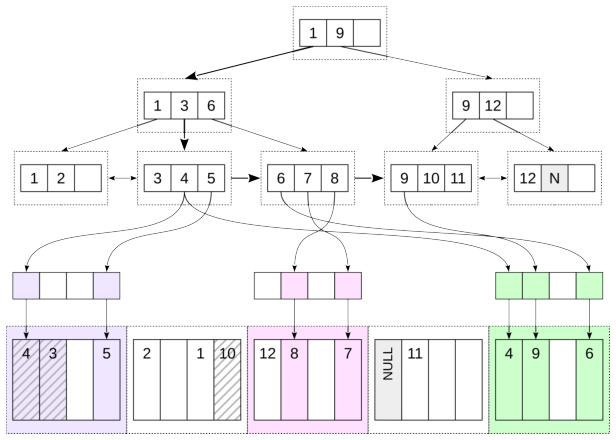
The bitmap itself is built serially: the leader performs the Bitmap Index Scan and constructs the shared bitmap state.
The heap phase can then be performed cooperatively by workers through Parallel Bitmap Heap Scan.
Count bookings made during the last three months for less than 5,000:
The leader constructs the bitmap in Bitmap Index Scan. Heap blocks selected by that bitmap are processed in parallel by Parallel Bitmap Heap Scan.
Remove the indexes created for the examples:
6. Comparing Access Methods
There is no universal selectivity threshold at which one access method becomes better than another, but the broad pattern is easy to see.
A plain index scan is most attractive when the predicate is highly selective—only one row or a small fraction of the table is needed. The cost of navigating the index and fetching a few heap pages is then much smaller than scanning the whole relation.
At intermediate selectivity, a bitmap scan is often competitive. It pays the startup cost of building the bitmap but reduces repeated heap page visits. In the worst case, the heap work of a plain index scan can grow roughly with the number of matching tuples, while a bitmap heap scan organizes that work around the number of heap pages that contain candidates.
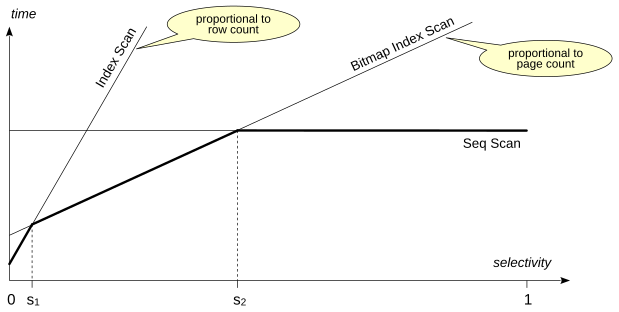
At low selectivity, when most rows pass the predicate, a sequential scan is usually best. Reading an index in addition to reading most of the heap only adds work. This effect is stronger on rotating disks, where random reads are much slower than reading sequentially located pages.
The crossover points depend strongly on the table, the index, physical correlation, row width, cache state, storage, planner cost parameters, and the exact query. The planner combines these estimates rather than using a fixed ”use an index below X percent” rule.
One more factor is ordering. A B-tree index scan delivers rows in index order and can therefore avoid a separate sort. That may make it attractive even when its raw row-access cost is not the smallest.
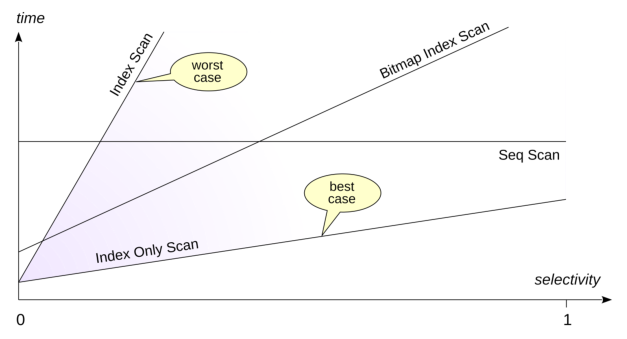
Index-only scan performance depends strongly on the visibility map and on how many heap pages are all-visible.
The planner therefore includes the estimated all-visible fraction when costing index-only access.
Referenced resources
- www.postgresql.org/docs/18/indexes-index-only-scans
- www.postgresql.org/docs/18/mvcc
- www.postgresql.org/docs/18/parallel-query
- www.postgresql.org/docs/18/sql-vacuum
- www.postgresql.org/docs/18/when-can-parallel-query-be-used