Explore the Airlines demonstration database: its schema, bookings, tickets, flights, routes, and the data used throughout the PostgreSQL 18 examples.
1. General Information
To work with more complex queries, we need a substantial database: nine tables filled with realistic data. We chose airline travel as the subject area. The database contains information about flights operated by an imaginary airline over a certain period of time.
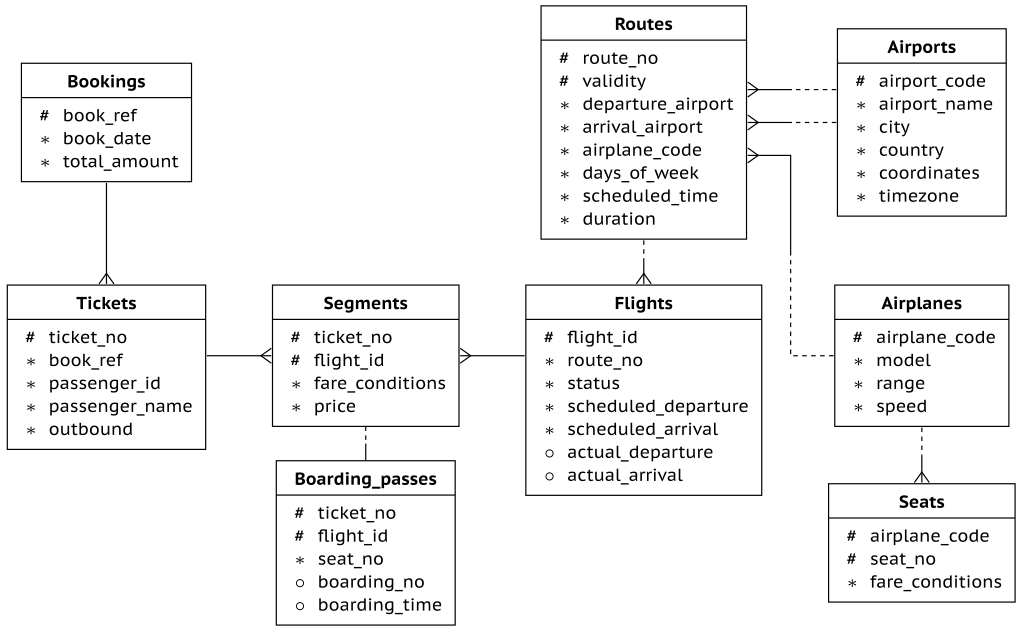
The database schema is shown below. We tried to make it neither too complicated nor too simple: simple enough to avoid unnecessary details, but rich enough to support meaningful and interesting queries.
The database is available on the website in four sizes. This book on query optimization uses the September 1, 2025 version, about 2.7 GB in size, containing six months of flight data.
You can check the version with the following function:
A booking can include several passengers. Each passenger is issued a separate ticket (tickets) for the outbound journey and, if needed, another one for the return journey.
A ticket contains one segment (segments) if there is a direct flight between the departure point and the destination, or several segments if the journey requires connections.
What segments do our passengers travel? It is enough to look at one passenger, because all passengers in the same booking follow the same itinerary:
The outbound and return itineraries do not have to match: on the way back, Evgeniy has three connections, and two of the flights (flights) are in Comfort class.
Each flight follows a route (routes) from one airport to another. Routes with the same route number have the same departure and arrival airports, while individual flights differ by departure date.
To find out which routes are behind the selected flights, we have to account for the temporal relationship between these tables. The schedule changes from time to time, so the join must match not only the route number but also the route’s validity interval to the flight’s departure time.
The timetable (timetable) view hides this complexity. Like a flight information board, it shows the information we need while hiding the join between the two tables:
Both outbound flights and one return flight have already arrived (status Arrived). At the demo database’s current time, the passengers are flying from CDG to MUC (status Departed). Check-in has not yet opened for the remaining flights (status Scheduled).
Airports (airports) use the standard three-letter airport code as their key. Here is the full record for one airport:
The number of seats (seats) and their distribution among fare classes depend on the airplane model used for the flight. In the demo database, all airplanes of the same model have the same cabin configuration.
Here is the complete record for one flight on the selected route. Actual times may differ from the schedule: usually not by much (the departure in this case was delayed by six minutes), but sometimes by several hours:
When a passenger checks in for the first flight, boardingpasses (boarding_passes) are issued for all flights on the ticket. A boarding pass specifies a seat. The combination of flight and seat is unique: two passengers cannot occupy the same seat. At boarding, the pass is stamped with the passenger’s boarding sequence number and the time they passed through the gate.
Which seats has our passenger occupied, or will occupy?
The demo database can display airport, city, country, and airplane names in different languages. The display language is controlled by a configuration parameter set at the database level: