# 统计信息
> 阅读规划器统计信息、高频值、直方图、函数依赖、非重复值数量、多元统计信息和表达式统计信息。
---
LLMS 索引: [llms.txt](/llms.txt)
---
## 1. 基本统计信息 {#qpt-section-6-1}
PostgreSQL 在两个层次收集基本规划器统计信息:关系整体层次,以及单独的列层次。
### 表级统计信息 {#qpt-p104-table-level-statistics}
关系级统计信息包括关系大小的估计值:`pg_class` 的 `reltuples` 和 `relpages` 列。这些值非常重要,以至于 PostgreSQL 不仅会在 `VACUUM` 和 `ANALYZE` 期间更新它们,也会在 `CREATE INDEX` 和 `CREATE TABLE AS` 等一些 DDL 操作之后更新它们。
如果当前物理文件大小不同于产生该估计时所依据的 `relpages` 值,规划器还可以按比例调整已保存的行数估计。这样,即使下一次完整统计信息刷新尚未发生,估计也能对表的增长作出反应。
对于每一列的统计信息,`ANALYZE` 会检查随机抽取的行,而不是每次都读取整张表。所需样本大小不会随着表增大,而是由 `default_statistics_target` 设置(默认值为 100),再乘以 300。
```sql
SELECT current_setting('default_statistics_target')::int
* 300 AS rows_in_sample;
rows_in_sample
----------------
30000
(1 row)
```
对于大表,根据样本得到的估计不会精确。规划器通常只需要足够准确的估计来区分竞争计划。数量级上的错误可能造成灾难性后果;小的抽样误差往往并不会。
考虑一个没有谓词的查询:
```sql
EXPLAIN SELECT * FROM flights;
QUERY PLAN
-------------------------------------------
Seq Scan on flights
(cost=0.00..744.71 rows=37671 width=51)
(2 rows)
```
行数估计来自 `pg_class`:
```sql
SELECT reltuples, relpages FROM pg_class
WHERE relname = 'flights';
reltuples | relpages
-----------+----------
37671 | 368
(1 row)
```
在这个例子中,它碰巧与精确计数相符:
```sql
SELECT count(*) FROM flights;
count
-------
37671
(1 row)
```
其余基本统计信息由 `ANALYZE` 按列收集。它们的内部表示存储在 `pg_statistic` 中;`pg_stats` 视图则以更友好、同时符合权限安全的形式展示最有用的字段。
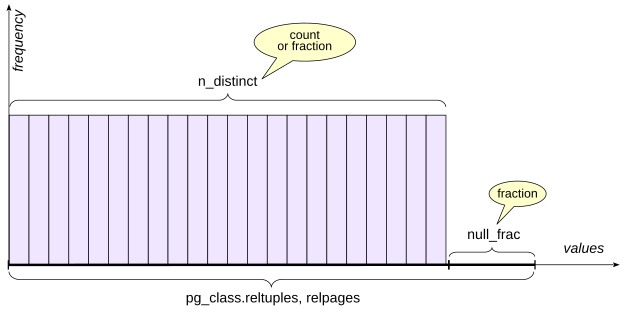
{#qpt-fig-6-1 num="6.1" caption="非重复值数量与空值比例" .book-original-figure .d-flex .flex-column .align-items-center width=421 height=208}
### 空值比例 {#qpt-p106-fraction-of-null-values}
`pg_stats.null_frac` 存储该列为空的行所占比例,取值范围为 0 到 1。
有些航班尚未出发,因此 `actual_departure` 仍为空:
```sql
EXPLAIN SELECT *
FROM flights WHERE actual_departure IS NULL;
QUERY PLAN
-------------------------------------------
Seq Scan on flights
(cost=0.00..744.71 rows=10755 width=51)
Filter: (actual_departure IS NULL)
(3 rows)
```
规划器通过将关系行数估计值乘以 `null_frac` 得到这个估计:
```sql
SELECT round(37671 * null_frac) FROM pg_stats
WHERE tablename = 'flights'
AND attname = 'actual_departure';
round
-------
10755
(1 row)
```
精确值与之接近,但并不完全相同:
```sql
SELECT count(*) FROM flights
WHERE actual_departure IS NULL;
count
-------
10806
(1 row)
```
### 非重复值数量 {#qpt-p107-number-of-distinct-values}
`pg_stats.n_distinct` 存储列中非空非重复值数量的估计值。正值表示估计的绝对数量。负值表示非重复值数量与行数的比例。例如,−1 表示所有值都是唯一的,这在主键中很常见。负数表示法会随着表增长自然扩展,因此很有用。
### 高频值 {#qpt-p107-most-common-values}
如果每个值出现的频率都相同,那么非重复值数量就能让我们了解很多有关相等谓词的信息。但真实数据很少这样配合。为此,PostgreSQL 还会存储另外两项信息:
- `pg_stats.most_common_vals`:高频值(most common values,MCV)数组,也称为 MCV 列表。
- `pg_stats.most_common_freqs`:这些值的频率数组。
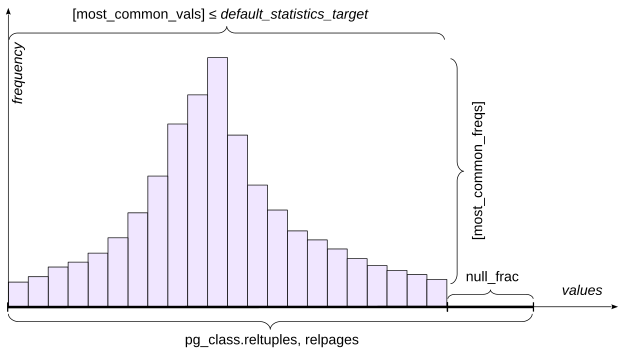
{#qpt-fig-6-2 num="6.2" caption="高频值及其频率" .book-original-figure .d-flex .flex-column .align-items-center width=417 height=236}
对于出现在 MCV 列表中的值,可以直接使用其保存的频率作为选择率估计。条目的最大数量由统计目标控制。`default_statistics_target` 提供默认值,而 `ALTER TABLE ... ALTER COLUMN ... SET STATISTICS` 可以针对单独的列覆盖该值。增大目标值也会增加 `ANALYZE` 使用的样本大小。
为了避免增大 `pg_statistic` 的大小,也避免让规划器承担无用的工作,大于 1 kB 的值会从统计信息和分析中排除。这么大的值很可能是唯一值,本来就几乎不可能出现在 `most_common_vals` 中。
为了进行实验,降低到达机场列的统计目标:
```sql
ALTER TABLE routes
ALTER COLUMN arrival_airport SET STATISTICS 10;
ANALYZE routes;
```
孟买(`BOM`)足够常见,因此出现在 MCV 列表中:
```sql
EXPLAIN SELECT *
FROM routes WHERE arrival_airport = 'BOM';
QUERY PLAN
---------------------------------------------
Seq Scan on routes
(cost=0.00..59.38 rows=55 width=103)
Filter: (arrival_airport = 'BOM'::bpchar)
(3 rows)
```
精确计数也是 55:
```sql
SELECT count(*) FROM routes WHERE arrival_airport = 'BOM';
count
-------
55
(1 row)
```
检查高频值及其频率:
```sql
SELECT unnest(most_common_vals::text::text[]) AS mcv,
unnest(most_common_freqs::text::float[]) AS mcf
FROM pg_stats
WHERE tablename = 'routes'
AND attname = 'arrival_airport'
ORDER BY 2 DESC;
mcv | mcf
-----+-------------
BOM | 0.027093597
FRA | 0.026108375
SVO | 0.026108375
DEL | 0.021182265
ATL | 0.020689655
BLR | 0.020689655
CAN | 0.020689655
TFU | 0.020197045
CDG | 0.019211823
HND | 0.019211823
(10 rows)
```
基数估计等于 `routes` 中的行数乘以保存的频率:
```sql
SELECT round(
2030 * most_common_freqs[
array_position((most_common_vals::text::text[]),'BOM')
]
)
FROM pg_stats
WHERE tablename = 'routes'
AND attname = 'arrival_airport';
round
-------
55
(1 row)
```
MCV 数据也会参与不等式估计:PostgreSQL 可以把满足范围条件的 MCV 条目的频率相加。
如果某个值不在 MCV 列表中,规划器会在假定剩余总体服从均匀分布的情况下估计它。
圣地亚哥(`SCL`)没有出现在我们包含十个值的 MCV 列表中:
```sql
EXPLAIN SELECT *
FROM routes
WHERE arrival_airport = 'SCL';
QUERY PLAN
---------------------------------------------
Seq Scan on routes
(cost=0.00..59.38 rows=25 width=103)
Filter: (arrival_airport = 'SCL'::bpchar)
(3 rows)
```
精确结果是 18:
```sql
SELECT count(*) FROM routes
WHERE arrival_airport = 'SCL';
count
-------
18
(1 row)
```
要得到这个估计,规划器首先把高频值的频率相加:
```sql
SELECT sum(f)
FROM pg_stats s, unnest(s.most_common_freqs) f
WHERE s.tablename = 'routes'
AND s.attname = 'arrival_airport';
sum
------------
0.22118227
(1 row)
```
该列有 73 个非重复值:
```sql
SELECT n_distinct
FROM pg_stats
WHERE tablename = 'routes' AND attname = 'arrival_airport';
n_distinct
------------
73
(1 row)
```
其中 10 个已经在 MCV 列表中被明确表示。由于没有空值,剩余概率质量会近似均匀地分布在其余 63 个值上:
```sql
SELECT round( 2030 * (1 - 0.22118227) / (73 - 10) );
round
-------
25
(1 row)
```
### 直方图 {#qpt-p112-histogram}
当非重复值太多,无法用 MCV 列表有效描述时,PostgreSQL 还会建立直方图。
直方图由包含值的多个桶组成。直方图桶的数量由同一个 `default_statistics_target` 参数控制。
桶边界的选择使得每个桶中大致包含相同数量的值;在图中,这体现为面积相等的矩形。采用这种构造后,PostgreSQL 只需在 `pg_stats.histogram_bounds` 中保存边界值数组。每个桶的频率等于 1 除以桶总数。
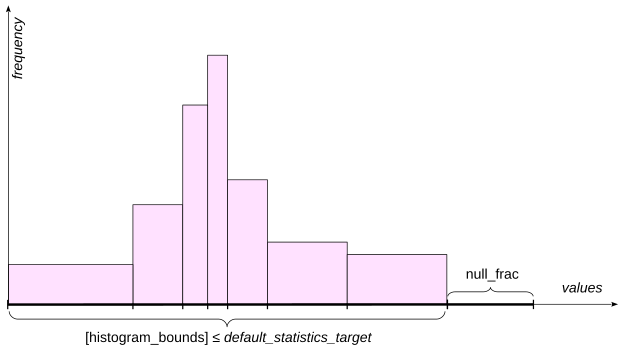
{#qpt-fig-6-3 num="6.3" caption="剩余值的直方图" .book-original-figure .d-flex .flex-column .align-items-center width=417 height=235}
对于类似 field < value 的不等式,规划器会估计直方图中位于边界值左侧的部分。它可以在包含边界的桶内插值,而不是只计算完整桶的数量。
MCV 值和空值会从直方图总体中排除:
```sql
SELECT histogram_bounds FROM pg_stats
WHERE tablename = 'routes'
AND attname = 'arrival_airport';
histogram_bounds
-----------------------------------------------
{AER,CKG,DFW,HEL,KZN,LHR,MXP,PKX,SVX,YEG,YYZ}
(1 row)
```
这就是为什么范围选择率会同时结合 MCV 列表和直方图的信息。
考虑:
```sql
EXPLAIN SELECT *
FROM routes WHERE arrival_airport <= 'DFW';
QUERY PLAN
----------------------------------------------
Seq Scan on routes
(cost=0.00..59.38 rows=579 width=103)
Filter: (arrival_airport <= 'DFW'::bpchar)
(3 rows)
```
精确计数为:
```sql
SELECT count(*) FROM routes WHERE arrival_airport <= 'DFW';
count
-------
609
(1 row)
```
请求区间内的 MCV 值贡献了以下频率:
```sql
SELECT sum( s.most_common_freqs[
array_position( (s.most_common_vals::text::text[]),v )
] )
FROM pg_stats s,
unnest(s.most_common_vals::text::text[]) v
WHERE s.tablename = 'routes'
AND s.attname = 'arrival_airport'
AND v <= 'DFW';
```
```text
sum
------------
0.12955666
(1 row)
```
在这个例子中,`DFW` 正好是第二个桶的右边界,因此十个直方图桶中有两个落在该区间内。没有空值。因此,估计值为:
```sql
SELECT round(
2030 * ( 0.12955666 + (1 - 0.22118227) * (2.0 / 10.0) )
);
round
-------
579
(1 row)
```
对于位于桶内的边界,PostgreSQL 会根据数据类型和操作符使用合适的插值来细化估计。
对于不在 MCV 列表中的值,直方图在等值条件下的作用小得多。此时 PostgreSQL 会退回到基于剩余非重复值数量的估计。
### 其他统计信息字段 {#qpt-p114-additional-statistics-fields}
还有几个统计信息字段会影响规划过程。
`pg_stats.correlation` 衡量列值的逻辑顺序与行的物理顺序之间的统计相关性。接近 1 或 −1 的值表示行的物理排列具有很强的有序性;接近零的值表示相关性很小。在计算索引扫描的代价时,这一点很重要,因为强相关性会降低预期的随机堆访问。
`pg_class.relallvisible` 存储可见性映射中标记为**全可见**的表页数量。全可见页面中的所有元组都已知对当前和未来所有事务可见。如果这个数量不够大,规划器可能会选择位图扫描,而不是仅索引扫描。
`pg_stats.avg_width` 存储列中值的平均大小,单位为字节,用于估计操作所需的内存。
### 自定义计划与通用计划 {#qpt-p115-custom-and-generic-plans}
使用简单查询协议时(见 [第二章“规划与执行”](/02-planning-and-execution/#qpt-chapter-2)),一条语句通常会在每次执行时作为新语句进行解析、规划和执行。
扩展协议允许准备语句,而这些语句可以带有参数。语法解析树保存在后端进程的本地内存中。这样,就可以等参数值已知后再进行规划。
**自定义计划**会使用一次执行的实际参数值生成。当数据存在偏斜时,这很有用,因为不同的参数值可能使不同的访问方法达到最佳效果。例如,对于稀有值,索引可能非常优秀;而对于非常常见的值,索引可能反而不如顺序扫描。
**通用计划**生成时不使用实际参数值。它可以在多次执行之间复用,从而节省规划时间。对于均匀分布的数据,通用计划尤其有效,因为条件的选择率不取决于具体参数值。
准备查询并创建索引:
```sql
PREPARE f(text) AS
SELECT * FROM flights WHERE status = $1;
CREATE INDEX ON flights(status);
```
取消的航班足够少,因此使用索引扫描:
```sql
EXPLAIN EXECUTE f('Cancelled');
QUERY PLAN
------------------------------------------------
Index Scan using flights_status_idx on flights
(cost=0.29..59.43 rows=210 width=51)
Index Cond: (status = 'Cancelled'::text)
(3 rows)
```
已抵达的航班很常见,因此自定义计划选择顺序扫描:
```sql
EXPLAIN EXECUTE f('Arrived');
QUERY PLAN
-------------------------------------------
Seq Scan on flights
(cost=0.00..838.89 rows=26900 width=51)
Filter: (status = 'Arrived'::text)
(3 rows)
```
再执行三次语句,使自定义执行总数达到五次:
```text
EXECUTE f('Arrived');
EXECUTE f('Arrived');
EXECUTE f('Arrived');
```
可以在 `pg_prepared_statements` 中看到计数器:
```sql
SELECT name, generic_plans, custom_plans
FROM pg_prepared_statements;
```
```text
name | generic_plans | custom_plans
------+---------------+--------------
f | 0 | 5
(1 row)
```
下一次执行时,这个例子会切换到通用计划。通用计划显示参数符号,而不是具体值:
```sql
EXPLAIN EXECUTE f('Arrived');
QUERY PLAN
------------------------------------------------------------
Index Scan using flights_status_idx on flights (cost=0...
Index Cond: (status = $1)
(2 rows)
```
```sql
SELECT name, generic_plans, custom_plans
FROM pg_prepared_statements;
name | generic_plans | custom_plans
------+---------------+--------------
f | 1 | 5
(1 row)
```
对于有偏斜的数据,这种切换可能并不理想。为处理这种情况,`plan_cache_mode` 可以覆盖自动启发式规则:
```sql
SHOW plan_cache_mode;
plan_cache_mode
-----------------
auto
(1 row)
SET plan_cache_mode = 'force_custom_plan';
EXPLAIN EXECUTE f('Arrived');
QUERY PLAN
------------------------------------------------------------
Seq Scan on flights (cost=0.00..838.89 rows=26900 widt...
Filter: (status = 'Arrived'::text)
(2 rows)
RESET plan_cache_mode;
```
## 2. 扩展统计信息 {#qpt-section-6-2}
自动收集的基本统计信息可能不足以产生准确的基数和选择率估计。
PostgreSQL 允许管理员手动确定需要哪些额外的扩展统计信息。你可以收集同时跨越多列的统计信息,即多元统计信息(multivariate statistics),也可以收集任意表达式的统计信息。
注意,基本统计信息会针对表及其列收集,但不会针对索引收集,表达式索引除外。因此,仅仅在多列上创建索引并不会创建多元统计信息。
使用 `CREATE STATISTICS` 命令创建扩展统计信息。其定义存储在 `pg_statistic_ext` 中;收集的数据存储在 `pg_statistic_ext_data` 中。
PostgreSQL 提供多种多元统计信息。
### 函数依赖 {#qpt-p118-functional-dependencies}
函数依赖(functional dependency)描述一个列中的值在多大程度上决定另一个列中的值。
| 城市 | 邮编 |
| --- | --- |
| Samara | 443000 |
| Kazan | 420000 |
| Nizhny Novgorod | 603000 |
| Veliky Novgorod | 173000 |
{#qpt-tbl-6-1 num="6.1" caption="函数依赖"}
例如,如果邮编唯一决定城市,那么针对 `city` 和 `postal_code` 的谓词就是相关的,如图所示。
考虑 `routes` 上的两个谓词:
```sql
SELECT count(*) FROM routes
WHERE route_no = 'PG0085' AND arrival_airport = 'FCO';
count
-------
7
(1 row)
```
没有扩展统计信息时,估计值会严重偏低:
```sql
EXPLAIN SELECT * FROM routes
WHERE route_no = 'PG0085' AND arrival_airport = 'FCO';
QUERY PLAN
---------------------------------------------------------
Bitmap Heap Scan on routes
(cost=4.20..22.77 rows=1 width=103)
Recheck Cond: (route_no = 'PG0085'::text)
Filter: (arrival_airport = 'FCO'::bpchar)
-> Bitmap Index Scan on routes_route_no_validity_excl
(cost=0.00..4.20 rows=7 width=0)
Index Cond: (route_no = 'PG0085'::text)
(7 rows)
```
原因在于,规划器假设谓词相互独立,并把逻辑 `AND` 组合的条件的选择率相乘,从而计算出结果选择率。计划清楚地展示了这一点:`Bitmap Index Scan` 节点中 `route_no` 条件的估计是正确的,但在 `Bitmap Heap Scan` 节点按 `arrival_airport` 过滤后,估计值就被低估了。不过我们知道,航线号唯一决定到达机场,因此在机场指定正确的前提下,第二个条件实际上是多余的。
创建依赖统计信息:
```sql
CREATE STATISTICS routes_dep(dependencies)
ON route_no, arrival_airport FROM routes;
ANALYZE routes;
```
检查依赖:
```sql
SELECT dependencies FROM pg_stats_ext
WHERE statistics_name = 'routes_dep';
dependencies
----------------------
{"1 => 4": 1.000000}
(1 row)
```
冒号后的数字是该属性映射测得的依赖程度。现在估计得到了改善:
```sql
EXPLAIN SELECT * FROM routes
WHERE route_no = 'PG0085' AND arrival_airport = 'FCO';
QUERY PLAN
---------------------------------------------------------
Bitmap Heap Scan on routes
(cost=4.20..22.78 rows=7 width=103)
Recheck Cond: (route_no = 'PG0085'::text)
Filter: (arrival_airport = 'FCO'::bpchar)
-> Bitmap Index Scan on routes_route_no_validity_excl
(cost=0.00..4.20 rows=7 width=0)
Index Cond: (route_no = 'PG0085'::text)
(7 rows)
```
`psql` 元命令 `\d routes` 也会列出表上定义的统计信息对象。`Statistics objects` 部分显示它们的名称、列以及非默认统计目标:
```text
...
Statistics objects:
"bookings.routes_dep" (dependencies) ON route_no,
arrival_airport FROM routes
```
### 最常见组合 {#qpt-p121-most-common-combinations}
列之间可能存在相关性,但没有任何一列在函数上决定另一列。图中展示了可能的城市—河流组合。`city` 和 `river` 上的谓词显然相关,但与前一个例子不同,这里没有任何一列决定另一列:城市和河流之间是多对多关系。
| 城市 | 河流 |
| --- | --- |
| Samara | Volga |
| Kazan | Volga |
| Nizhny Novgorod | Oka |
| Nizhny Novgorod | Volga |
| Veliky Novgorod | Volkhov |
{#qpt-tbl-6-2 num="6.2" caption="最常见组合"}
下面是演示数据库中的类似例子:
```sql
EXPLAIN (analyze, timing off, summary off, buffers off)
SELECT * FROM routes
WHERE departure_airport = 'BOM' AND airplane_code = '7M7';
QUERY PLAN
------------------------------------------------------------
Bitmap Heap Scan on routes
(cost=4.69..40.71 rows=9 width=103)
(actual rows=17.00 loops=1)
Recheck Cond: (departure_airport = 'BOM'::bpchar)
Filter: (airplane_code = '7M7'::bpchar)
Rows Removed by Filter: 38
Heap Blocks: exact=27
-> Bitmap Index Scan on routes_departure_airport_lowe...
(cost=0.00..4.69 rows=55 width=0)
(actual rows=55.00 loops=1)
Index Cond: (departure_airport = 'BOM'::bpchar)
Index Searches: 1
(12 rows)
```
规划器低估了行数。对这对列建立 MCV 统计信息后,估计值现在正确了:
```sql
CREATE STATISTICS (mcv)
ON departure_airport, airplane_code FROM routes;
ANALYZE routes;
EXPLAIN SELECT * FROM routes
WHERE departure_airport = 'BOM' AND airplane_code = '7M7';
QUERY PLAN
------------------------------------------------------------
Bitmap Heap Scan on routes
(cost=4.69..40.72 rows=17 width=103)
Recheck Cond: (departure_airport = 'BOM'::bpchar)
Filter: (airplane_code = '7M7'::bpchar)
-> Bitmap Index Scan on routes_departure_airport_lowe...
(cost=0.00..4.69 rows=55 width=0)
Index Cond: (departure_airport = 'BOM'::bpchar)
(7 rows)
```
可以使用 `pg_mcv_list_items` 函数检查多元 MCV 数据:
```sql
SELECT values, frequency
FROM pg_statistic_ext
JOIN pg_statistic_ext_data ON oid = stxoid,
pg_mcv_list_items(stxdmcv) m
WHERE stxname = 'routes_departure_airport_airplane_code_stat'
LIMIT 3;
values | frequency
-----------+----------------------
{FRA,77W} | 0.009852216748768473
{BOM,7M7} | 0.008374384236453201
{PVG,77W} | 0.008374384236453201
(3 rows)
```
### 非重复组合 {#qpt-p122-distinct-combinations}
规划器可能出错的另一种情况是分组。多元 `ndistinct` 统计信息可以改善按多列分组的估计值。
在图中的例子里,所有字段可能形成的组合数量,显然不能简单地将各列的非重复值数量分别相乘来确定。
| 城市 | 地区 | 邮编 |
| --- | --- | --- |
| Samara | Samara Oblast | 443000 |
| Kazan | Republic of Tatarstan | 420000 |
| Nizhny Novgorod | Nizhny Novgorod Oblast | 603000 |
| Veliky Novgorod | Novgorod Oblast | 173000 |
{#qpt-tbl-6-3 num="6.3" caption="非重复组合"}
统计非重复的直达机场对:
```sql
SELECT count(*) FROM (
SELECT DISTINCT departure_airport, arrival_airport
FROM routes
);
count
-------
932
(1 row)
```
没有多元非重复值统计信息时,规划器严重低估了分组数量:
```sql
EXPLAIN SELECT DISTINCT departure_airport, arrival_airport
FROM routes;
QUERY PLAN
-------------------------------------------------
HashAggregate
(cost=64.45..66.48 rows=203 width=8)
Group Key: departure_airport, arrival_airport
-> Seq Scan on routes
(cost=0.00..54.30 rows=2030 width=8)
(5 rows)
```
创建扩展统计信息对象。如果没有指定类型,PostgreSQL 会包含适用的所有受支持多元类型:
```sql
CREATE STATISTICS
ON departure_airport, arrival_airport FROM routes;
ANALYZE routes;
EXPLAIN SELECT DISTINCT departure_airport, arrival_airport
FROM routes;
QUERY PLAN
-------------------------------------------------
HashAggregate
(cost=64.45..73.77 rows=932 width=8)
Group Key: departure_airport, arrival_airport
-> Seq Scan on routes
(cost=0.00..54.30 rows=2030 width=8)
(5 rows)
```
估计得到了改善。检查保存的估计值:
```sql
SELECT n_distinct
FROM pg_stats_ext
WHERE statistics_name =
'routes_departure_airport_arrival_airport_stat';
n_distinct
---------------
{"3, 4": 932}
(1 row)
```
`\dX` 会列出扩展统计信息对象。对象本身的值存储在 `pg_statistic_ext_data` 视图中。
### 表达式统计信息 {#qpt-p124-statistics-on-expressions}
扩展统计信息还可以为表达式收集普通的单变量统计信息,就像表中有一个保存该表达式结果的列一样。
| 城市 | 邮编 | 地址 |
| --- | --- | --- |
| Samara | 443000 | 443000, Samara |
| Kazan | 420000 | 420000, Kazan |
| Nizhny Novgorod | 603000 | 603000, Nizhny Novgorod |
| Veliky Novgorod | 173000 | 173000, Veliky Novgorod |
{#qpt-tbl-6-4 num="6.4" caption="表达式统计信息"}
表达式也可以与列或其他表达式一起参与多元统计信息。
如果没有表达式统计信息,操作数是表达式的谓词可能会迫使规划器使用通用默认选择率,因为它没有表达式自身的分布数据。例如:
```sql
EXPLAIN (analyze, timing off, summary off, buffers off)
SELECT * FROM flights
WHERE extract( month FROM scheduled_departure
AT TIME ZONE 'Europe/Moscow' ) = 1;
QUERY PLAN
------------------------------------------------------------
Seq Scan on flights
(cost=0.00..1027.24 rows=188 width=51)
(actual rows=5529.00 loops=1)
Filter: (EXTRACT(month FROM (scheduled_departure AT T...
Rows Removed by Filter: 32142
(5 rows)
```
这个估计值太小了。提供统计信息的一种方式是表达式索引,但即使索引不用于访问,它也会产生存储和维护代价。如果目标只是改善估计,就创建表达式统计信息:
```sql
CREATE STATISTICS
ON extract( month FROM scheduled_departure
AT TIME ZONE 'Europe/Moscow' )
FROM flights;
ANALYZE flights;
```
```sql
EXPLAIN
SELECT * FROM flights
WHERE extract( month FROM scheduled_departure
AT TIME ZONE 'Europe/Moscow' ) = 1;
QUERY PLAN
------------------------------------------------------------
Seq Scan on flights
(cost=0.00..1027.24 rows=5561 width=51)
Filter: (EXTRACT(month FROM (scheduled_departure AT T...
(3 rows)
```
现在估计值已经接近实际值。
表达式统计信息可以在 `pg_stats_ext_exprs` 视图中查看:
```sql
SELECT statistics_name, left(expr,40) AS expr,
n_distinct, most_common_vals
FROM pg_stats_ext_exprs \gx
-[ RECORD 1 ]----+-----------------------------------------
statistics_name | flights_expr_stat
expr | EXTRACT(month FROM (scheduled_departure
n_distinct | 7
most_common_vals | {10,1,12,11,3,4,2}
```
清理本章创建的对象:
```sql
DROP INDEX flights_status_idx;
DROP INDEX
SELECT 'DROP STATISTICS ' || statistics_name
FROM pg_stats_ext \gexec
DROP STATISTICS
DROP STATISTICS
DROP STATISTICS
DROP STATISTICS
```
## 参考资源 {#referenced-resources}
- [www.postgresql.org/docs/18/planner-stats]()
- [www.postgresql.org/docs/18/planner-stats]()
- [www.postgresql.org/docs/18/planner-stats]()
- [www.postgresql.org/docs/18/planner-stats]()
- [www.postgresql.org/docs/18/row-estimation-examples]()
- [www.postgresql.org/docs/18/view-pg-stats]()